Here's where you'll find answers to commonly asked questions about choosing, upgrading, and using QuickBooks software. If you need more information before making your purchase decision, please call us at (800) 224-0952.

Version: Choosing the right QuickBooks product

Q: What's the difference between Simple Start Free edition and Simple Start?

A: QuickBooks Simple Start Free Edition only lets you track 20 customers while QuickBooks Pro lets you track thousands.

Q: My business doesn't need "accounting software."  What's different about Simple Start?

A: Simple Start is designed for people who don't want or need full–fledged "accounting software," just an easy way to efficiently keep track of sales, expenses, and customers. If you've been using paper ledgers, spreadsheets to track your numbers, and word processing documents or paper forms for your invoices and sales receipts, Simple Start is perfect for you.

Q: My spreadsheet works fine. What else can Simple Start do for me?

A: Plenty! QuickBooks: Simple Start can help you avoid errors, save time, and keep you much more organized. Simple Start tracks all your transactions and invoices in one place, giving you easier access to more information than you could possibly get from a paper–based system or a spreadsheet.

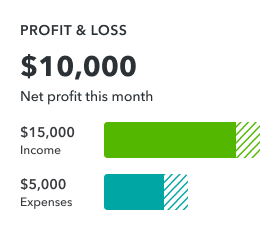
You can automatically run reports that tell you where you stand on everything from profits and losses to sales and expenses. Simple Start saves you hours at tax time by giving you all the totals you need for your tax forms.

Q: Can Simple Start grow with my business?

A: Simple start makes it very easy for small business owners to start tracking their finances more efficiently, without having to learn complicated software or complex accounting concepts. As your business becomes more complex, you can easily upgrade to QuickBooks: Pro, Premier, or Online Edition. All the data you've entered in Simple Start will transfer to your new edition, so you can access it instantly.

Q: How can I tell which edition of QuickBooks I need?

A: If you're currently using a spreadsheet or paper ledger to keep track of your money, QuickBooks: Simple Start may be perfect for you. Users call it "amazingly easy." It lets you track money coming into and going out of your business just by writing checks, issuing invoices, and sales receipts.

For businesses that need additional tools, like inventory, time tracking, and more advanced reporting, QuickBooks: Pro is a more advanced, full-featured financial management system. It offers more flexible customization options for your forms, more flexible pricing options, and report customization. It can share information with Microsoft Outlook, Excel, and Word. And it can accommodate 5 simultaneous users over a network.

QuickBooks: Premier offers the most comprehensive set of QuickBooks tools, including tools for business planning and forecasting, and advanced inventory management. QuickBooks: Premier is also available in customized industry specific editions designed to meet the needs of contractors, accountants, nonprofit organizations, retailers, manufacturers, wholesalers and professional services providers

Finally, QuickBooks: Online Edition is a complete accounting package that gives you access to your financial data anytime anywhere, via the Web. You can also use it to allow multiple users access to the same data simultaneously from wherever they happen to be located.

Note: Simple Start is for NEW QuickBooks users. Simple Start cannot import data from prior versions of QuickBooks Pro or Premier.

Q: Does Simple Start handle inventory?

A: With Simple Start you can keep a list of all items you sell but it does not have inventory functionalities. If you need to keep track of your inventory you may find QuickBooks: Pro or Premier to be a more appropriate solution for you.

Q: What if I decide I like my old method better?

A: Try QuickBooks for up to 60 days at no risk. If you're not 100% satisfied for any reason, please call customer service within 60 days of purchase at 1-800-446-8848 to request a refund. To process your request, the agent will need the product license number located on the CD.

General: Getting started and growing with Simple Start

How long does it take to get started with Simple Start?

A: Get started quickly with a simple setup interview. Answer three easy questions to customize Simple Start for your business. Then you're ready to work.

Can Quicken do the same thing as Simple Start?

A: Quicken is specifically designed to handle personal finances while Simple Start handles small business finances. Each product is tailored with features, reports, and workflows to meet the needs of its specific audience. If you require a single solution to handle personal finances and small business finances for a small, home-based, Schedule C-filing business with no employees, then Quicken Premier Home & Business might be the right solution for you.

Support: How to find assistance with Simple Start

Q: Will QuickBooks 2009 run on Microsoft Windows Vista?

A: Yes, QuickBooks will run on the Windows Vista and Windows XP operating systems. For information on using previous versions of QuickBooks on Windows Vista, please see: www.quickbooks.com/support/vista.

Q: How can I get help with Simple Start?

A: Simple Start is so easy to use, you may never need help. But just in case you do need assistance, there's plenty of help available in the product and from our top-notch technical support staff. Interactive two-minute tutorials right in the software give you an overview and show you how to perform everyday jobs. You can get additional help with any task by clicking on the "Help" menu. You'll also find answers to frequently asked questions at www.quickbooks.com/support.

Q: Is there specific QuickBooks training available?

A: Yes. There is a wide variety of QuickBooks-specific training available to help new users get started, learn, and confidently use QuickBooks. Visit www.quickbooks.com/training to learn about the QuickBooks training that is right for your business.

Q: What is a ProAdvisor? Can they help me set up Simple Start?

A: Certified QuickBooks ProAdvisors are independent CPAs, accountants, bookkeepers, computer consultants, and trainers who work with small businesses. They are considered QuickBooks experts because they have successfully completed comprehensive and rigorous QuickBooks training developed by Intuit. ProAdvisors help businesses like yours get started, and can customize QuickBooks for your unique needs to help you get the most out of the software.

Q: Where can I find guidance and tips from other QuickBooks users?

A: Visit the QuickBooks User Community to connect with other QuickBooks users and experts, ask questions, and share advice. Search or browse through a variety of discussion topics or post your own question.

Q: How do I find my computer system configurations?

A: To find your computer system configurations:

Processor and RAM*

  1. Click on the Start button (located on the bottom left-hand corner of your Desktop).
  2. Select Settings →  Control Panel.
  3. Click on System.

*The Processor and RAM are listed on the bottom right of this screen.

Disk space
Double–click on My Computer on the Desktop to view your free disk space.

Add-ons: Using other services that work with Simple Start

Q: Can I set up payroll on Simple Start?

A: Yes, Simple Start can track payroll (additional fees apply). But if you want to populate and print 1096 and 1099 forms for contractors, you'll want to use QuickBooks Pro instead.

Q: What other business products and services work with Simple Start?

A: The QuickBooks Solutions Marketplace offers software applications that integrate seamlessly with QuickBooks. Eliminate data reentry and save time, so you can focus on more important things. Developed by industry experts, these software applications help solve the business needs for those in construction, retail, manufacturing, legal, non-profit, and other industries.

View the products and services available at our online QuickBooks Solutions Marketplace QuickBooks: Solutions MarketPlace. Some additional products and services include:

  • Checks, Forms, and Supplies
  • Merchant Services (Credit Card Processing)
  • Employee and Human Resource Services and Tools

Q: Can QuickBooks handle credit card and debit card payments?1

A: Yes. You can accept all major credit cards and debit cards right in QuickBooks if you have an Intuit QuickBooks Merchant Service account, the only payment processing solution that allows you to process payments directly into QuickBooks. 2 No new hardware, software, or phone lines are required. Eliminate the need for double data entry; just process the credit card and debit card transactions directly in QuickBooks and the data is automatically recorded in your QuickBooks software.

QuickBooks now also helps you keep more accurate records by telling you which customer payments have been deposited to your bank and by allowing you to download your QuickBooks Merchant Service fees directly into QuickBooks. QuickBooks Merchant Service is sold separately. No teaser rates, no hidden fees, no cancellation fees, and no long-term contracts.

Learn More or Apply Now

Integration: Find specialized products that help you work even better

Q: Are there any third-party solutions that integrate and extend Simple Start functionalities?

A: Simple Start has an open SDK available for integration with third party solutions that may extend QuickBooks Simple Start functionalities. If you are interested in learning about third party solutions available to you, please visit the QuickBooks: Solutions MarketPlace.

Import: Bringing your information into Simple Start

Q: Can I import downloaded bank account transactions into Simple Start?

A: Simple Start has a bank register that you can use to keep track of all the checks you write and deposits you make to your bank and credit card accounts. Currently, Simple Start does not automatically import bank account transactions, so you must enter them yourself. If you want to use Online Banking to download your bank and credit card transactions and import them into QuickBooks you may find QuickBooks: Pro or Premier to be a more appropriate solution for you.

Q: Can I import previous versions of QuickBooks (Pro or Premier), Quicken, PeachTree, or Microsoft Excel data into Simple Start?

A: No. Simple Start is designed for first-time QuickBooks users and users of prior year versions of Simple Start only. You will start with a blank company file and input any previous data manually since Simple Start does not have Quicken, PeachTree, or Excel integration functionalities. Also, Simple Start cannot import data from prior versions of QuickBooks: Basic, Pro, or Premier Editions. If you want to import your data from Quicken, PeachTree, Excel, or any other program, you may want to consider QuickBooks: Pro, Premier, or Online Edition.

Important disclaimers, disclosures and FAQ Notes
1 Requires QuickBooks Simple Start financial software 2006 (for the PC) or higher (sold separately) and a merchant account through QuickBooks Merchant Service. Application approval and Internet access required. Transaction fees apply. Additional fees apply to accepting American Express, and Diners Club cards. Rates are determined by the financial institution and are subject to change without notice. Transactions are subject to Association guidelines. Terms, conditions, features, pricing, service and support options are subject to change without notice.
2 Additional fees, terms, and conditions apply.