
SUMMER SAVINGS 90% OFF QuickBooks for 3 months* Ends 8/27

Buy now

Switch to QuickBooks and 70% off for 3 Months
SarahannCAnswer
Level 9
Jul 27, 2022 6:28 PM UTC

Welcome to QuickBooks Community, teoffice!


We can go to Intuit account page to view the Sign In & Security section. I'm happy to show you the complete steps. Here's how:


  1. Let's sign in to your Intuit account.
  2. Click the Sign & security section.

Here's a sample screenshot for your additional reference:
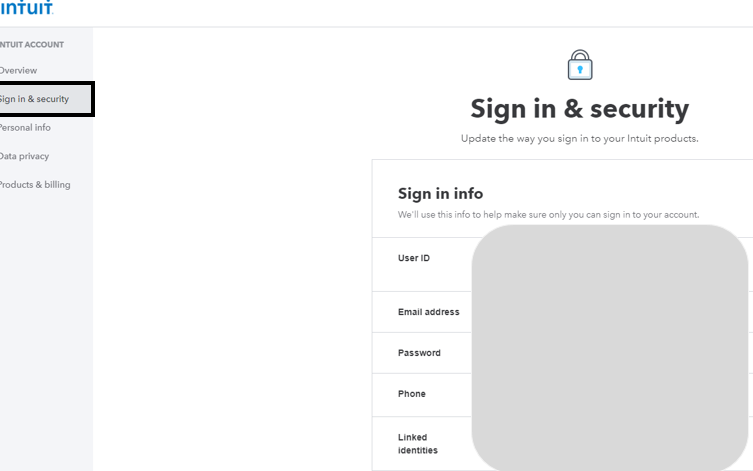
 

That's it. Also, we can read through these articles to learn more about account management:


If you have other QuickBooks concerns or want me to guide you further in finding some of your information, just let me know by adding a new post below. I always got your back. Take care and have a good one.

2 replies

SarahannCAnswer
Level 9
Jul 27, 2022 6:28 PM UTC

Welcome to QuickBooks Community, teoffice!


We can go to Intuit account page to view the Sign In & Security section. I'm happy to show you the complete steps. Here's how:


  1. Let's sign in to your Intuit account.
  2. Click the Sign & security section.

Here's a sample screenshot for your additional reference:


That's it. Also, we can read through these articles to learn more about account management:


If you have other QuickBooks concerns or want me to guide you further in finding some of your information, just let me know by adding a new post below. I always got your back. Take care and have a good one.

Jul 28, 2022 9:17 AM UTC
As part of an effort to help secure your account, Google offers security recommendations. If there are outstanding issues, these will be listed ...
MyEnvoyAir Login