SUMMER SAVINGS 90% OFF QuickBooks for 3 months* Ends 8/27

Buy now
Switch to QuickBooks and 70% off for 3 Months
Jan 25, 2020 12:23 AM UTC
Question

Customer Balance doesn't match Customer Aging

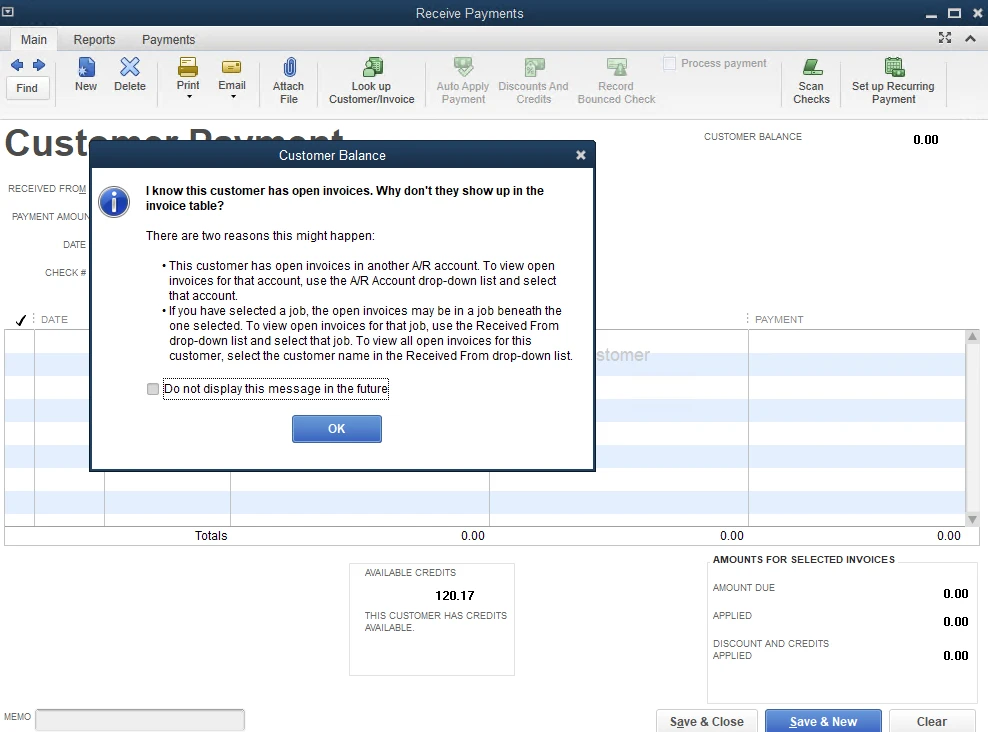
I received a payment from a customer and tried to enter it, but I get a notice that says, "I know this customer has open invoices.  Why don't they show up in the invoice table?" and gives 2 suggestions how to resolve it.


Neither work.


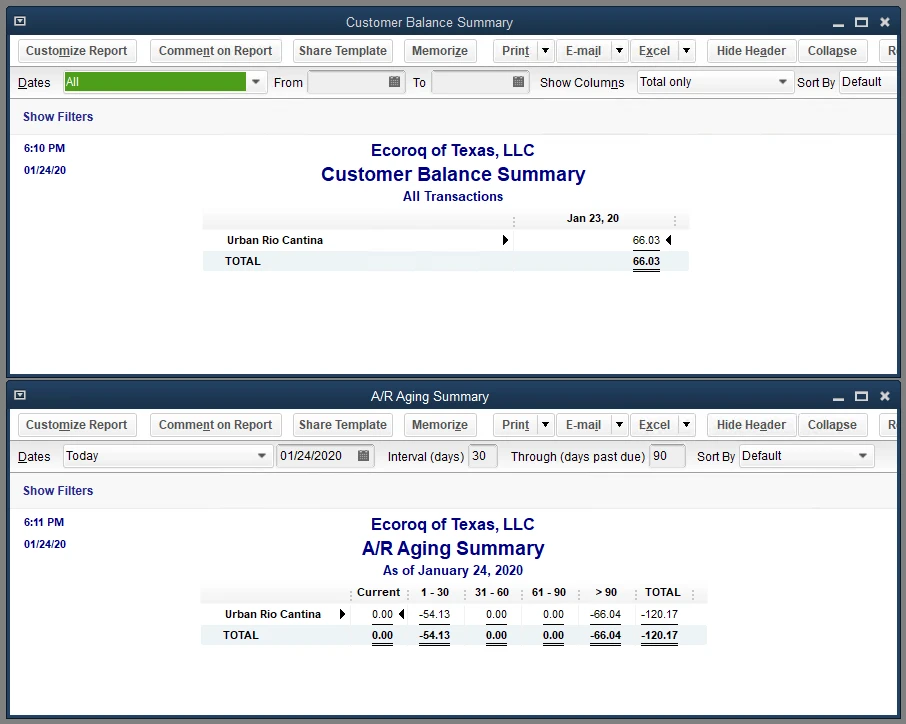
The situation is a single customer shows a positive balance when I look at the balance in the Customer Center and when I run a "Customer Balance Summary" report of $66.03.  But when I run an "A/R Aging Summary" report, it shows a negative balance of -$120.17.


Does anyone know what could be causing this?  I've attached 2 screenshots to illustrate.


TIA.


Jay
 

9 replies

Level 9
Jan 25, 2020 2:48 AM UTC

Hi there, jaygar.


The Account Receivable Aging Summary report displays the number of unpaid invoices that are outstanding and how many days they have been outstanding. This report depends on the due of the invoices. In other words, even if the invoices already paid, if the payment doesn't same as the due date or the date is before, the report still shows negative.


However, if you click the transactions from the A/R Aging Summary report, the invoices will shows paid.


The Customer Balance Summary Report tells you how much each owes you or the total balance of the customer. This report depends on the specific due date of the invoices.


Please check this article to see different reports that cater to your business needs: Understand reports.


Please know that you're always welcome to post if you have any other concerns. Wishing you and your business continued success.

jaygarAuthor
Jan 25, 2020 1:51 PM UTC

Thank you for your reply.  Can you explain why I get the error message when I try to enter a payment for this customer?  How do I fix that?


Jay

Moderator
Jan 25, 2020 3:33 PM UTC

Thanks for getting back to us, @jaygar.


There are two possible reasons why you've received the Customer Balance error. And I'd like to share them with you and help you from there.


Here are the following reasons:


  • The open invoices have another associated A/R account.
  • The open invoices might be in a job beneath the selected customer.

To get this fixed, you'll have to view the account of the open invoices, then select the appropriate account from the A/R Account drop-down.


Also, if there's a job under the selected customer, you'll have the select that specific job or customer in the Received From drop-down.

You can read this article for more details: Record an invoice payment.


As always, feel free to visit our QuickBooks Community help website if you need tips and related articles in the future.


Keep in touch if you need further assistance with this, or if there's anything else I can do for you. I've got your back. Have a good day.

Dec 14, 2020 9:28 PM UTC

Did you find the solution to this Jay?

I also am having an issue the same problems

Jan 11, 2021 2:59 PM UTC

I ran into this issue when reorganizing many customers for a client. They were already precategorized as sub-customers or jobs of a customer name. We'll say Customer "Name 1". I wanted to group a number of those jobs under another name, "Name 2". So it became Name 1:Name 2:Job Name. When I did this, the reporting and payment data didn't show anything for those jobs. I tried the steps above. It seems, they were too many subcategories deep... When I went to Edit/Add multiple customers, I created a new Customer as "Name 2" and reassigned them as a job to Name 2 (Quick way is to edit the columns you see, filter your search as much as you can, type in Name 2 in the JOB OF column, right click, and copy down). Everything is now showing as it should be.