
SUMMER SAVINGS 90% OFF QuickBooks for 3 months* Ends 8/27

Buy now

Switch to QuickBooks and 70% off for 3 Months
QuickBooks Team
Apr 13, 2026 9:46 PM UTC

Hi there, Ovm12343. You can print your 2025 expenses from the Profit and Loss by simply filtering for the correct dates in the dropdown menu.
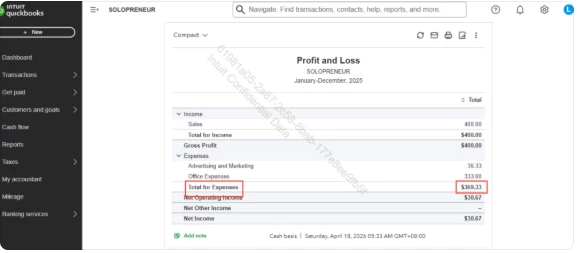
 

To get started, head to the Reports menu and open a Profit and Loss report. Set the date range to Last Year (or filter specific dates manually), then click the total expense amount at the bottom to see the full list of transaction details. Once the report looks correct, click the Print icon to generate a hard copy or save it as a PDF. You can also select the Export icon if you’d prefer to save the data in Excel for your tax preparer.


If you have any additional concerns, please reach out to us again. We’re always here to help.

1 reply

QuickBooks Team
Apr 13, 2026 9:46 PM UTC

Hi there, Ovm12343. You can print your 2025 expenses from the Profit and Loss by simply filtering for the correct dates in the dropdown menu.
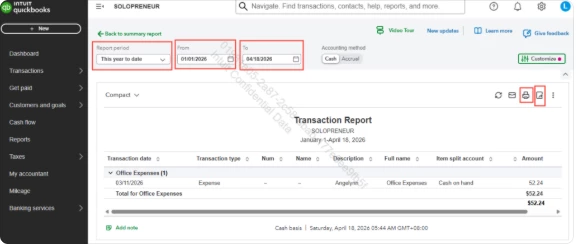
 

To get started, head to the Reports menu and open a Profit and Loss report. Set the date range to Last Year (or filter specific dates manually), then click the total expense amount at the bottom to see the full list of transaction details. Once the report looks correct, click the Print icon to generate a hard copy or save it as a PDF. You can also select the Export icon if you’d prefer to save the data in Excel for your tax preparer.


If you have any additional concerns, please reach out to us again. We’re always here to help.