
SUMMER SAVINGS 90% OFF QuickBooks for 3 months* Ends 8/27

Buy now
Switch to QuickBooks and 70% off for 3 Months
Sep 21, 2022 9:34 PM UTC
Question

How to manage COG which varies from month to month

Dear Community,


My apology if this question has been addressed in a prior post, but I haven’t been able to find the exact answer.

My question is regarding managing COG in QuickBooks Desktop.
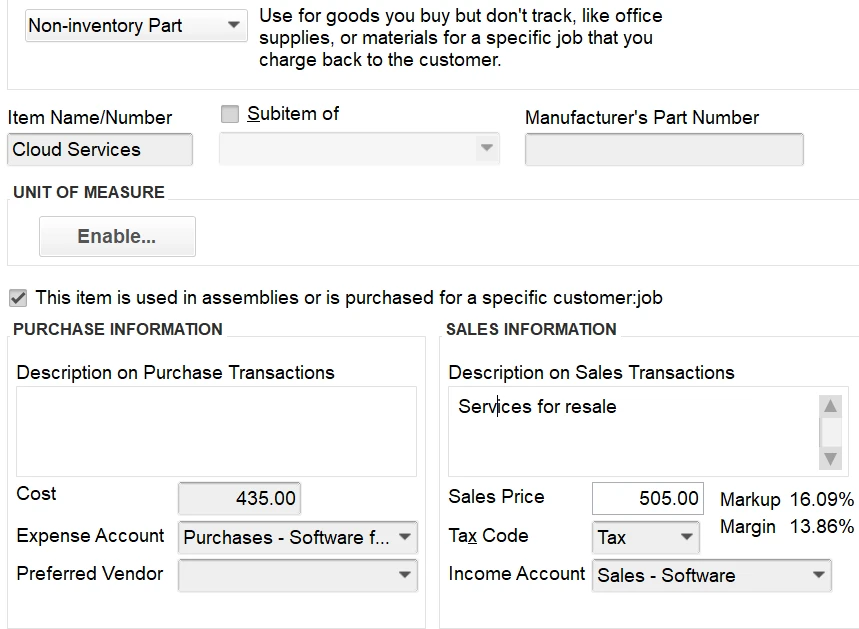
We resell a service to a client at a fixt cost, but our cost varies from month to month.
I have figured out how to setup COG with a fixed cost for a client, but I’m not sure how to set up varying cost.
This would enable more accurate reporting capabilities for this buy /sell relationship for this client.  

For example:
In the month of January, our cost for the service may be $100.00, but sold to the customer at $125.00.
In the month of February, based on the service consumption by the customer, our cost may now be $120.00, and the customer may be charged $145.00.
The big question is, is there a way to manage varying COG for a client in QB?


See screenshot of sample COG item


Thanks.

4 replies

katherinejoyceO
Level 9
Sep 21, 2022 10:25 PM UTC

Hello there, @link360.


I understand that you need help in managing COGS that vary from month to month to monitor them accordingly.


In QuickBooks, you can manually update the cost from the inventory items list. When you update the cost for inventory items, the new prices will only affect your future sales and won't change your past rate. Here's how: 


  1. Select Edit in the top left, then Preferences at the bottom
  2. From the left menu, click Items & Inventory, then choose the Company Preferences tab at the top
  3. Select Advanced Inventory Settings, then choose the FIFO tab.


The cost will then be based on the price in the bill, but it will not change the cost of previously purchased items (First In, First Out concept).


After updating your inventory costs, I recommend running the Inventory Valuation Detail report to view your past and current sales for a specific inventory and verify their cost/selling price. Here's how: 


  1. Click the Reports tab, then select Inventory.
  2. Select Inventory Valuation Summary, then set the dates to All.
  3. Double-click the item in question.


For additional guidance and references, you can check out these articles below: 


Know that I'm always here to help if you have more questions about managing your COGS in QuickBooks. Take care!

link360Author
Sep 21, 2022 11:14 PM UTC

Hi @katherinejoyceO,


Thank you for the quick response and guidance. 

I followed your instructions and was unable to click on the "Advance Inventory Settings" because it is greyed out. I tried checking the " inventory and purchase orders are active" box, but that did not enable the Advance Inventory settings.


Any recommendations on that ? 


See the attached screenshot. 


Thanks


Level 9
Sep 22, 2022 1:03 AM UTC

Let me continue the help, link360.


I got some troubleshooting steps to help enable the Advance Inventory settings on your QuickBooks Desktop account.


Let's make sure your QuickBooks software is up-to-date so you always have the latest features and fixes. To do either manual or automatic system updates, please refer to this article for the step-by-step guide: Update QuickBooks Desktop to the latest release.


Here's how to manually update your software:


  1. Go to the Help menu.
  2. Select Update QuickBooks Desktop.
  3. Click the Options tab.
  4. Select Mark All and then click Save.
  5. Go to the Update Now tab.
  6. Select the Reset Update checkbox.
  7. When you're ready, select Get Updates.

To give you more insight and visual guide on how to update QuickBooks Desktop, please check out this article: Update QuickBooks Desktop to the latest release.


Keep me posted for additional questions with inventory setting or other concerns. I'd be more than happy to help. Wishing you the best of luck.