
Invoice for set number of hours per month with roll over hours
I have a few clients that pay me a (mostly) fixed amount per month and get a specific amount of hours. If they don't use those hours they can bank them for a future project. Right now I do everything manually but I am wondering if QB Online has a way to automate this.
I currently don't use QB Time to track my time. I just use Single Time Activity to put in any hours worked for a specific client on a given day.
For example:
Client A:
- They pay me to use 4 hours a month at $80/hour ($320/month).
- They usually only use about 2-2.5 hours a month which means they get a credit of hours
- Sometimes they go over which either reduces the amount of hours credited or puts them in the negative for number of hours credited.
- Currently the invoice would have a list of hours worked on specific dates (charging $0.00 for them) and a summary section with below that. Something like this:
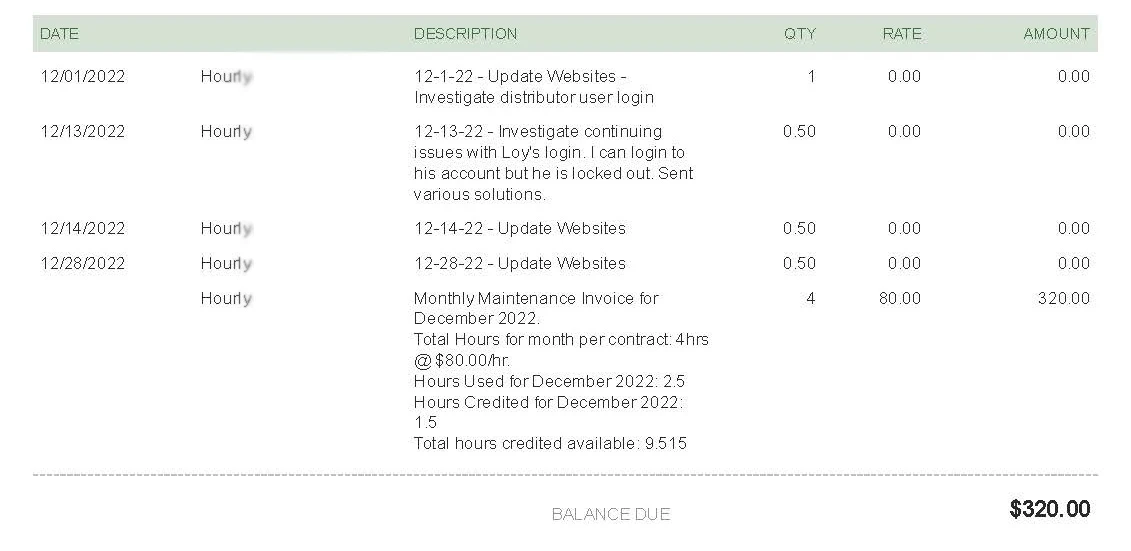
Each month, I add my time (once again, I use Single Time Activity and not QB Time). I then have to go in and set those hours to 0.00 and to change the name of the month in the summary at the bottom. Then I total up the hours and subtract it or add it to their credited hours.
Sometimes I purchase software for them and remove an equivalent amount of hours from their credited hours (i.e. - $80 of software would remove 1 credited hour) .
Client B
- Same as above but they don't ever go into negative credited hours. They get charged for any overage each month.
Basically, I wanted to know if there is a way to automate this either by using Single Time Activity or QB Time and set a client to have a specific amount of hours each month and a specific rate and they get them an invoice each month that shows where they are at with their credited hours and how much they owe.