
SUMMER SAVINGS 90% OFF QuickBooks for 3 months* Ends 8/27

Buy now
Switch to QuickBooks and 70% off for 3 Months
Oct 28, 2022 11:55 PM UTC
Question

Quickbooks Desktop is unable to send your emails to outlook
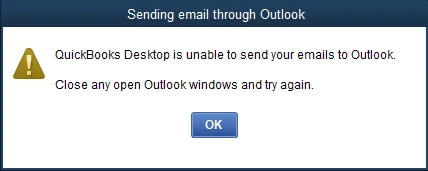
I have tried multiple options from rebooting, reinstalling and repairing both office and QuickBooks, running the QuickBooks recovery tool, and deleting the user profile. This problem seems to be with 1 specific user. Other users on the same machine are not having this issue

13 replies

katherinejoyceO
Level 9
Oct 29, 2022 1:18 AM UTC

Thanks for letting us know about your concern, @At-At1980. I appreciate you did the necessary troubleshooting before reaching us. 


Concerning this issue, this is usually just a settings matter. I've got you the steps to fix this so you can send emails from QuickBooks.


First off, ensure QuickBooks isn't set to automatically run as an administrator. Here's what you need to do:


  1. Close QuickBooks Desktop, then open the Windows Start menu.
  2. Type "QuickBooks" into the search, then right-click the QuickBooks icon and select Open file location.
  3. In the folder, right-click the QuickBooks.exe file, then select Properties.
  4. Pick the Compatibility tab, then uncheck the Run this program as Administrator option. If the option is grayed out, click Show Settings for All Users to make the option available.
  5. Click Apply, then OK.


After that, try sending a test email or transaction to yourself. If you still see an error, move on to Steps 2, outlined in this help article: How to fix "Error: QuickBooks is unable to send your email to Outlook".


If the issue persists even after following the steps, I'd recommend contacting our Customer Care team to help you check what's causing this to happen and find a fix. 


Should you have more questions while managing your emails in QuickBooks, don't hesitate to let me know so I can help you out again.

At-At1980Author
Oct 31, 2022 9:53 PM UTC

Unfortunately, I have tried all of the troubleshooting steps in that documentation and also tried customer care as well, they were unable to solve the issue for me. This error is happening on both Intuit QuickBooks Enterprise Solutions - Professional Services Edition 23.0 and 22.0

Fiat Lux - ASIA
Level 14
Oct 29, 2022 1:49 AM UTC

@At-At1980 

Which QB Desktop year version do you run?

At-At1980Author
Oct 31, 2022 9:56 PM UTC

I am having this issue with both Intuit QuickBooks Enterprise Solutions - Professional Services Edition 23.0 and 22.0

Oct 31, 2022 10:08 PM UTC

What is issue you have with Enterprise? is there any error code?

Dec 30, 2022 11:14 PM UTC

i had the same issue - dktp 2022.  i upgraded to 2023 and that worked.  couldn't sspend any more time on it

Dec 31, 2022 12:07 AM UTC

@Ag1956 Interesting. I had tested Enterprise 2023 and I still had the same problem. I can give it another try to confirm.


@SirielJeaB Hopefully the fix will get released into an update and get installed, no notification necessary to anyone, or information about the fix will be posted in the forums and those that want to test a pre-release can do so.


We have three users now that are having this issue. In all cases, if we login to the computer as another user (another Windows profile), that profile has no problem sending emails. 


I've tried deleting everything I can find in AppData for Intuit and QuickBooks as well as Temp files and nothing makes a change. Registry for HKCU seems to be the same between a non-working and working user.


There has to be some file corruption or something similar that impacts the user. Are there any ideas on things we can at least try? I'm afraid that making new user accounts is only a bandaid and the users will have problems again down the road.