
BLACK FRIDAY SALE 70% OFF QuickBooks for 3 months* Ends 11/29

Buy now
Switch to QuickBooks and 70% off for 3 Months
Jun 25, 2022 5:53 AM UTC
Question

Summary shows zero balance. Enterprise M&W
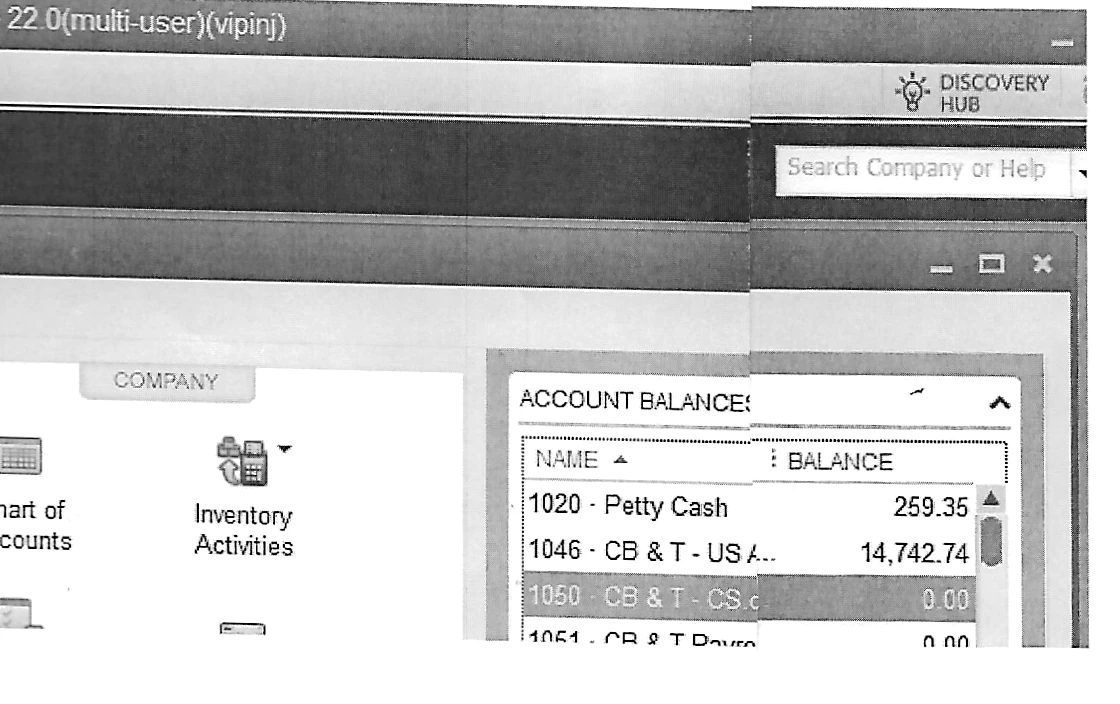
Summary window shows zero balance at Account #1050.

After opening acct details, there is an actual positive balance.  Just started doing this.  We figured should "auto refresh" for multi user mode with file on server.

Advice?


5 replies

Level 9
Jun 25, 2022 7:34 AM UTC

Welcome back to the QuickBooks Community, sdguy. I'll be sharing details on how the account summary/details work in the Chart of account section. Then, ensure you'll be able to see your account information accurately in the QuickBooks program.


When the account or summary shows zero balance when opening the Chart of Accounts, the account details will also appear as zero balance. Since the window shows zero balance but there is an actual positive balance after opening the acct details, I recommend running the Verify and Rebuild Data Utilities to get this sorted out. The Verify Data utility identifies any potential data damage issues that might've caused unable to view Barcode2 in QuickBooks columns when mapping. While the Rebuild Data utility repairs damaged data in your company file. Before this, you'll have to secure a backup copy of your company file.


To Verify data:


  1. Go to the File menu.
  2. Scroll down to Utilities.
  3. Select Verify Data.
  4. Click OK.


To Rebuild Data:


  1. Go back to the File menu.
  2. Choose Utilities.
  3. Select Rebuild Data.
  4. Click on OK when you get the message Rebuild has completed.


For further details, you can refer to this article: Verify and Rebuild Data in QuickBooks Desktop.


Additionally, I appreciate you if you can provide screenshots of your end on the summary or COA section and the account details page. That way, I can share accurate information or solution to check the cause of the issue.


Lastly, you may refer to this article to see steps on how you can merge accounts in QBDT: Merge list entries in QuickBooks Desktop.


Let me know if there's anything else I can assist you with managing account balance or details. I'm always here ready to back you up anytime, sdguy. Have a good day!

sdguyAuthor
Jul 1, 2022 7:08 AM UTC

We ran verify. 

Found too many errors (23) for us to deal with. 

dotNET error?


@ChristieAnn 11 wrote:

Welcome back to the QuickBooks Community, sdguy. I'll be sharing details on how the account summary/details work in the Chart of account section. Then, ensure you'll be able to see your account information accurately in the QuickBooks program.


When the account or summary shows zero balance when opening the Chart of Accounts, the account details will also appear as zero balance. Since the window shows zero balance but there is an actual positive balance after opening the acct details, I recommend running the Verify and Rebuild Data Utilities to get this sorted out. The Verify Data utility identifies any potential data damage issues that might've caused unable to view Barcode2 in QuickBooks columns when mapping. While the Rebuild Data utility repairs damaged data in your company file. Before this, you'll have to secure a backup copy of your company file.


To Verify data:


  1. Go to the File menu.
  2. Scroll down to Utilities.
  3. Select Verify Data.
  4. Click OK.


To Rebuild Data:


  1. Go back to the File menu.
  2. Choose Utilities.
  3. Select Rebuild Data.
  4. Click on OK when you get the message Rebuild has completed.


For further details, you can refer to this article: Verify and Rebuild Data in QuickBooks Desktop.


Additionally, I appreciate you if you can provide screenshots of your end on the summary or COA section and the account details page. That way, I can share accurate information or solution to check the cause of the issue.


Lastly, you may refer to this article to see steps on how you can merge accounts in QBDT: Merge list entries in QuickBooks Desktop.


Let me know if there's anything else I can assist you with managing account balance or details. I'm always here ready to back you up anytime, sdguy. Have a good day!


These don't seem like input errors.... sounds like a support case... As we don't need these errors to recur.

These should be ironed out before we close out our month.


@ChristieAnn 11 wrote:

Welcome back to the QuickBooks Community, sdguy. I'll be sharing details on how the account summary/details work in the Chart of account section. Then, ensure you'll be able to see your account information accurately in the QuickBooks program.


When the account or summary shows zero balance when opening the Chart of Accounts, the account details will also appear as zero balance. Since the window shows zero balance but there is an actual positive balance after opening the acct details, I recommend running the Verify and Rebuild Data Utilities to get this sorted out. The Verify Data utility identifies any potential data damage issues that might've caused unable to view Barcode2 in QuickBooks columns when mapping. While the Rebuild Data utility repairs damaged data in your company file. Before this, you'll have to secure a backup copy of your company file.


To Verify data:


  1. Go to the File menu.
  2. Scroll down to Utilities.
  3. Select Verify Data.
  4. Click OK.


To Rebuild Data:


  1. Go back to the File menu.
  2. Choose Utilities.
  3. Select Rebuild Data.
  4. Click on OK when you get the message Rebuild has completed.


For further details, you can refer to this article: Verify and Rebuild Data in QuickBooks Desktop.


Additionally, I appreciate you if you can provide screenshots of your end on the summary or COA section and the account details page. That way, I can share accurate information or solution to check the cause of the issue.


Lastly, you may refer to this article to see steps on how you can merge accounts in QBDT: Merge list entries in QuickBooks Desktop.


Let me know if there's anything else I can assist you with managing account balance or details. I'm always here ready to back you up anytime, sdguy. Have a good day!


They are:

Verify Results

Company File D:\Shares\CSA Quickbooks\Enterprise June 22\co

System Date 06/30/2022

Verify run on 06/30/2022 17:14:07

Issues found 23

! We found some errors that you can easily fix by rebuilding your To begin, click Rebuild Now.

Errors you can fix by rebuilding your data

Expand All

Account Balances

Error 61 (12)

See Online Article

Item History

► Error 292 (2) See Online Article

4 Error 293 (5)

See Online Article

Lists

►Error (3)

Transaction

Error 179

See Online Article

Moderator
Jul 1, 2022 8:48 AM UTC

I appreciate you getting back to us and sharing the result after running the verify tool, @sdguy.


I've come with a solution that can help fix the errors so your summary account will show accurate balances.


The error you received can be fixed by rebuilding your data. If you haven't yet, I recommend doing it so. Here's how:


  1. Go to the File menu, then select Rebuild Data.
  2. Click on OK to close all windows.
  3. Once the rebuild's finished, select OK.


If you get the same result, let's repair your company file to fix minor data issues. I'll show you how:


  1. Download the latest QuickBooks Tool Hub version.
  2. Open and install the file.
  3. Complete the installation and open the tool hub.
  4. Select Quick Fix my File.
  5. Click OK when it completes and launch your QuickBooks.


If the issue persists, you can check out this article for more troubleshooting steps: Fix company file and network issues with QuickBooks File Doctor.


Come back to this post and let us know how it goes, @sdguy. I want to make sure this issue is taken care of.


You may also want to run and customize reports in QuickBooks Desktop. This will help you view information and focus on the details that matter the most to you.


Wishing you all the best.