
SUMMER SAVINGS 90% OFF QuickBooks for 3 months* Ends 8/27

Buy now
Switch to QuickBooks and 70% off for 3 Months
Feb 12, 2020 6:57 PM UTC
Question

Can anyone print an invoice from Safari on iPad Pro?

I am trying to print invoices from Safari on iPad Pro. Clicking the Print of Preview link pulls up the menu. I uncheck Print Later, then click Print, expecting a new window to display with the PDF to print/download, however, nothing happens.
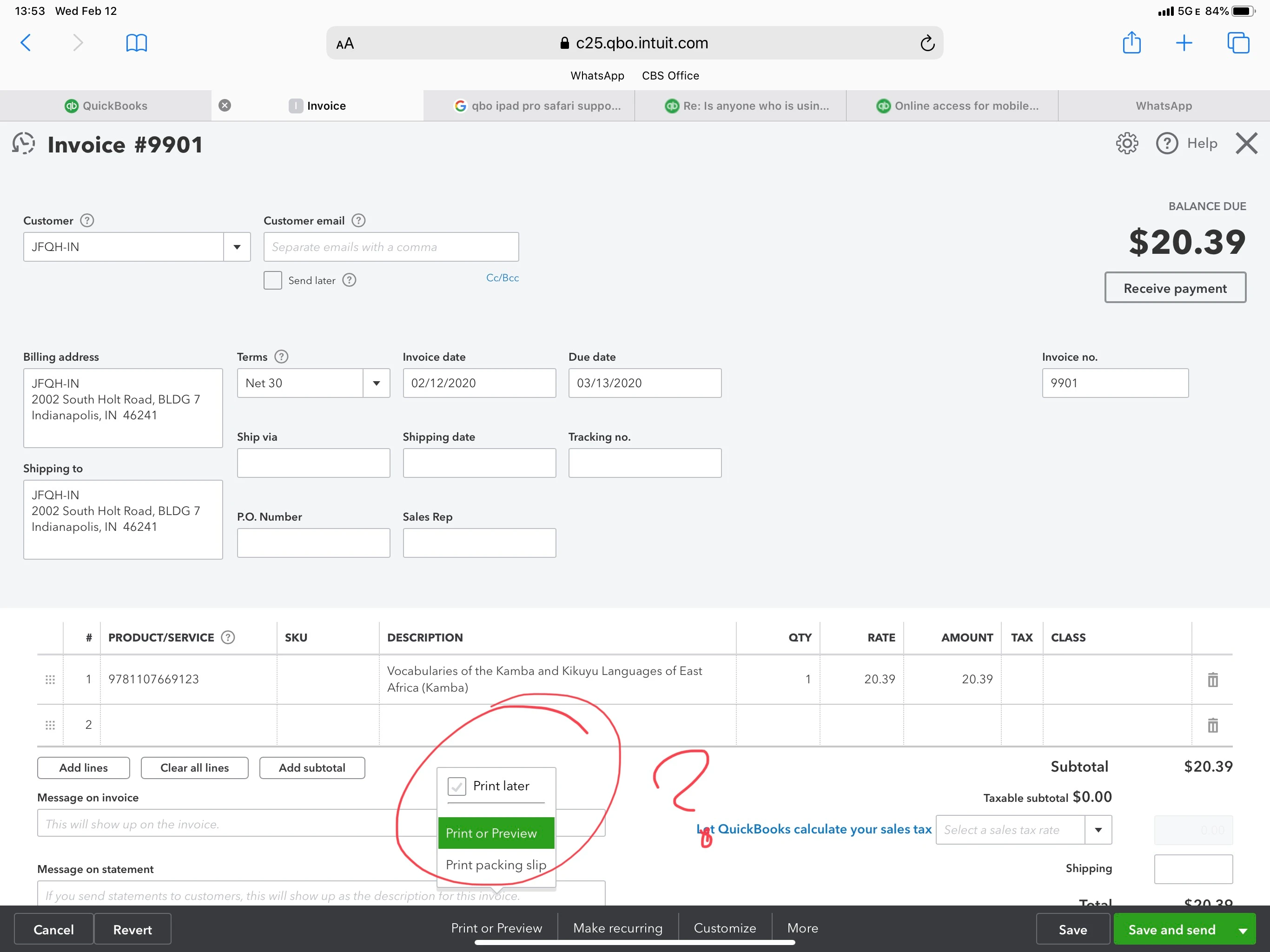


Customer Service said this is not a bug, just not supported! How is this not supported?


NOTE: This doesn’t work in Chrome either, but QBO is clear that they are not supporting Chrome.

NOTE 2: Many functions not working in Safari, do work in Chrome.

10 replies

Level 8
Feb 12, 2020 8:06 PM UTC

Welcome back, @BDLHOLDINGS.


QuickBooks Online was made around Google Chrome, so that's why we always recommend using Google Chrome as your go-to browser for the product.


If you're trying to fix the Print and Preview button on the Safari browser, then I suggest clearing your browsing data. Your browser can store data over some time that can cause glitches or error messages.


Here's how to clear your data file within the Safari browser:

  1. Go to the Settings app on your iPad Pro.
  2. Tap Safari.
  3. Select Clear History and Website Data.


It's that easy!


This link may come in handy about printing invoices.


I value you and the success of your business. Remember, I'm only a comment away if you need me. Enjoy the rest of your day!

Feb 12, 2020 9:15 PM UTC

Thank you for the quick reply. 


This post was related to Safari, which according to the QBO help page (https://quickbooks.intuit.com/learn-support/global/getting-started/quickbooks-online-access-for-mobile-devices/00/381497 ) Chrome is not officially supported by may work.


That said, I much prefer to use Chrome as more functions seem to work here than in Safari. 


As far as your troubleshooting steps, I have cleared the cache, history and website data multiple times prior to positing..but this does not work. 


Your referenced screen shot is from an iPhone and I am using iPad Pro; a nuanced difference but a difference nonetheless. 


Please open a ticket and send to the developers. 

May 14, 2021 4:21 PM UTC

Having the same problem printing from the iPad. Safari or chrome. Now even the quicklook iPad app is working


May 14, 2021 5:31 PM UTC

Im having the same issue. I called qb and they don't believe this is happening. that link you circle in red is not an active link, They need to fix this right the way. 

Jen_D
Level 8
May 14, 2021 7:07 PM UTC

Thanks for posting an update about this invoice printing issue in your mobile device (iPad), @patrick5632,


If you're still unable to print the invoice there, I recommend getting in touch with our Support Team this time. This way we can get this issue reported to our engineers for a fix.


Follow these steps to contact our support:


  1. Open a browser in your iPad and paste this link: http://qbo.intuit.com/.
  2. Go to the Help menu in QuickBooks, then choose the Search tab.
  3. At the bottom click on Contact us.
  4. Enter the keyword Account Management and Billing in the What can we help you with? box.
  5. On the next screen, scroll down to How would you like to connect with us section.
  6. Choose Chat with us to initiate a discussion with a live agent.
  7. Enter you account contact information then press Get a chat.


Reach out to back to me if you need further assistance while working with QuickBooks invoicing or other tasks. I'm always here to help and make sure you’re taken care of. Have a great rest of the day.

Nov 8, 2022 8:26 PM UTC

i found an easy work for me, i create invoice in sales….then open separate window, go to dashboard, look for outstanding invoices, find my invoice, on right side where it default displays..receive payment..click on arrow and select print and you get a display of invoice and save or print the new view from there.

Nov 8, 2022 10:46 PM UTC

Thank you for sharing this. While this technically works, its too involved. We should be able to print directly from the invoice / estimate page. 

Nov 9, 2022 12:01 AM UTC

I agree, Quickbooks should have fixed this long ago.