BLACK FRIDAY SALE 70% OFF QuickBooks for 3 months* Ends 11/29

Buy now
Switch to QuickBooks and 70% off for 3 Months
Jul 7, 2021 9:07 AM UTC
Question

Filter to Exclude Closed Sales order from Sales Order report.

Hi,

I am trying to create a report that lists detailed Open Sales Orders per client with a determined item filter.

When I launch the report, it shows both Open and closed sales orders.


What is the specific filter that excludes Closed/invoiced Sales orders from the report ?

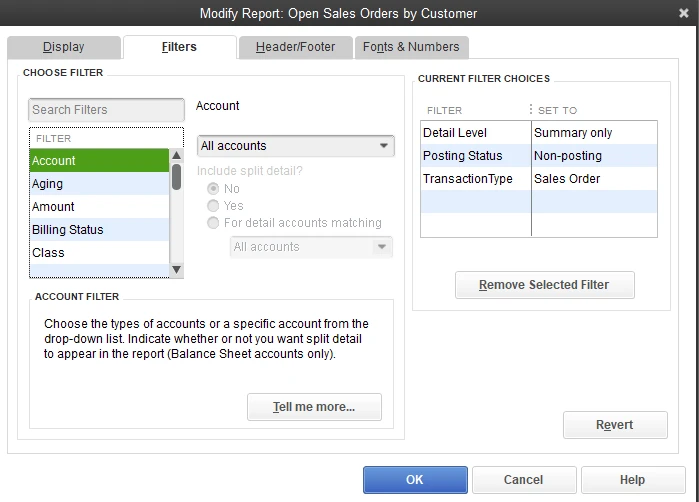
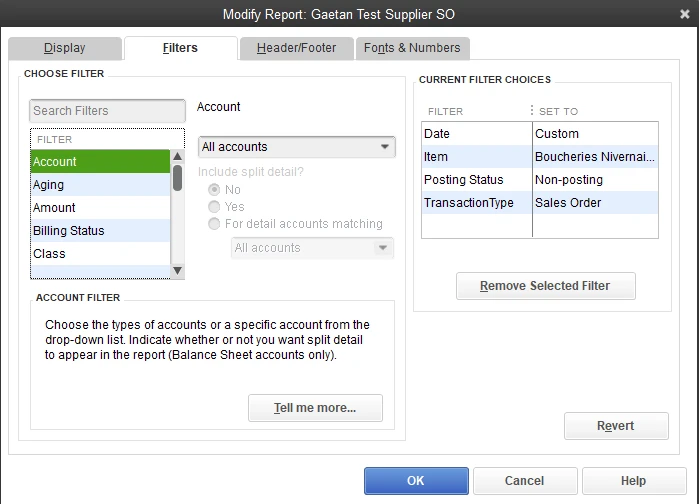
When I compare the filters of "Open sales orders report" and my custom report, they are the same, yet show different outputs.


Thanks for helping !

Gaetan
 

9 replies

Level 8
Jul 7, 2021 10:37 AM UTC

Thanks for bringing this to our attention, @Gaetan64.


Usually, when running Open Sales Orders by Customer or Item report, it will only show open sales orders. In your case, the closed sales orders also show on the same statement.


This way, I suggest running verify and rebuild tool to find potential issues so that QuickBooks will self-resolve them if it finds any errors. Before that, make sure to back up your company file in case of any issues.


Once done, you can rerun the Sales Order report specified for an item or customer.


I've added an article for more details to customize sales, financial, and expense reports: Customize reports in QuickBooks Desktop. It includes how to display specified columns and filter specific data.


Keep me posted for additional questions or other concerns with running sales reports in QuickBooks or any system-related questions. I'd be more than happy to help. I wish you the best of luck and more power to your business!

Gaetan64Author
Jul 8, 2021 3:50 AM UTC

Hi Jovychris, 


Thank you for your feedback, however it does not quite fix my issue.


In other words, what is the filter to exclude all closed and invoiced sales order from a Sales order report ?

I can't use the "Open sales order" report as it is lacking flexibility in the filtering and information display.


I want to run a Sales Order report where I filter out Closed & Invoiced Sales order.


The Output from my own report should show a detailed list of All Open Sales orders per client, filtered by item category.


Thanks,

Gaetan

MichelleBh
Level 8
Jul 8, 2021 5:33 AM UTC

I'm here to guide you on how to filter your custom reports, @Gaetan64.


I have here some steps on how to exclude the closed and invoiced transactions in your Sales Order report. This way, you can review all the open sales orders without a moment's delay. 


Let's make sure to filter the Paid Status to Open only. Such that the closed and invoiced sales order will invisible on the report. Let me guide you on how. 

  1. Go to the Reports icon, then choose your custom Sales Orders report. 
  2. Select the Customize Report tab on the upper left side. 
  3. Choose Display, then check the Paid option to see the status. 
  4. Click Filters, then type Paid Status in the box and pick Open. 
  5. Tap OK. 


For more details about customizing reports, check out this article: Understand reports in QuickBooks.


If the issue continues, I'd recommend contacting our technical support. They can further investigate the main cause of the problem and provide other troubleshooting steps. Thus, you can review your open sales order swiftly. 


Here's how: 

  1. Go to this QBDT help link. 
  2. Select your product and click Continue. 
  3. Enter your concern in the box and tap Continue. 
  4. Choose either Chat with us or Have us call you.  
  5. Follow the on-screen instructions.


Ensure to check our support hours to know their availability.


Visit these articles below to know more about the pick, pack, ship, and other sales order topics.


You can always leave a message below if you have further concerns about your sales order. I'm glad to help you. Take care.