
SUMMER SAVINGS 90% OFF QuickBooks for 3 months* Ends 8/27

Buy now


Switch to QuickBooks and 70% off for 3 Months
Apr 19, 2022 3:06 PM UTC
Solved

Is there a way to make my customized invoice the default invoice when I use the quick invoice link under the new tab?

Also, can I shut off the payment methods or do I have to turn them off every time I create an invoice?
JasroV
JasroVAnswer
Level 8
Apr 19, 2022 3:50 PM UTC

Yes, there is, @msalamone-buholt.
 

You'd be glad to know that it only takes a few clicks to make your customized template your default template for your invoice. I'd be delighted to guide you through the steps.
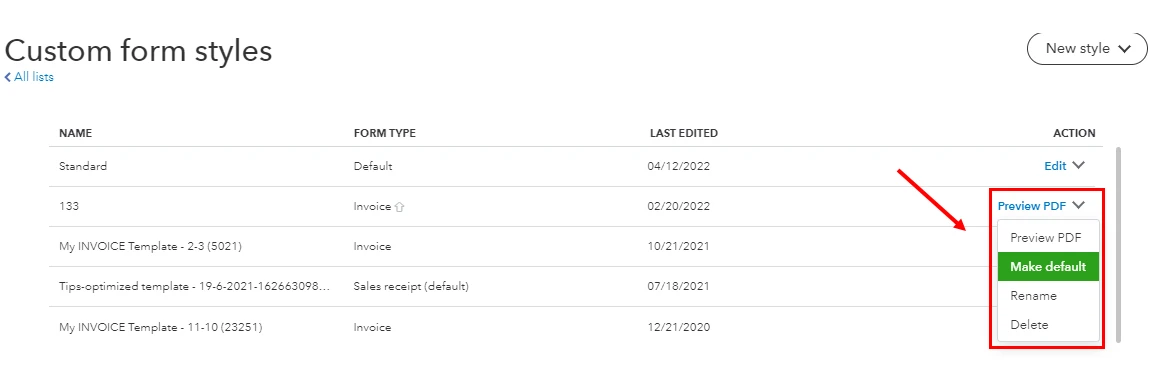
 

  1. Go to the Gear icon in your QuickBooks Online (QBO) account.
  2. Select Custom Form Styles.
  3. Locate your template
  4. Select the drop-down arrow in the Action column.
  5. Click Make default. 


You can also check Step 7 in this article for more details about this: Customize invoices, estimates, and sales receipts in QuickBooks Online.


In regards to turning off your payments methods, you can refer to the steps outlined in this resource for guidance: Add, edit, or disable a credit card.


Once you're all good to go, you might want to utilize this article that can help you manage your customer payments: Record invoice payments in QuickBooks Online.


I'm always here if you need more help with your invoice and QBO. Simply tag me in your reply and I'll get back to you as soon as I can. Have a wonderful day ahead!

3 replies

JasroV
JasroVAnswer
Level 8
Apr 19, 2022 3:50 PM UTC

Yes, there is, @msalamone-buholt.
 

You'd be glad to know that it only takes a few clicks to make your customized template your default template for your invoice. I'd be delighted to guide you through the steps.


  1. Go to the Gear icon in your QuickBooks Online (QBO) account.
  2. Select Custom Form Styles.
  3. Locate your template
  4. Select the drop-down arrow in the Action column.
  5. Click Make default. 


You can also check Step 7 in this article for more details about this: Customize invoices, estimates, and sales receipts in QuickBooks Online.


In regards to turning off your payments methods, you can refer to the steps outlined in this resource for guidance: Add, edit, or disable a credit card.


Once you're all good to go, you might want to utilize this article that can help you manage your customer payments: Record invoice payments in QuickBooks Online.


I'm always here if you need more help with your invoice and QBO. Simply tag me in your reply and I'll get back to you as soon as I can. Have a wonderful day ahead!

Apr 19, 2022 3:54 PM UTC

Perfect, thank you.  you saved me a ton of time trying to figure that out.

Tori B
QuickBooks Team
Apr 19, 2022 4:42 PM UTC

You're certainly welcome, @msalamone-buholt. 


Please know that any time you have questions or concerns, the QuickBooks Community has your back. Take care, and have a wonderful day ahead!