
SUMMER SAVINGS 90% OFF QuickBooks for 3 months* Ends 8/27

Buy now
Switch to QuickBooks and 70% off for 3 Months
Jun 11, 2020 5:06 PM UTC
Question

Where in the world is the Income/Profit and Loss Report?

I cannot find the profit and loss report.  I've followed the instructions from several other posts, and it's simply not there.  Here's a screenshot of my reports dashboard.  (You can also see I searched for the report and got zero results.)  Any help finding the P&L would be greatly appreciated.
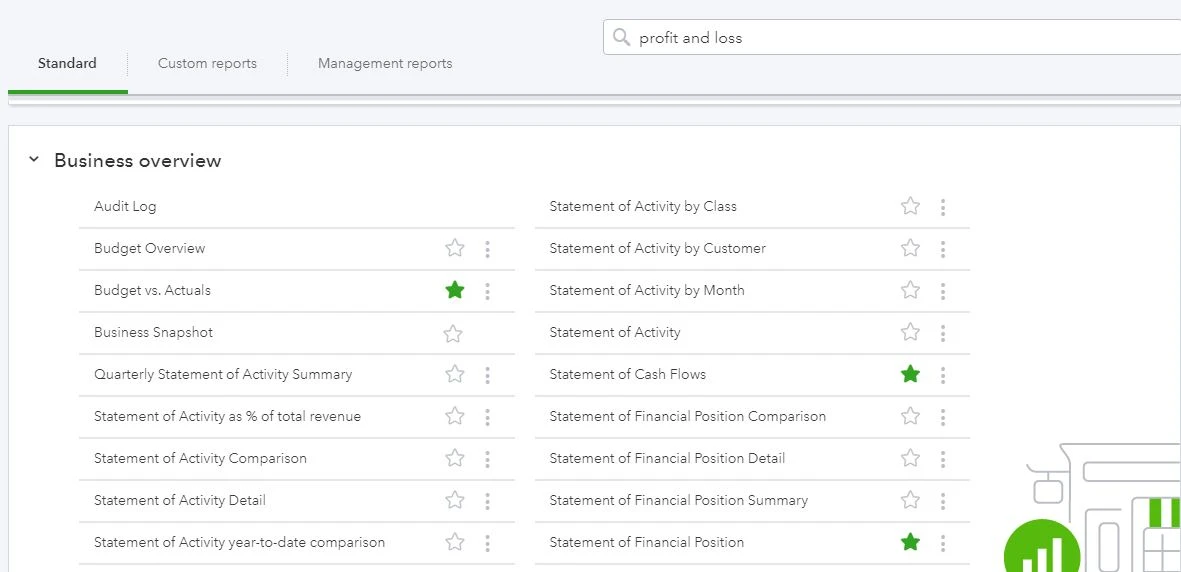
 

P.S.  On a side note, it's ridiculous that it isn't called the Income Statement, or at least Profit & Loss (Income Statement), or something along those lines.  Literally every accounting resource lists it as one of the Big Four (Income, Balance, Cash Flow, Statement of RE), and yet Quickbooks decides to confusingly name them differently.  Yet another unnecessary complication.


10 replies

Level 2
Jun 11, 2020 6:34 PM UTC

You are correct.  You should see Income Statement. Look under Accountant or Financial reports.

Moderator
Jun 11, 2020 6:53 PM UTC

We will sort this out, @raehenderson.


There are times odd behavior occurs. Let perform some troubleshooting steps to get this fix.


You can use an incognito or private window to determine if it’s a browser-related issue. Here are the keyboard shortcuts:


  • Google Chrome: Ctrl+Shift+N
  • Mozilla: Ctrl+Shift+P
  • Internet Explorer: Ctrl+Shift+P
  • Safari: Command+Shift+N


If you're able to view the Profit and Loss report in a private window, you'll need to clear your browser's cache to start a clean slate. And at the same time, it can optimize your browser's performance. You can also use other browsers as an alternative.


Let me share this article that has information on how to customize reports and set multiple filters: Customize reports in QuickBooks Online. It also contains recommended custom reports.


I appreciate your feedback regarding the report terms used by QuickBooks. I’ll take that as part of the opportunity for future enhancement.


You can count on me if there are any problems. Thanks.

Jun 11, 2020 7:45 PM UTC

Hello,


Thank you for the response.  I've tried the incognito mode as well as Google Chrome and Microsoft Edge, and it still doesn't show up.  Is there another possible reason the P&L report is gone?

Level 8
Jun 11, 2020 8:46 PM UTC

Thanks for your prompt response, @raehenderson.


Your Company type tax form has configured to a Nonprofit organization. Other reports changes when you change the company type.


It's the reason why you can't see the "Profit and Loss" report in the Reports menu. Instead, you can look for Statement of Activity. It will report your revenue, expenditures, and net income (profit or loss). Also called a revenue statement that you see now under Business overview.


In case you wanted to email and print reports, you can refer to this article: Run reports in QuickBooks Online. It includes links about report features like customizing and memorizing statements.


Feel free to leave a comment if you need further assistance. I'll be around to help. Have a good one!

Jun 11, 2020 8:51 PM UTC

We are a non-profit, and our tax form under account settings is set correctly.  Even if we're a non-profit, we still need to run income statements.  Does Quickbooks have another name for the income statement when it's a non-profit entity?  This is exceptionally confusing.  

Level 8
Jun 11, 2020 10:05 PM UTC

Thanks for adding more details, @raehenderson.


I've updated my answer above to ensure other Community members will see correct information and avoid confusion in the future.


Yes, the name of the reports is different when you're company type is set up as a Nonprofit organization (Form 990) in QuickBooks Online. Also, it is called a revenue statement or statement of financial results or income under Business overview.


You can always leave a message below if you have more questions. I'll be alert with your replies. Stay safe and well!