
SUMMER SAVINGS 90% OFF QuickBooks for 3 months* Ends 8/27

Buy now


Switch to QuickBooks and 70% off for 3 Months
Feb 10, 2021 7:55 PM UTC
Solved

Why does quickbooks change type from Noninventory to Inventory when Importing products and services

Qty is set to 0. No Inventory Asset Account entered.
Rose-A
Rose-AAnswer
Level 10
Feb 10, 2021 9:22 PM UTC

It's good to see you here in the Community, jay-autumnsupply.


I'd like to share some information and help you with importing non-inventory items in QuickBooks Online.


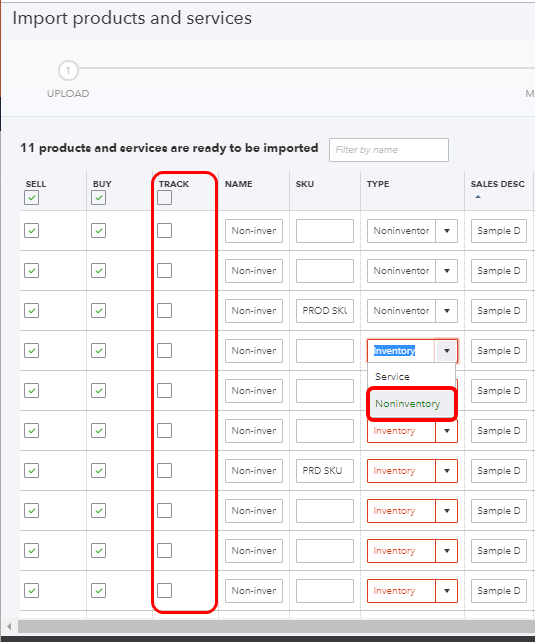
QuickBooks Online automatically sets your product type from Non-Inventory to Inventory items if the Track column option is selected.
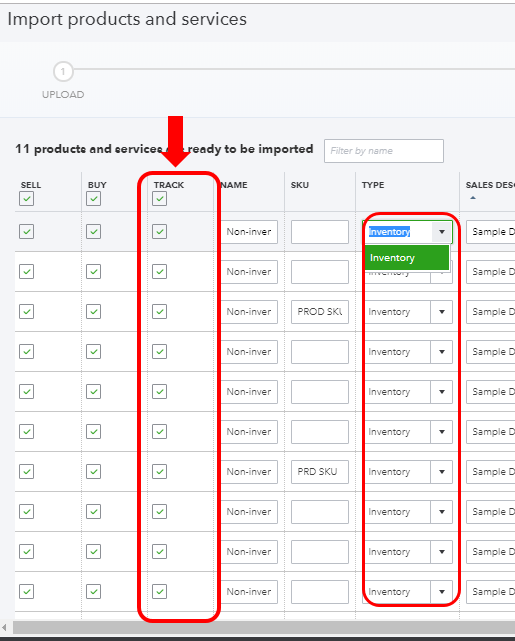
 

To ensure you're importing the correct product item, remove the check-mark under the Track column and manually change the Type to Non-Inventory.
 

You can take a look at this article to help and guide you with the importing process: Import products and services into QuickBooks Online. On the same link, you'll find tips on how to import categories and sub-categories in the system.


Additionally, you can go through this write-up to know more about our products and services in QuickBooks Online as well as steps to track your best sellers: Adding Products and Services, Customers, and Vendors to Lists.


This should get you moving today, jay-autumnsupply. Don't hesitate to let me know if I can be of additional assistance while importing your products or if you have any follow-up questions in mind. I'm always here to keep helping. Have a good one!

4 replies

Rose-A
Rose-AAnswer
Level 10
Feb 10, 2021 9:22 PM UTC

It's good to see you here in the Community, jay-autumnsupply.


I'd like to share some information and help you with importing non-inventory items in QuickBooks Online.


QuickBooks Online automatically sets your product type from Non-Inventory to Inventory items if the Track column option is selected.


To ensure you're importing the correct product item, remove the check-mark under the Track column and manually change the Type to Non-Inventory.


You can take a look at this article to help and guide you with the importing process: Import products and services into QuickBooks Online. On the same link, you'll find tips on how to import categories and sub-categories in the system.


Additionally, you can go through this write-up to know more about our products and services in QuickBooks Online as well as steps to track your best sellers: Adding Products and Services, Customers, and Vendors to Lists.


This should get you moving today, jay-autumnsupply. Don't hesitate to let me know if I can be of additional assistance while importing your products or if you have any follow-up questions in mind. I'm always here to keep helping. Have a good one!

Feb 12, 2021 10:16 PM UTC

There must be an alternative to this.  Certain fields should be set so that Tracking is not set as default, especially when Noninventory was passed in to begin with.   Maybe quickbooks could give this option when uploading to begin with?  You also have to be careful when setting your qty fields (format).  If it goes in as a General field, that produces one set of settings.  If it goes in as a Text fields, that produces another.  That fields alone should be passed thru a procedure in quickbooks that sets it to the desired format.