Turn on suggestions
Auto-suggest helps you quickly narrow down your search results by suggesting possible matches as you type.
Showing results for
Help?
We have to understand these transactions first so we can fix the double entries, Green.
When you say A/R amounts, do you mean invoices, while sales records mean sales transactions? Can you explain how you had both sales records and A/R amounts in your reconciliation at the same time?
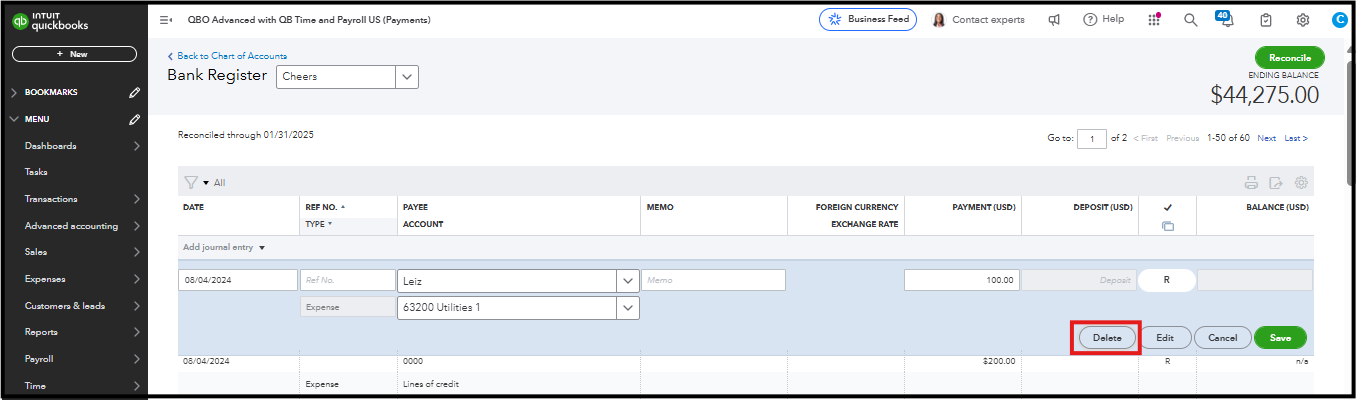
If these sales transactions are from the Banking page, you can simply unmatch them to remove them from your books and the reconciliation. However, if you entered them manually in the bank register, you will need to open each one and delete them individually.
To manually delete each transaction:
Regarding the A/R amounts, are these bank deposits that use the A/R category? What kind of transactions are these? Typically, when you record an invoice, which affects A/R by default, you can mark it as paid directly on the invoice page, or you can match a downloaded bank transaction to it to indicate that the invoice is paid. Then, the payment will appear on the Reconciliation page. See about recording an invoice payment.
If you have other concerns about this, feel free to respond. We're here to help.
You have clicked a link to a site outside of the QuickBooks or ProFile Communities. By clicking "Continue", you will leave the community and be taken to that site instead.
For more information visit our Security Center or to report suspicious websites you can contact us here


