Thank you for taking the initiative to troubleshoot, @Dayclone1. The amount of historical data that can be transferred to QuickBooks varies by financial institution. Different banks have different policies on the volume of data they allow to be downloaded to accounting software like QuickBooks.
Some banks let you download the last 90 days of transactions. Since you've mentioned that only the 3 months of the transactions were imported to QuickBooks, I suggest you manually upload your missing transactions using .CSV file. To do this, you'll need to get the transactions from your bank, you can find guidance on this in the article: Get transactions from your bank.
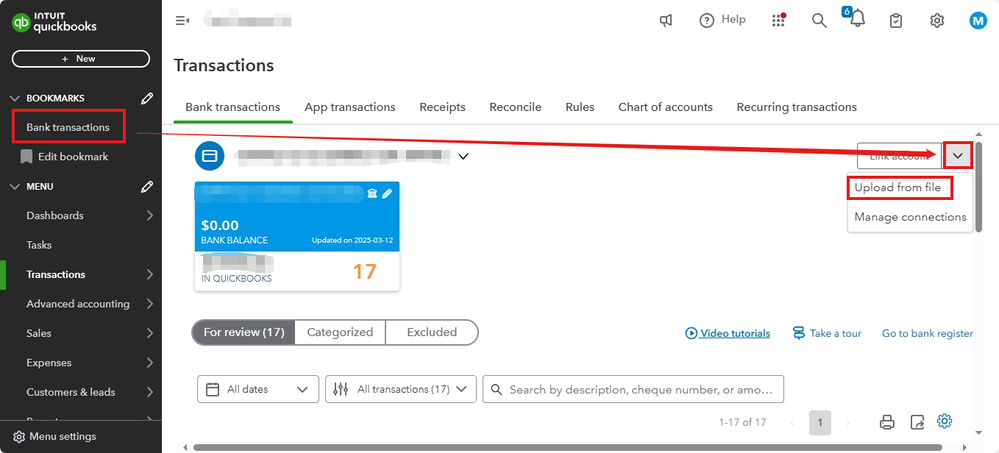
Here's the procedure to manually upload transactions using a .CSV file:
- Navigate to the Bank Transactions menu.
- Select the drop-down menu beside the Link Account.
- Click Upload from file.
- Select Drag and Drop or Select Files then choose the file you downloaded from your bank and click Continue.
- From the QuickBooks Account dropdown, select the account for the upload. If you're new and don’t see an account, select Add New to create a new bank account.
- Follow the onscreen instructions to correctly match the columns in your file to the appropriate fields in QuickBooks, then click Continue.
- Choose the transactions you want to import into QuickBooks and click Continue.
- Hit Yes to confirm the import, then select Done.
For step-by-step guidance on manually uploading transactions, see this article: Manually upload transactions into QuickBooks Online.
Additionally, it's crucial to categorize transactions and reconcile accounts regularly to prevent financial discrepancies, ensures accuracy for budgeting and taxes, and aids in early detection of unauthorized activities.
If you need further help uploading transactions from your bank, feel free to reply to this post. I'm here to assist you!


