Hello sareli,
The Timesheet fields on the Custom Fields page originate from two sources: QuickBooks Online and QuickBooks Time. Fields marked with the QuickBooks logo are synced from QuickBooks Online and cannot be edited.
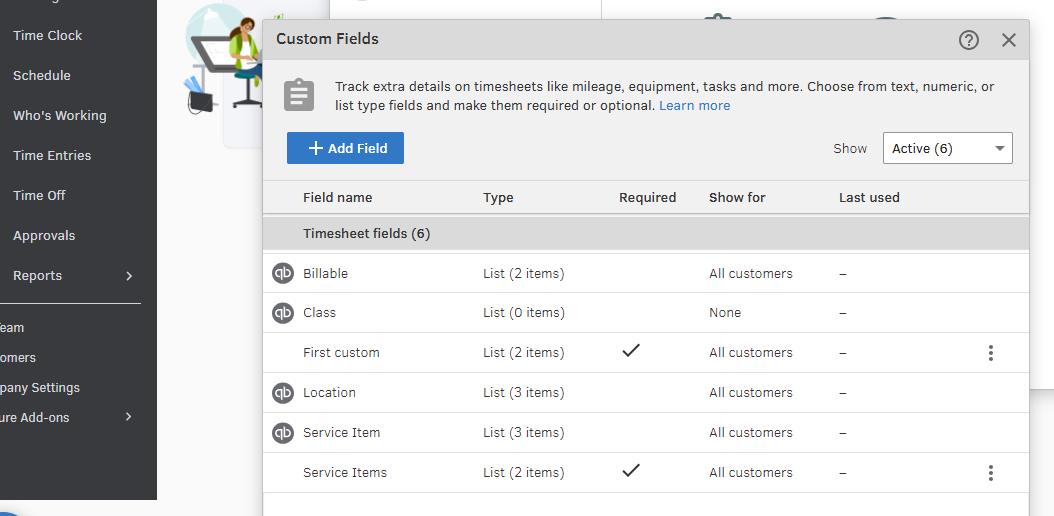
To make changes, you’ll need to create a new custom field and set it to Required. Here’s how to add a custom field:
- From the Custom Fields window, click the + Add Field button, then select Add Field Anyway.
- Enter a name for the Name field (this is required) and check the box for Required to make it mandatory.
You’ll need to create at least two items associated with this field.
- Click the + Add Item button and enter the item’s name (required).
- Go back to the Field page and click the + Add Item button again to add another item.
- Once done, click the Save button to save the field.
Feel free to check this article for further guidance: Set up and manage custom fields in QuickBooks Time.
We’re here to help if you have any questions or need further assistance.


