 QuickBooksHelpIntuit
Move from TurboTax Business Incorporated to Pro Tax
by Intuit• Updated 1 week ago
You can move your T2 returns from TurboTax Business Incorporated (TTBInc) to Pro Tax in QuickBooks Online Accountant. Rename each TTBInc file so it uses the ProFile file extension, then import it into Pro Tax. After that, you can carry the return forward to the next tax year without re-entering your data.
Why move to Pro Tax?
Pro Tax is cloud-based professional tax software. It uses the same engine and code as TTBInc, and it adds the forms, schedules, and worksheets that different types of returns need.
With Pro Tax, you get:
- Free phone and chat support
- Unlimited access to the Pro Tax community, where you can connect with other Pro Tax users
- Hundreds of self-help articles
Move your TTBInc returns to Pro Tax
Here's how to move a T2 return from TTBInc to Pro Tax:
- On your computer, find the T2 file you created in TTBInc. For example, a 2025 T2 file ends in .GB25.
- Right-click the file, select Rename, and change the file extension to .GT2. For example, change NewCorp (20220629).GB25 to NewCorp (20220629).GT2. The file now uses the ProFile format.
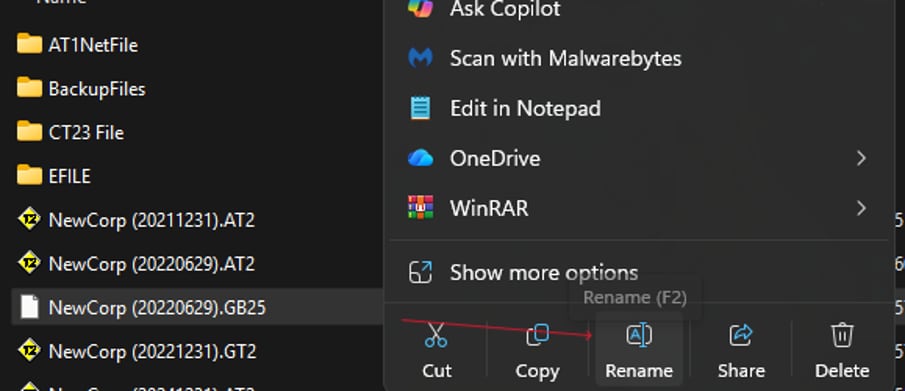
- In Pro Tax, select Import Returns, then select Import Returns from ProFile.
- Select the renamed file to import it.
- Open the imported return in Pro Tax.
After you import the return, you can carry it forward in Pro Tax to the next tax year. You won't need to enter your data again or restart the return.
Get help with your move
New Pro Tax users can book a free, one-time assisted onboarding session with a Pro Tax expert. The expert can help you move your returns and walk you through the software. Request an onboarding session.
Frequently asked questions
Can I use Pro Tax on the same computer I used for TTBInc?
Yes. Pro Tax works on any device with a web browser, including computers, tablets, and phones.
Does Pro Tax cost the same as TTBInc?
Pro Tax offers full licences that let you file an unlimited number of T2 returns. A T2 OnePay is priced similarly to a TTBInc licence. [SME to confirm: pricing comparison wording]
What if I need to amend a return from a previous year in TTBInc?
You still have access to your previous TTBInc licences and software, so you can amend those returns in TTBInc.
How can I file my T2 or AT1 in Pro Tax?
You can NETFILE both T2 and AT1 returns in Pro Tax. If you have EFILE credentials, you can also use EFILE.
Paper filing a return you prepared in Pro Tax may result in penalties from the CRA.
Contact Pro Tax support
Pro Tax support includes:
- Technical support by phone at 1-800-452-9970
- Technical support by chat, which you can open from inside the software
- The Pro Tax community hub, with hundreds of articles to help you create and prepare your T2 return
More like this