Turn on suggestions
Auto-suggest helps you quickly narrow down your search results by suggesting possible matches as you type.
Showing results for
All of sudden my QB desktop can't find my printer. I have had to do all manual checks. Annoying and so inefficient. I downloaded printer tool box and did several times. No fix. Please help
Hello there, @ShevFamilyFdn. Welcome to the Community.
I understand how inconvenient it can be when QuickBooks Desktop (QBDT) suddenly isn't recognizing your printer, especially since you've already tried several steps to get it working. Let's go through some troubleshooting together to get this resolved.
Step 1: Run the QuickBooks Tool Hub.
The Tool Hub helps fix common errors. For the best experience, we recommend you use Tool Hub on Windows 10, 64-bit.
Here's how:
Step 2: Use the Print and PDF Repair tool
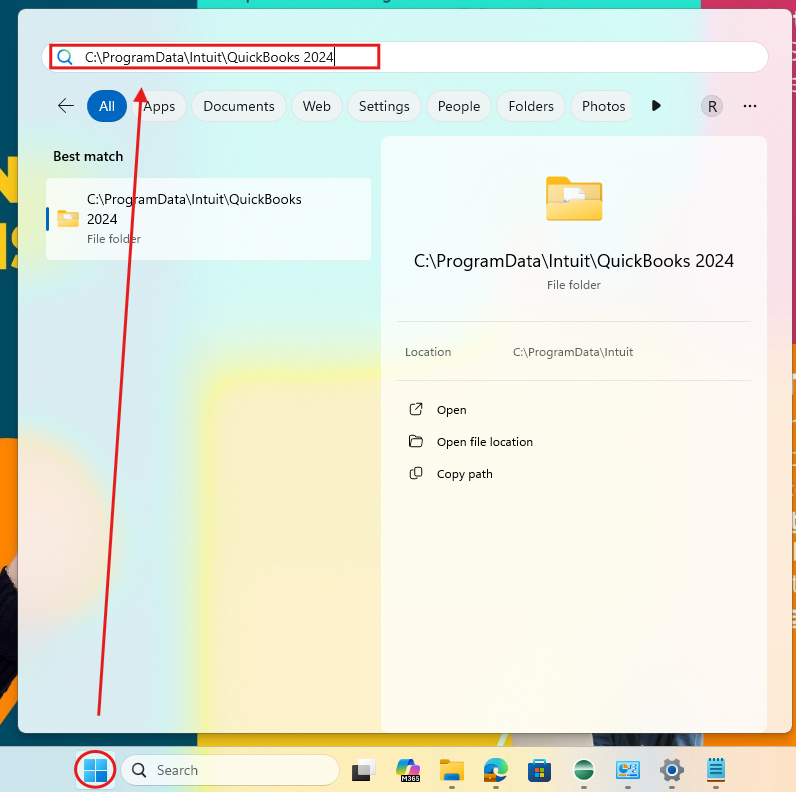
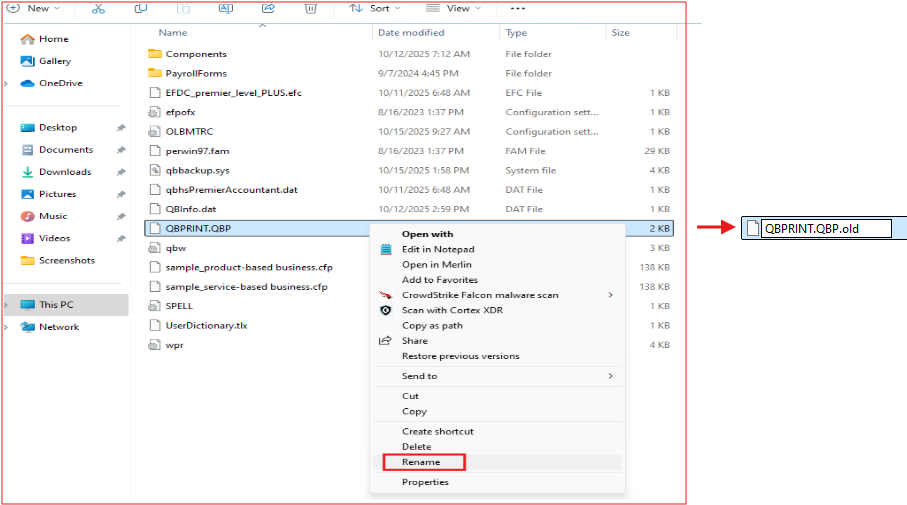
If issue still persist, you can rename the QBPrint.QBP file. QBDT keeps a small file that remembers your printer settings. If that file gets damaged, QuickBooks may not recognize your printer. Renaming it tells QuickBooks to create a new, clean version, which clean the issue right away.
Here's how:
If you have any follow-up questions, please don't hesitate to click the Reply button.
desktop pro plus 2024
Thank you renaming the file worked! Should have asked sooner. Thank you
Good day, ShevFamilyFdn.
I am pleased to know that my colleague was able to assist you in addressing your concern. It is always gratifying when situations are resolved efficiently. If you have any further inquiries or require additional assistance, please do not hesitate to reach out again.
Wishing you a wonderful day ahead.


You have clicked a link to a site outside of the QuickBooks or ProFile Communities. By clicking "Continue", you will leave the community and be taken to that site instead.
For more information visit our Security Center or to report suspicious websites you can contact us here


