Yes, Lisa, you can create a Journal Entry to fix the mismatch between your purchases and sales.
This is necessary because the incorrect categorization of your sales items as "Services" rather than "Inventory" has prevented the accounting system from properly aligning your sales with inventory levels and recording the associated Cost of Goods Sold (COGS).
By adjusting your inventory, COGS, and revenue accounts through a Journal Entry, you'll ensure your financial statements accurately represent your business's activity for the past eight months while preventing further inaccuracies in future reporting periods.
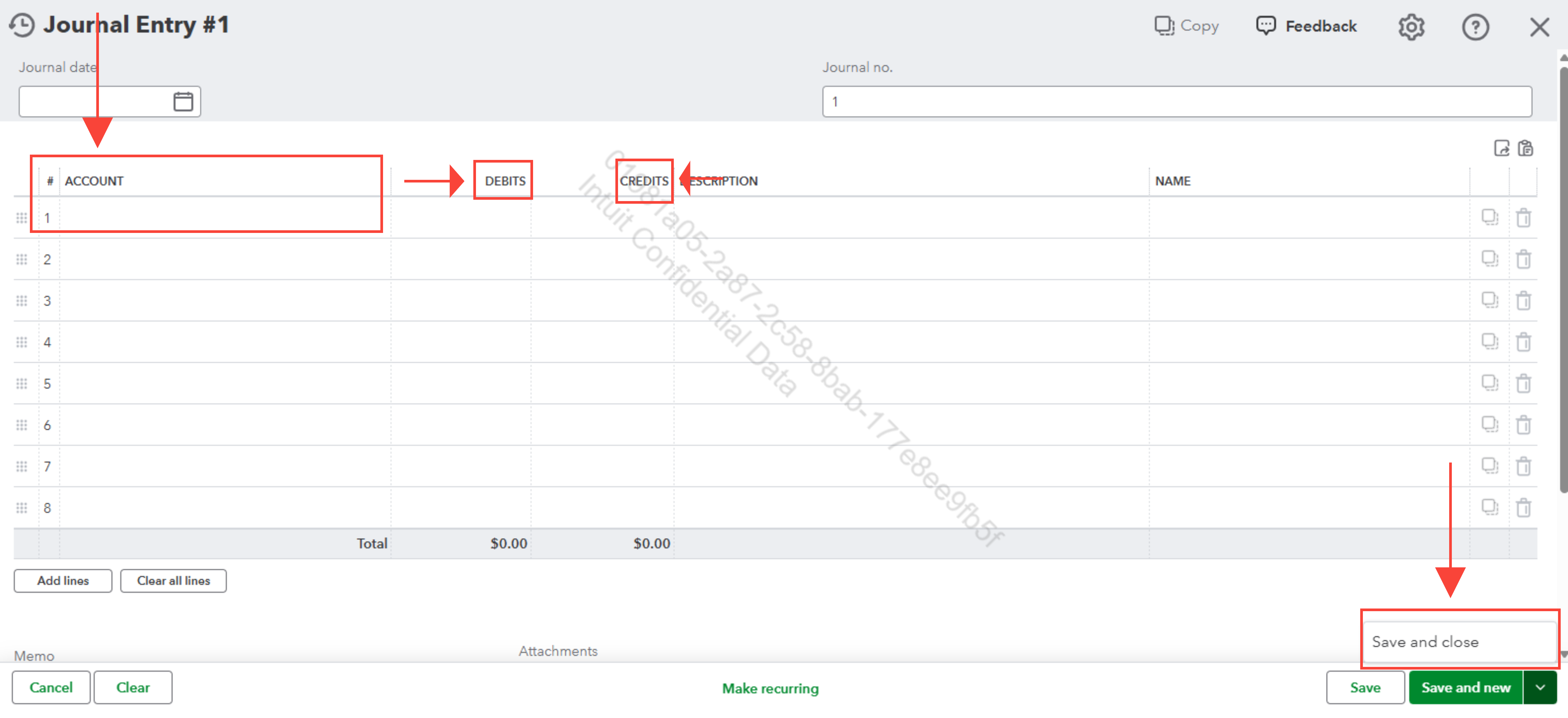
Here’s how to create a Journal Entry:
- Select + New or + Create.
- Select Journal entry.
- On the first line, select an account from the Account field. Depending on if you need to debit or credit the account, enter the amount in the correct column.
- On the next line, select the other account you're moving money to or from. Depending on if you entered a debit or credit on the first line, enter the same amount in the opposite column.
- Check the amounts - you should have the same amount in the Credit column on one line and the Debit column on the other. This means the accounts are in balance.
- Enter information in the memo section so you know why you made the journal entry.
- Select Save and new or Save and close.
I recommend consulting an accountant to ensure Journal Entry adjustments are accurate, comply with standards, and reflect true business activity. Their expertise ensures proper categorization and prevents reporting errors.
If you have any questions about QuickBooks, please reach out to us again.


