Thank you for reaching out about running reports for customers without transactions since a specific date, Shae-Jackson. I understand the importance of tracking customer activity and engaging with them effectively. I can guide you through a method to find this information.
In QuickBooks Online, you can identify customers with no transactions since a specified date by running and comparing two different reports. Please know there isn't a direct option to generate a single report that shows this information.
Begin by generating the Transaction List by Customer report. This will display all customers who have transactions within your selected date range. Here's how:
- Go to the Reports menu in the left panel.
- Enter Transaction List by Customer in the search bar.
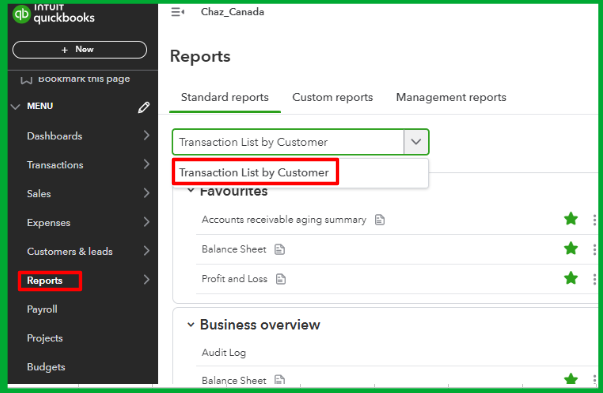
- Customize this report by setting the date range you are concerned.

Next, run the Customer Contact List report, which provides a complete list of all your customers, regardless of their transaction history. To do this, navigate the Reports menu and search for Customer Contact List.
Now, compare these two reports. Customers who show up in the Customer Contact List but don’t appear in the Transaction List by Customer are the ones who haven't had any transactions during the specified period.
Additionally, to maximize the value of your financial reports, refer to the article: Customize reports in QuickBooks Online. It offers step-by-step guidance to tailor your reports to focus on the data that matters most to your business.
I hope the steps provided will assist you in effectively identifying these customers using QuickBooks Online. If you encounter challenges or have additional questions as you proceed, please don't hesitate to reply below. I'm here to ensure you have all the support you need to utilize QuickBooks effectively.


