Turn on suggestions
Auto-suggest helps you quickly narrow down your search results by suggesting possible matches as you type.
Showing results for


Let's make sure this information is successfully added to your customer profile, @vanislecarpetcleaning.
Before proceeding, is it not appearing while you are creating the invoice (in the invoice window) or only on the print/preview page? Did this issue happen after you edited the customer's profile details and then created the invoice?
QuickBooks Online does not automatically update existing transactions when you change a customer's profile (it is not retroactive). The original invoice keeps the old details.
To successfully sync the new customer information, delete the current invoice and create a new one.
Here's how to do it:
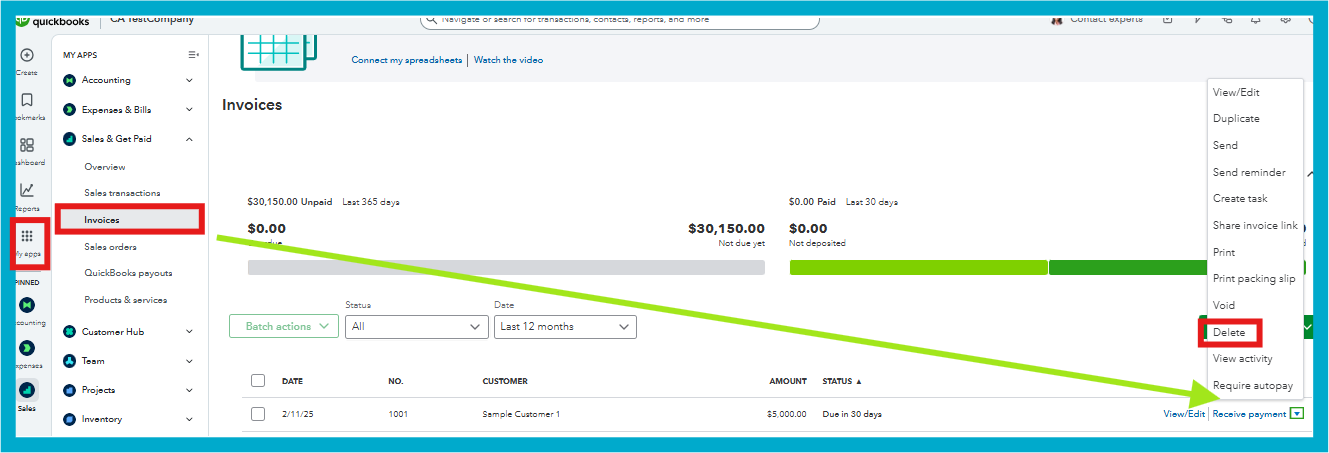
You can manually add the customer's name using the dropdown menu if it's missing on the invoice creation page.
Feel free to reach out here again if you have further questions or need additional assistance. We're here to help.
This happens with all invoices since the update when adding a new customer or a new invoice to an existing customer. It just shows the address . I have gone into invoice template to edit and there isn’t even a tab on the left to tick to add customer name . I have tried this on the app and the computer. This just started when quickbooks updated
Is this a issue with others
Thank you, Vanisle, for providing more details about your situation.
I appreciate the effort you've put into troubleshooting, including reviewing the invoice template and testing the issue on both the mobile app and computer.
Since the problem persists, I recommend reaching out to our QuickBooks Live support team for more specialized assistance. With the tools like secure screen-sharing, they'll be able to access your account directly, identify the issue, and guide you through the necessary steps to resolve it.
Here is how to connect with them:
You can also refer to this article to check our Support Hours: Get help with QuickBooks products and services.
If there's anything else you need or any additional questions or concerns, let us know. You can use the Reply button below.


You have clicked a link to a site outside of the QuickBooks or ProFile Communities. By clicking "Continue", you will leave the community and be taken to that site instead.
For more information visit our Security Center or to report suspicious websites you can contact us here


