Turn on suggestions
Auto-suggest helps you quickly narrow down your search results by suggesting possible matches as you type.
Showing results for
It appears to be happening since about 2 months ago

We understand how duplicate transactions can create difficulties in managing your finances, Nigel, and we’re here to help address this matter.
To assist you more effectively, could you let us know the name of the bank you’ve connected to the QuickBooks Self Employed (QBSE)? This will help us identify the root cause.
Duplicate transactions are often the result of data being imported directly from your bank account and can occur due to various reasons, such as connecting issues from the bank to QuickBooks, re-syncing or disconnecting and reconnecting the bank, or entering transactions manually.
To resolve duplicate transactions, you can Exclude them from your bank feeds by following these steps:
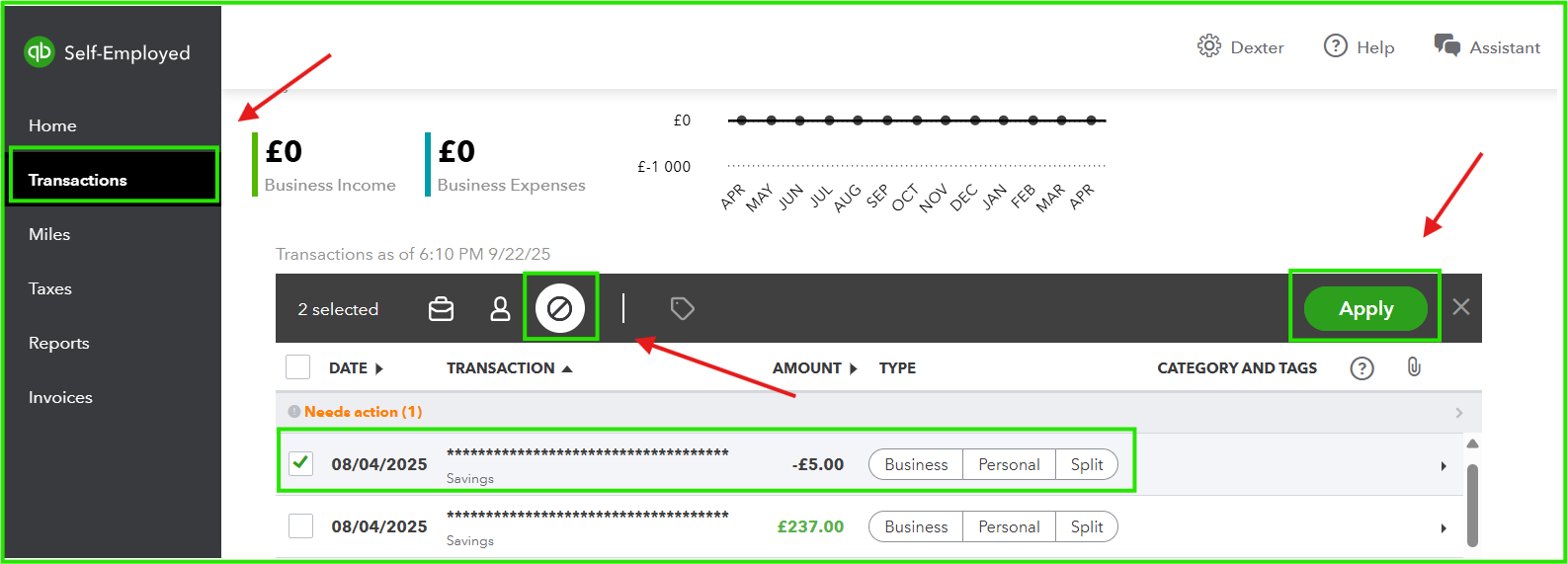
In addition, we recommend contacting your bank to check if there are any ongoing maintenance updates or technical issues that may be interfering with transaction imports.
If the bank confirms there are no such issues, we suggest reaching out to our Phone Support Team. They can securely review your account and offer additional solutions.
Please know that you're always welcome to return here if you have any further questions or need assistance with managing your bank transactions in QuickBooks. We're ready to help whenever you need us.
The bank is Tide.
So I have to go through all the transactions and figure out which are duplicates? That sounds time consuming and annoying.
Isn't there a way that you can do it automatically?
We understand that checking duplicate transactions one by one can be time-consuming for you, Nigel.
Currently, the only way to handle duplicate transactions is to review them individually and exclude them by batch. This ensures duplicates are properly identified and keeps your financial records accurate.
You can leave a comment below if you need further assistance with your QuickBooks tasks. We're here help.


You have clicked a link to a site outside of the QuickBooks or ProFile Communities. By clicking "Continue", you will leave the community and be taken to that site instead.


