Turn on suggestions
Auto-suggest helps you quickly narrow down your search results by suggesting possible matches as you type.
Showing results for
Get 50% OFF QuickBooks for 3 months*
Buy now
Thanks for posting here, @doug71,
I want to make sure your payroll transactions are accounted for properly. If your payroll posts on two accounts, it's possible that the new bank for Direct Deposit is not set as default in QuickBooks.
After changing your Direct Deposit bank account, you will also need to update the default bank in the payroll accounting preferences. This will ensure your payroll transactions and tax payments post to the correct account in your books.
The steps below will work for QuickBooks Online Enhanced subscriptions:
For QuickBooks full-service subscriptions, the steps are listed in this article: Change your payroll bank account
Let me know the result after reviewing the settings. I want to make sure this is resolved and I'm here if you need further help. Have a good one!
Thanks for the reply Jen! The account is already set up that way. It is a new quickbooks cash account and this is the first payroll from it. My major concern is that the payroll was actually debited twice, once from the QB cash balance and again from the business bank account. I obviously want to ensure the books are correct as well but am highly concerned that a single transaction can be processed twice from different accounts. I have gone back and verified there was only one transaction entered and it notes deduction from the QB cash account balance. Any advice on getting the money back and how to prevent in the future. I'm super concerned at the moment. Thanks, Doug
I appreciate the complete details you've shared, @doug71.
When processing payroll you'd want to make sure to choose the correct bank account in the Run Payroll page.
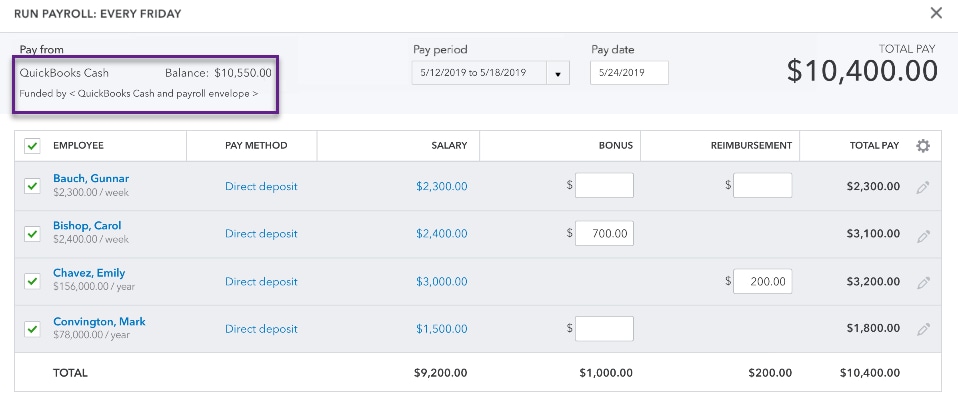
Also, you can go to the Accounting Preferences in your Payroll Settings to assign the correct account. Here's how:

On the other hand, I'd recommend contacting our Payroll Support. A specialist can securely access your QuickBooks account and further verify if payroll was deducted from your business bank account. Here's how:
Also, here's an article you can read to learn more about our support hours and types: Support hours and types.
Let me know if you have other questions. The Community and I are always here to help.
Hi Lamjeuvail, thanks for the note. All is selected as you have described and appreciate your reply but but my business account and qu8ckbooks cash have both been debited as the transactions and balances reflect the deduction. The issue is now having to wait until tomorrow to get this resolved. I have not had a great experience with the new QB cash account to date. Having this issue leaves me very unsettled as I also have a substantial check out there for materials for a job that will likely not clear now due to this. Needless to say I'm not too happy as it will cost me another few hours in the phone and lost time from work to resolve. I have spent about 10 hours on the phone fixing other issues this past week.


You have clicked a link to a site outside of the QuickBooks or ProFile Communities. By clicking "Continue", you will leave the community and be taken to that site instead.
For more information visit our Security Center or to report suspicious websites you can contact us here


