Turn on suggestions
Auto-suggest helps you quickly narrow down your search results by suggesting possible matches as you type.
Showing results for
SALE EXTENDED 70% OFF QuickBooks for 3 months* Ends 12/8
Buy nowI do not pay for my federal employment taxes until the end of the year--QuickBooks is taking my money how do i correct this and get my money back

Thank you for reaching out, @carguysgal. I'm happy to share my insight about why QuickBooks is taking out federal taxes automatically and the steps you can take to manage this process, so you can smoothly transition to making your tax payments at the end of the year.
QuickBooks offers an Auto Payroll feature which instantly processes payroll and related tax deductions to make it easy for QBO Payroll users. Instead of withdrawing and paying taxes when you're due, QuickBooks will schedule tax payments and form filings on time.
For customers who have Auto Pay & File turned on, federal employment taxes are being deducted without manual input. This way, you don't have to monitor various tax deadlines, miss payment notifications, or unexpectedly deal with withdrawals due to overlooked payments NSF.
To stop this, you can disable the Automate taxes and forms feature from the Payroll Settings.
Here's how:

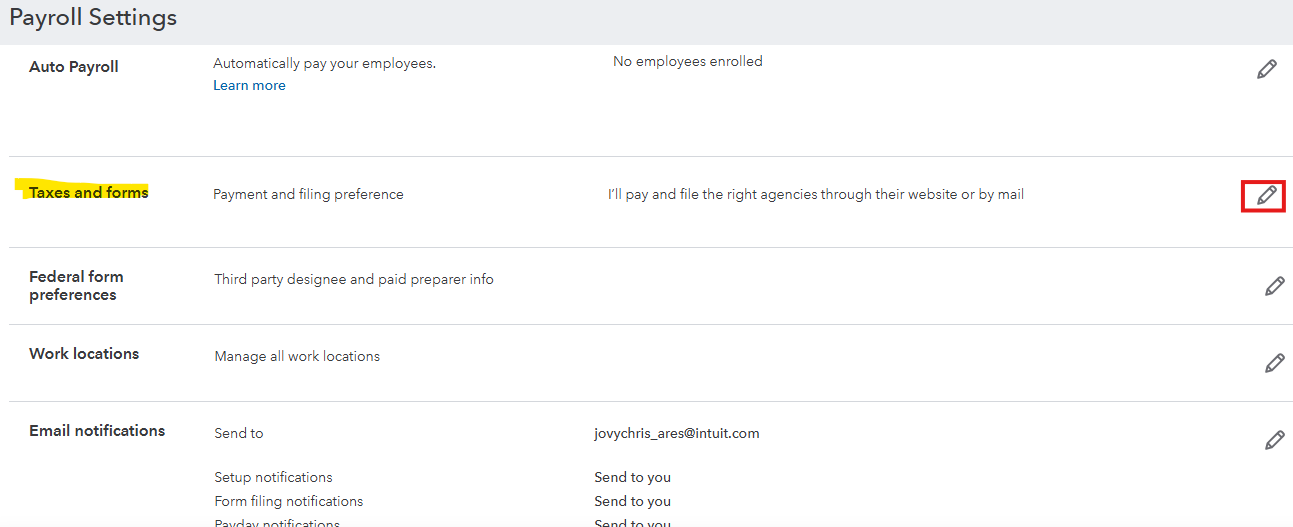
Please note that once Auto-Pay/File is activated, it will begin automatically processing payments from the first of the following month onward. Any prior tax liabilities must still be handled manually outside of QuickBooks until the Tax Filing System assumes responsibility for future payments.
To facilitate your refund process, I highly recommend contacting our dedicated Live Support Team. They can securely handle any necessary personal information and ensure your request is processed efficiently.
In the future, if you want to view and record your local tax liabilities, feel free to explore these resources:
You can also Explore QuickBooks Payroll to help you in managing your payroll taxes, reports, and other forms.
I hope the information and steps I provided helps. If you have additional questions, feel free to reach out anytime. My team and I are always here to assist you and ensure your experience is smooth while using the program.
Why do you only deposit at year-end? The IRS has only two options: monthly or semi-weekly.
Short answer is that quickbooks sits in your money, while raising the cost to do payroll and gains interest. They have gone from the small business haven to run at all cost. There are cheaper options for accounting and payroll.
Short answer is that quickbooks sits in your money, while raising the cost to do payroll and gains interest. They have gone from helpling the small business to making profits at all cost. There are cheaper options for accounting and payroll.


You have clicked a link to a site outside of the QuickBooks or ProFile Communities. By clicking "Continue", you will leave the community and be taken to that site instead.
For more information visit our Security Center or to report suspicious websites you can contact us here


