Turn on suggestions
Auto-suggest helps you quickly narrow down your search results by suggesting possible matches as you type.
Showing results for
SALE EXTENDED 70% OFF QuickBooks for 3 months* Ends 12/8
Buy now
I've got your back to help you change payroll payment dates, @gswank1465.
In QuickBooks Online, you have the option to edit a pay period. You can follow these steps below on how to update the schedule in your account, depending on the payroll service that you're using.
If you're using QuickBooks Online Payroll Full Service, Core, Premium, or Elite:
If you have QuickBooks Online Payroll Enhanced:
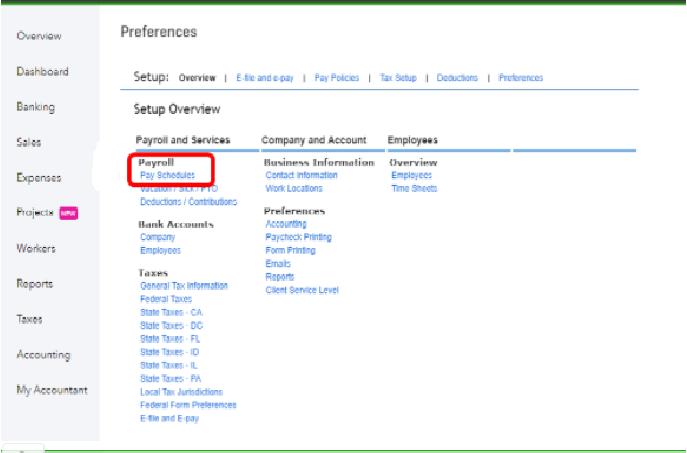
For detailed information, you may also check out this article for your reference: Set Up And Manage Payroll Schedules.
Just in case you missed processing payroll on the scheduled date, you may need to create a set of paychecks outside of a regular payroll run. For your reference, you can review this resource: Create unscheduled checks in Online Payroll.
That should get you back on track. Please let me know how that works for you or if you have other questions about managing pay schedules in QuickBooks. I'll be here and ready to help anytime. I'm cheering you on continued prosperity.
Hi, @gswank1465.
Hope you’re doing great. I wanted to see how everything is going about the payment payroll date concern you had the other day. Was it resolved? Do you need any additional help or clarification? If you do, just let me know. I’d be happy to help you at any time.
Looking forward to your reply. Have a pleasant day ahead!


You have clicked a link to a site outside of the QuickBooks or ProFile Communities. By clicking "Continue", you will leave the community and be taken to that site instead.
For more information visit our Security Center or to report suspicious websites you can contact us here


