Space for pervasive banner when authenticated

Host your company data in multi-user mode in QuickBooks Desktop


This article provides detailed information on QuickBooks Desktop hosting and multi-user mode.
For steps on how to set up or troubleshoot a multi-user network:
Setting up a network or multi-user environment
Error H101, H202, H303, or H505 when opening your company file to resolve multi-user issues
Hosting defined
The term hosting is used to describe the situation where the computer that is storing a company file (the host) allows other computers to access the file.
QuickBooks uses a service to manage company file access:
QuickBooks 2024 uses QuickBooksDB34
QuickBooks 2023 uses QuickBooksDB33
QuickBooks 2022 uses QuickBooksDB32
In Windows Control Panel, you can find this service in User Accounts under Users for this computer. Look for the service that corresponds to your version of QuickBooks Desktop.
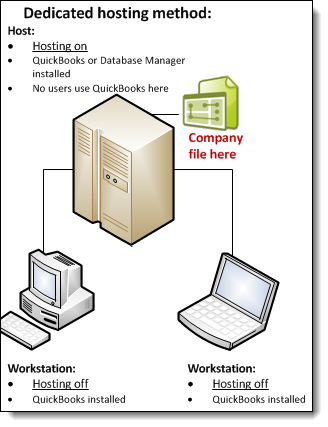
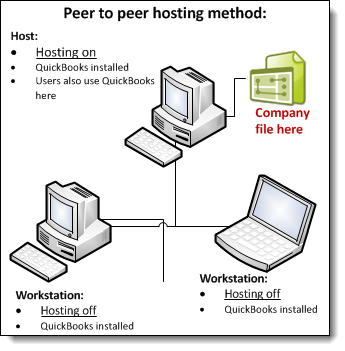
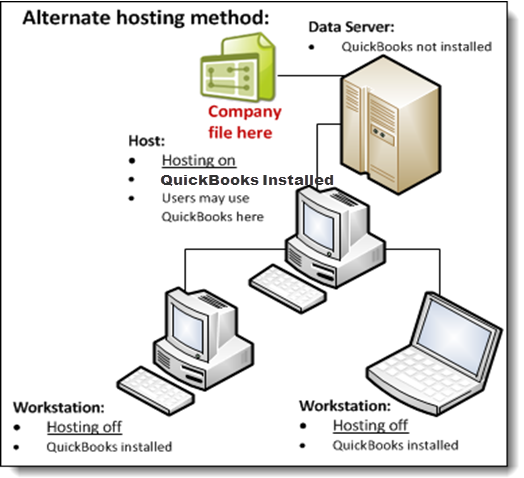
The following diagrams illustrate QuickBooks Desktop hosting modes.
Dedicated hosting
Peer to peer hosting
Alternate hosting
How company files are accessed
QuickBooks Desktop requires that 3 conditions are met before it can allow access to company files:
Windows File permissions: The user who is logged in must have permissions set to Full control, which includes permission to look at, open, and modify the file.
Database Server mode: The database server can successfully open the company file.
QuickBooks User login: Each user must have a QuickBooks user login and password.
Once these 3 requirements are met, you can access the company file.
Hosting Modes
The hosting mode is set for each version of QuickBooks Desktop and for each computer. It isn't set for the company file or the QuickBooks Desktop installation. When multiple versions of QuickBooks Desktop 2018 or later are used concurrently, the hosting mode settings for each version are independent.
There are 3 hosting modes: Not Hosting (also known as Hosting Off), Hosting Local Files only, and Hosting Local & Remote files.
In Not Hosting mode
QuickBooks Database Manager runs as a normal process, as a Windows user running QuickBooks Desktop.
Not Hosting mode doesn't support multi-user mode. Not Hosting mode uses shared memory to communicate with QuickBooks Desktop. In this mode, only the QuickBooks Desktop user who is running QuickBooks Desktop on the local computer can use a database server to access a file.
In Hosting Local Files only mode
QuickBooks Database Server Manager runs as a Windows service named QuickBooksDBXX (where XX is a number from 25 to 28 determined by the version of QuickBooks Desktop, as described under "Hosting defined," above) and as the Windows user QBDataServiceUserXX (with XX being the same 2-digit number from 25 to 28 that the Windows service uses).
As long as the computer is on, the service QuickBooksDBXX is always running.
Multi-user mode is supported, using TCP/IP to communicate with QuickBooks Desktop. QuickBooks Desktop users on remote computers can access company files using a database server running in Hosting Local Files only mode.
A computer in Hosting Local Files only mode can host only those files that are located on that computer.
In Hosting Local & Remote files mode:
QuickBooks Database Manager runs as a normal process, as the currently logged on Windows user. This process starts when a user logs in to Windows and stops when the user logs out.
A computer in Hosting Local & Remote files mode can support multi-user mode, using TCP/IP to communicate with QuickBooks Desktop. QuickBooks Desktop users on remote computers can access company files on this computer using a database server.
A local computer in this mode can host files stored on it, as well as files that are located on remote computers and opened on the local computer.
How QuickBooks Desktop determines which database server to communicate with
QuickBooks Desktop looks for the .nd file. The .nd file is a small text file with the same name as the company file, but with a .nd file extension. This file is located in the same directory as the company file, which has the file extension .qbw. The directory also contains the information needed to contact the server, such as the IP address and port.
QuickBooks Desktop determines whether the .qbw file is in use.
If QuickBooks Desktop finds the .nd file and detects that the company file is in use, QuickBooks Desktop tries to communicate with the server:
If it's successful, QuickBooks Desktop opens the company file.
If it isn't successful, an error message that describes the steps needed to resolve the issue appears. See Error H101, H202, H303, or H505 when opening your company file.
Sign in now for personalized help
See articles customized for your product and join our large community of QuickBooks users.
Call Sales: 1-800-365-9606




