Having access to your vendor transaction list is essential for managing your finances effectively. We can troubleshoot together to get everything working the way it should be, Lena22.
Sometimes your browser may encounter issues that prevent you from seeing your vendor transactions. This happens due to outdated browser versions or compatibility problems.
You can delete the cache and clear Intuit-specific cookies to free up space and potentially improve your device performance. But if the problem persists, consider switching to another browser.
But if you're still getting the same, I recommend contacting our phone support team so they investigate further, assess the complexity of the problem, and address any issues that may need multiple layers of process and fix.
- Go to the (?) Help menu.
- Select the Search tab and type in Contact us.
- Click the Contact Us button and choose the Have us call you option.
- Follow the prompts so you'll get a callback.
In the meantime, you can run the Transaction List by Vendor report so you'll get to show up your vendor transactions. Here's how:
- Go to the Reports tab and type in Transaction List by Vendor.
- Select the correct Report period.
- Click Run report.
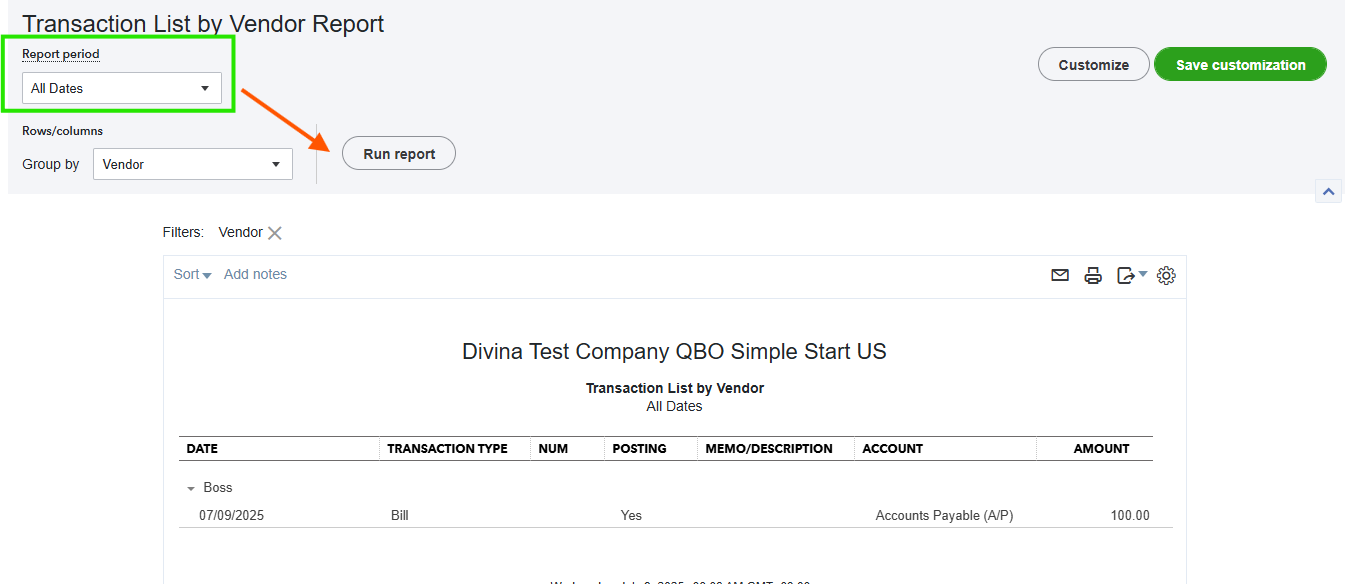
To know more on how to filter reports to display specific details or customize the layout to showcase the right data, check out this article: Customize Reports.
If there's anything else you'd like help with or if you have additional questions about your vendor transactions, please don't hesitate to let us know. We're here to ensure that everything runs smoothly.


