SALE EXTENDED 70% OFF QuickBooks for 3 months*   Ends 12/8

Buy now
cancel
Showing results for 
Search instead for 
Did you mean: 
Announcements
Simplify payday and set payroll to run automatically on QuickBooks. Explore QuickBooks Payroll
shislop
Level 3

How do I allow certain employees to view other employee locations

in Quickbooks Time. I don't want to assign employees as managers because I don't want them to be able to edit or approve timesheets.

2 Comments 2
Jovelyn_M
QuickBooks Team

How do I allow certain employees to view other employee locations

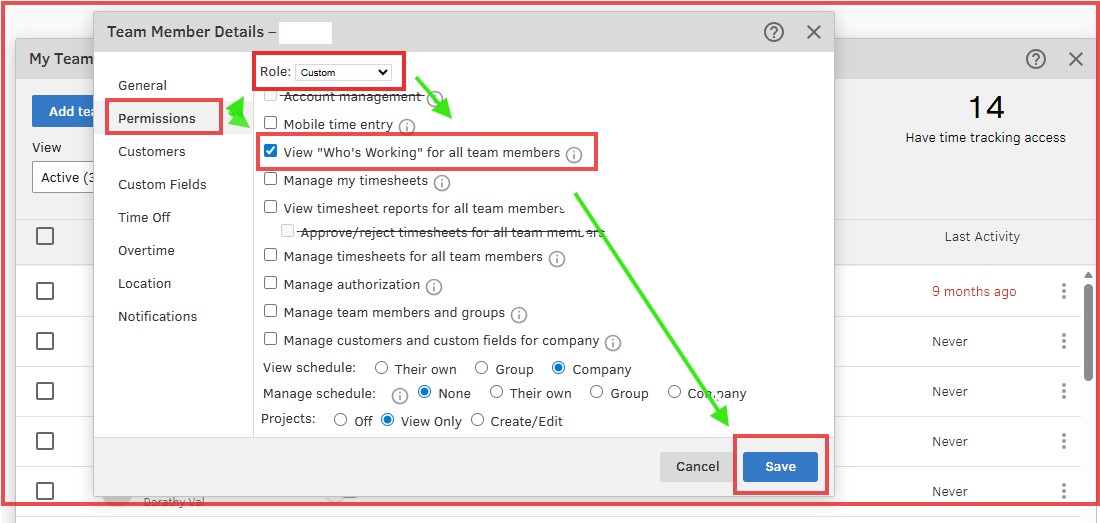
To allow certain employees to view other employee locations in QuickBooks Time, we can enable the specific permission for viewing the "Who's Working" map, Shis. Let me assist you further.


Here's how:


  1. Go to Time then click Go to classic QuickBooks Time.
  2. Navigate to My Team.
  3. Select the team member you want to update.
  4. Click on the three horizontal dots and choose Edit.
  5. Select to the Permissions tab.
  6. Check the box for View "Who’s Working" for all team members.
  7. Also ensure that the Role is not set to Admin or Payroll Manager.
  8. Click Save.


For more details, please refer to this article on adding and managing your team members in QuickBooks Time: Add and manage team members for QuickBooks Time.


If you still need further assistance, please don't hesitate to drop a post below.

Jovelyn_M
QuickBooks Team

How do I allow certain employees to view other employee locations

Hi Shis.


I just wanted to follow up to check if the resolution we provided helped resolve your issue.


Please let us know if everything is now working as expected or if you’re still experiencing any problems.


We’ll be glad to assist further if needed.

Need QuickBooks guidance?
Log in to access expert advice and community support instantly.

Need to get in touch?

Contact us