Turn on suggestions
Auto-suggest helps you quickly narrow down your search results by suggesting possible matches as you type.
Showing results for
SALE EXTENDED 70% OFF QuickBooks for 3 months* Ends 12/8
Buy now
Confused on how to enter this. I am NOT an accountant.
I sell through my own website. No problem entering an invoice when I sell something in person. But I also list products on other websites. (Chairish and Ruby Lane in my case.) There are no integration apps for those sites. I have the etsy app, and it set up various accounts for me. But for these other sides without apps How do I enter the sale, and account for the fees and commission?
For example:
Item listed on site for $100. Customer paid this price.
Chairish takes 20% commission of the sale.
I receive $80 in my PayPal account, but in the transactions imported, there are no expenses. So, only my profit is recorded (does it matter?), and does not show original full sales price, commission, and any possibly fees.
So only the amount I receive is put into quickbooks when transactions are imported. How/should I enter the rest?

Hello there, @filamentvintagelighitng.
You can manually enter the transaction, so you can easily account for the fees and commission. To get started, you'll have to create an invoice for the sales and process receive payment. Let me show you how.
Then, record the invoice payments that you've created so it will show the original sales price. For more information, see this article: Record invoice payments in QuickBooks Online.
Once done, make a bank deposit and create a negative amount on the Add funds to this deposit column to balance what you receive in your Paypal account.
Here's how:
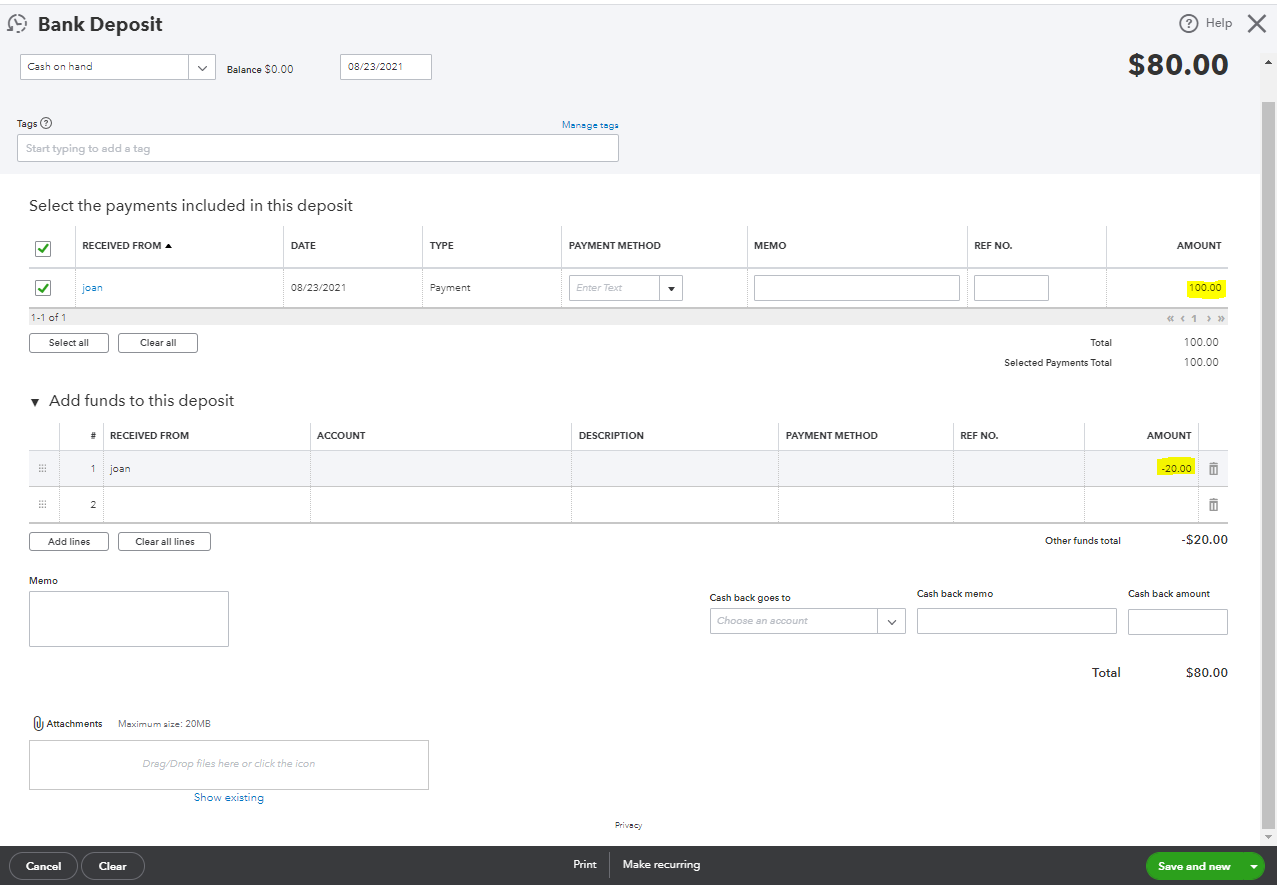
For detailed steps and how to manage your bank deposit, click this article: Record and make bank deposits in QuickBooks Online.
Also, you can check out these articles that can guide you in categorizing and reconciling your accounts effectively in your QBO software:
Keep me posted if you have other concerns managing your sales transaction. I'll be around to assist you. Have a great rest of the day.
Prepare your Sales Receipt data with the following template
| RefNumber | Customer | TxnDate | ShipDate | ShipMethodName | TrackingNum | Location | Class | BankAccount | PaymentMethod | PaymentRefNumber | BillAddrLine1 | BillAddrLine2 | BillAddrLine3 | BillAddrLine4 | BillAddrCity | BillAddrState | BillAddrPostalCode | BillAddrCountry | ShipAddrLine1 | ShipAddrLine2 | ShipAddrLine3 | ShipAddrLine4 | ShipAddrCity | ShipAddrState | ShipAddrPostalCode | ShipAddrCountry | PrivateNote | Msg | Currency | ExchangeRate | BillEmail | ToBePrinted | ToBeEmailed | ShipAmt | ShipItem | TipAmt | DiscountAmt | DiscountRate | TaxRate | TaxAmt | DiscountTaxable | LineServiceDate | LineItem | LineDesc | LineQty | LineUnitPrice | LineAmount | LineClass | LineTaxable |
| 101 | Janice Johnson | 01/10/2020 | Checking | Check | 20013 | 110 Main Street | Suite 2000 | Dallas | TX | 99875 | 110 Main Street | Suite 2000 | Dallas | TX | 99875 | Special Handling | Thank you for your order! | [email address removed] | N | Y | 0.02 | Y | Leather Case | Leather Case | 2 | 10 | TAX | ||||||||||||||||||||||
| 101 | Janice Johnson | 01/10/2020 | Checking | Check | 20013 | 110 Main Street | Suite 2000 | Dallas | TX | 99875 | 110 Main Street | Suite 2000 | Dallas | TX | 99875 | Special Handling | Thank you for your order! | [email address removed] | N | Y | 0.02 | Y | Gift Cards | Gift Cards | 2 | 5 | TAX | ||||||||||||||||||||||
| 102 | Leonard Walker Inc | 01/10/2020 | Checking | Cash | paid cash | 9 Winding Road | Winchester | NY | 12345 | 9 Winding Road | Winchester | NY | 12345 | Thank you for your order! | [email address removed] | Y | N | Y | Handhelds | Portable Game Player | 1 | 100 | TAX | ||||||||||||||||||||||||||
| 102 | Leonard Walker Inc | 01/10/2020 | Checking | Cash | paid cash | 9 Winding Road | Winchester | NY | 12345 | 9 Winding Road | Winchester | NY | 12345 | Thank you for your order! | [email address removed] | Y | N | Y | Software | 1 Year Warranty | 1 | 25 | TAX | ||||||||||||||||||||||||||
| 102 | Leonard Walker Inc | 01/10/2020 | Checking | Cash | paid cash | 9 Winding Road | Winchester | NY | 12345 | 9 Winding Road | Winchester | NY | 12345 | Thank you for your order! | [email address removed] | Y | N | Y | Extended Warranty | 1 Year Extended Warranty | 1 | 5 | TAX | ||||||||||||||||||||||||||
| 103 | Lisa Smith | 01/10/2020 | Checking | Check | 4591 | 19 Jerico Drive | Bensalem | PA | 84256 | 19 Jerico Drive | Bensalem | PA | 84256 | We appreciate your business! | [email address removed] | N | Y | Gift Certificate | $50 Gift Certificate | 1 | 50 | NON | |||||||||||||||||||||||||||
| 103 | Lisa Smith | 01/10/2020 | Checking | Check | 4591 | 19 Jerico Drive | Bensalem | PA | 84256 | 19 Jerico Drive | Bensalem | PA | 84256 | We appreciate your business! | [email address removed] | N | Y | Magazine Subscription | Annual Magazine Subscription | 2 | 12 | NON |
then utilize an importer tool
https://transactionpro.grsm.io/qbo


You have clicked a link to a site outside of the QuickBooks or ProFile Communities. By clicking "Continue", you will leave the community and be taken to that site instead.
For more information visit our Security Center or to report suspicious websites you can contact us here


