I've come to show you a way how to run a report that contains job cost detail and worked hours, @Tammys2.
Thanks for sharing your concern on the Community page.
You’ll need to run a separate report to get this information. You can run the Time by Job Summary for total worked hours and Job Profitability Summary report for the cost. Then you'll have to export them in an Excel format and combine them all in a single sheet. Let me show you how:
- Go to the Reports menu and then select Jobs, Time & Mileage.
- Choose Time by Job Summary.
- Click Customize Report and select the details you need to show on the report.
- Click OK.
- Press the Excel tab and then select Create New Worksheet.
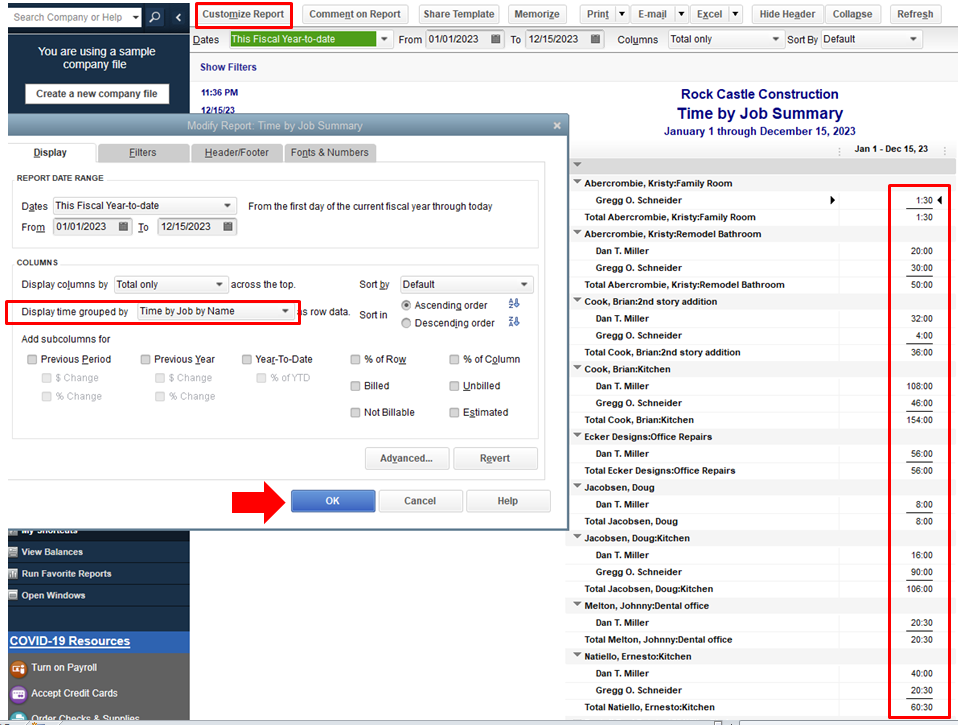

Here are the steps to pull up the other report:
- Go back to the Reports menu.
- Select the Jobs, Time & Mileage, then Job Profitability Summary.

- Press the Customize Report and make sure to select the Act. Cost under Display tab.
- Hit OK.

- Select the Excel tab and then click Create New Worksheet.
You can refer to this article here to customize your reports in QuickBooks Desktop. It includes several links that cover basic information about reports.
Also, in case you’ll want to have the same settings of the report to be available for future use. You can visit this link about creating, access, and modifying memorized reports.
Let me know if you further assistance with these reports. I’ll be here to help you anytime. Have a great day.




