- Mark as New
- Bookmark
- Subscribe
- Permalink
- Report Inappropriate Content
User permissions for Payroll
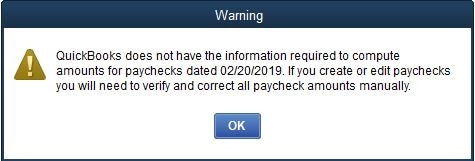
I've assigned Full Access as far as payroll to one of my employees, so she could update all of the Employee files with titles and hire/term dates. However, whenever she opens an Employee record there are warnings popping up about not being able to create paychecks dated today, and downloading new tax tables. The same warnings pop up when she tries to save any changes, and she has to cancel out rather than save changes.
I don't get these warnings when I try to do the same thing. I have downloaded and installed all available payroll updates. I don't understand why a note about creating paychecks would pop up every time we try to access an employee record, and haven't seen that happen before.
I've attached a screenshot of the warning about creating paychecks.
Solved! Go to Solution.

- Mark as New
- Bookmark
- Subscribe
- Permalink
- Report Inappropriate Content
Account management
Did she get the updates on her machine / where she's using QB?
- Mark as New
- Bookmark
- Subscribe
- Permalink
- Report Inappropriate Content
Account management
No, does she need to download the updates as well? Would that clear up both warnings?


- Mark as New
- Bookmark
- Subscribe
- Permalink
- Report Inappropriate Content
Account management
Thanks for the details, ekileen.
Let me help you fix the payroll error on your QuickBooks Desktop.
BRC is correct. Updating QuickBooks Desktop to the latest release and downloading the latest payroll updates can usually resolve this error.
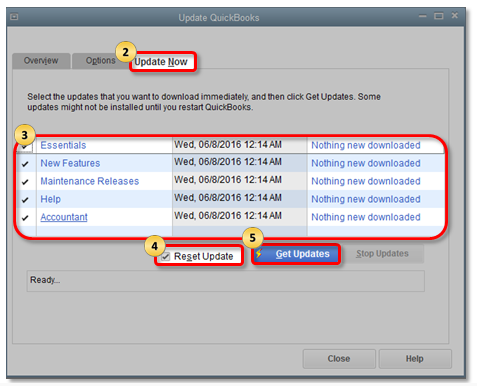
To update QuickBooks Desktop:
- Choose Help at the top menu bar, then select Update QuickBooks.
- Click Update Now at the top, then check the box next to Reset Update.
- Select Get Updates (see the first screenshot).
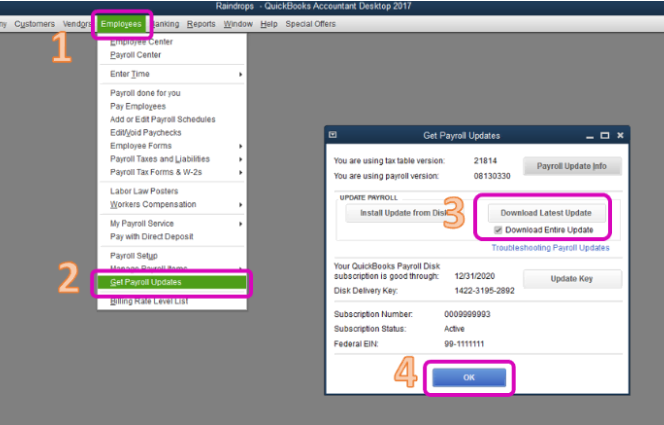
To download the latest payroll tax table:
- Select Employees at the top menu bar, then choose Get Payroll Updates.
- Check the box next to Download Entire Update.
- Click Download Latest Update.
- Click OK (see screenshot below).
Once done, please let your user update any information in the Employee Center.
The information above should help you fix the error. Please ping me in the comments section if you have other questions. Enjoy your day.
- Mark as New
- Bookmark
- Subscribe
- Permalink
- Report Inappropriate Content
Account management
Each computer has its own update, so anyone using payroll with QB on a different computer needs to update to get those updates. That's what the prompts to update are for...
- Mark as New
- Bookmark
- Subscribe
- Permalink
- Report Inappropriate Content
Account management
I didn't realize there was a separate Payroll Update to be done - thank you!
Problem solved.