


- Mark as New
- Bookmark
- Subscribe
- Permalink
- Report Inappropriate Content
Account management
Thank you for checking in with us, @Cbpilotcars.
Currently, the option to delete customers in QuickBooks Self-Employed (QBSE) isn't possible. However, we can edit the customer's name in the invoice.
Here's how:
- Go to the Invoices menu.
- Choose the customer you want to delete.
- Click the drop-down arrow under Action.
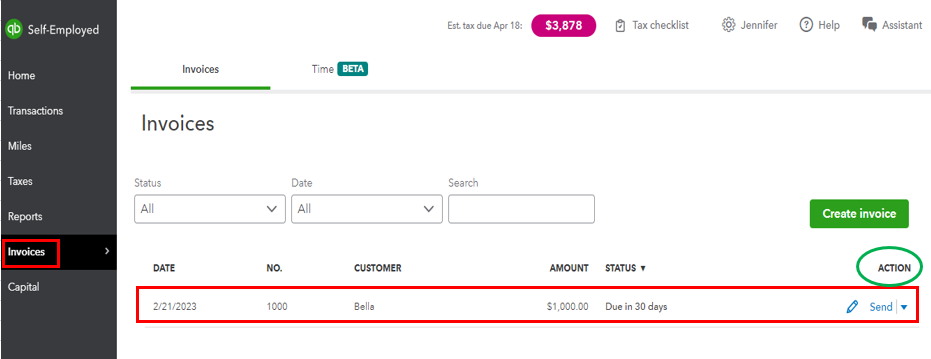
- Select Edit.
- Click the Edit customer info link.
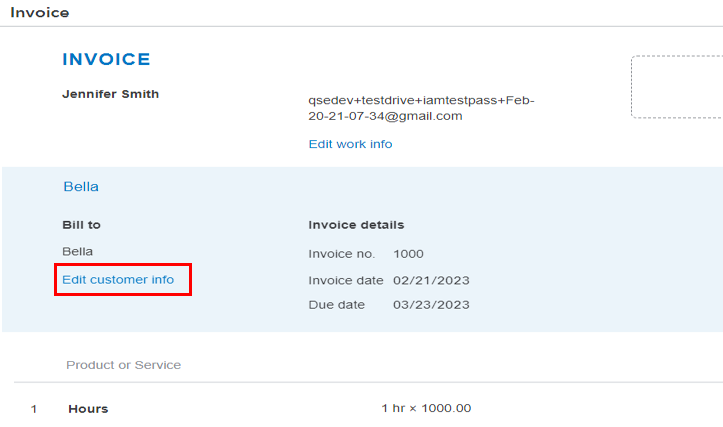
- Change the name and hit Save.
- Select the Subscribe to send drop-down arrow, then choose Save.
I'd also suggest sending feedback to our product developers. This way, they can add the feature in future updates. I'll show you how.
- Go to the Invoice menu.
- Select Create invoice.
- In the Invoice window, you'll see the Feedback option in the upper right corner.

You can visit this link about adding products and services to an invoice: Create invoices in QuickBooks Self-Employed. It outlines the instructions to enter the transaction using a browser or a mobile device.
Let me know if you need further guidance managing your customers in QuickBooks. I'm always happy to assist. Take care.
