
- Mark as New
- Bookmark
- Subscribe
- Permalink
- Report Inappropriate Content
Our company is financing a car of total value of 240k , we paid 40k as an advance , and 2000 as a reservation fees , how to pass these entries in QBO and remaing loan


- Mark as New
- Bookmark
- Subscribe
- Permalink
- Report Inappropriate Content
Banking
I can guide you through recording your car loan, @accounts-america.
In QuickBooks Online (QBO), we can set up a liability account to track the loan and its payments. This account will track what you owe and I'm glad to guide you through the process.
First, let's set up a liability account to record what you owe:
- Go to the Gear icon then select Chart of accounts.
- Click on New to create a new account.
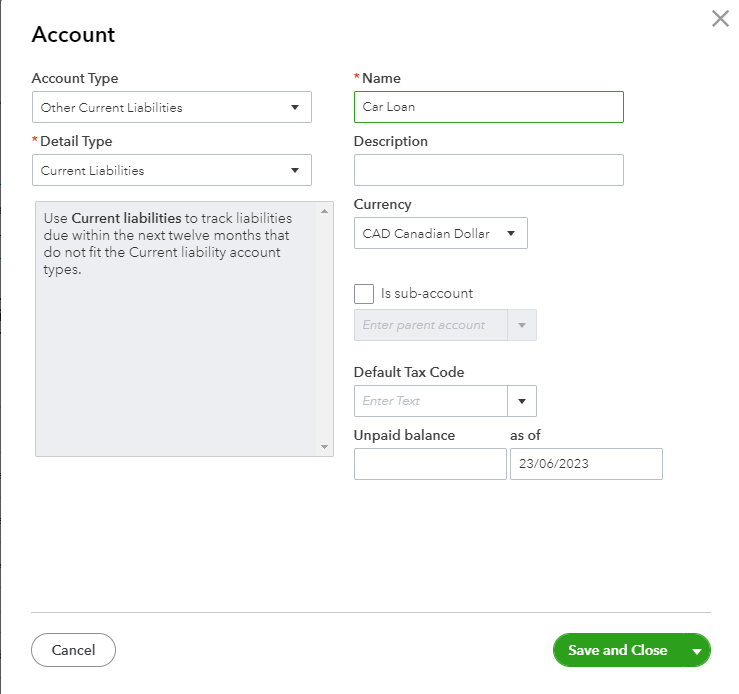
- Select Non-current liabilities in the Account Type ▼ dropdown. If you wish to pay off the loan by the end of the current financial year, choose Current Liabilities instead.
- Select Notes Payable (or Loan Payable) in the Detail Type ▼ dropdown.
- Give the account a Name. You can go for a "Car Loan" or whatever you want to name it.
- Enter the Unpaid balance. In this section, I'd recommend entering the full amount of the loan and we'll just record the advanced payment in the later steps. Choose when you start tracking your finances.
- When done, hit Save and Close.
Now, let's record the money you got from the loan:
Then, you can now record the amount you got from the loan. Refer to the steps below:
- Select the + New button.
- Choose Journal entry.
- From the first Account dropdown, select the liability account you just created.
- Select the bank account on the second line. Please know that this instruction is only possible if you put all the loan amounts right into your bank. Otherwise, you’ll need to reach out to your accountant for assistance.
- Enter the same amount in the Credits and Debits column, then save.
You can refer to this article for a complete and detailed step-by-step process: Set up a loan in QuickBooks Online.
Additionally, here's an article that'll help you ensure that your bank and credit card statements match: Reconcile an account in QuickBooks Online.
Keep in touch if you need any more assistance with this, or if there's something else I can do for you. I've got your back. Have a good day and stay safe.
