

- Mark as New
- Bookmark
- Subscribe
- Highlight
- Report Inappropriate Content
Banking
I'd be happy to show you how you can find the account details from your Banking page. It's not hard at all, and just takes a few clicks.
Here's what you'll want to do:
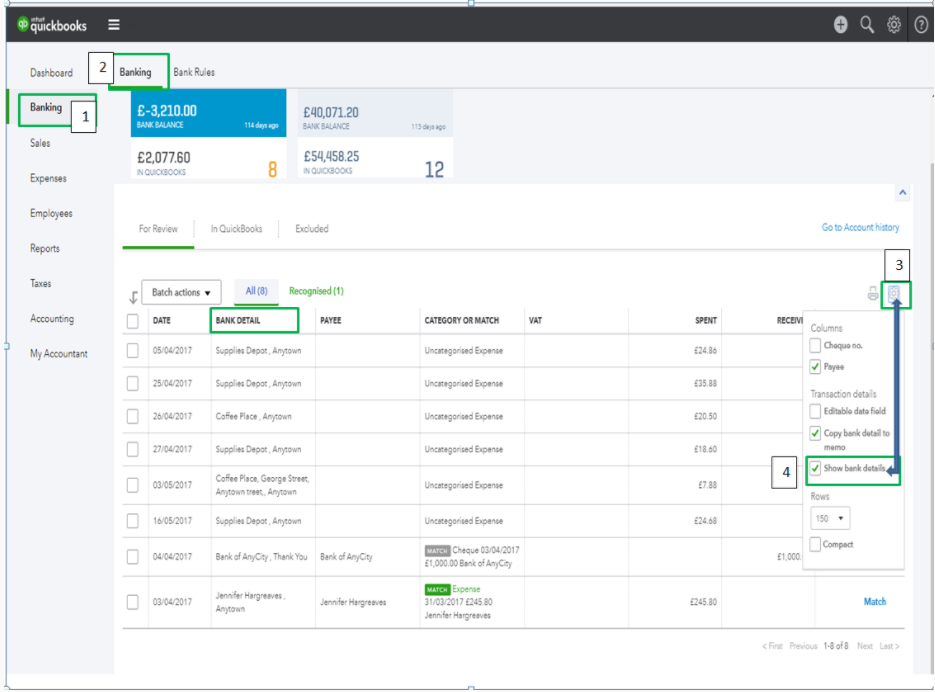
1) Click Banking on the left navigation panel and select the Banking sub-tab.
2) Click the small Gear icon above the Action column.
3) Select the Show bank details from the drop-down options.
Presto, you now have the Bank Detail column on your Banking page! I've added a screenshot below for your reference.
0 Cheers
