

- Mark as New
- Bookmark
- Subscribe
- Highlight
- Report Inappropriate Content
Employees and Payroll
Jumping in to help you correct your expense amounts, PLANETOFPRO.
You can undo the categorisation of the downloaded payroll transactions. Then, exclude them from your bank to avoid duplicate expense records. Here's how:
- Go to Transactions menu and select Banking.
- Proceed to the Categorized tab.
- Look for the paychecks or payroll transactions, then click Undo under the Action column. This will remove the duplicate payroll journal in your Profit and Loss report.
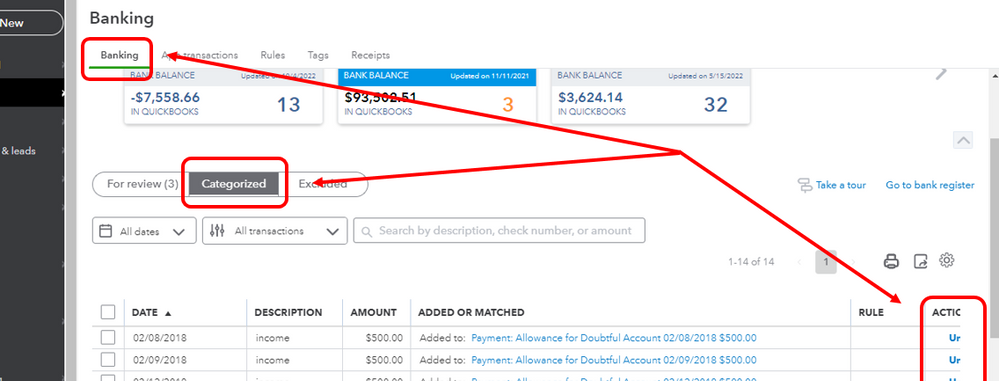
Once done, follow these steps on how to exclude them:
- Proceed to the For review tab.
- Select all payroll transactions that you want to remove.
- Click Exclude.
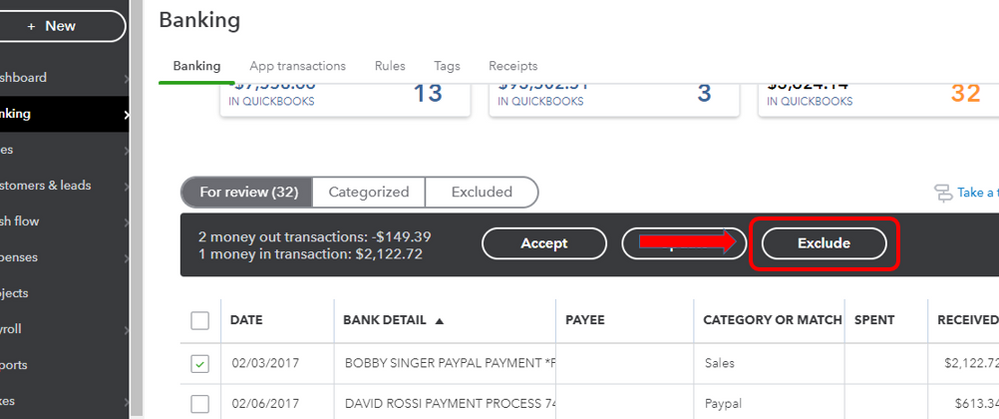
Here's an article about this for more details: Exclude a Bank Transaction you Downloaded into QuickBooks Online.
Let me also share these articles for additional references:
- Customise Transaction Mapping in QuickBooks Online Payroll
- What To Do If You Can't Create Journals in Standard Payroll
Please don't hesitate to reply to me and share updates if you're able to sort out the expense amounts in your financial reports. The Community is always here if you need anything else.
0 Cheers
