
- Mark as New
- Bookmark
- Subscribe
- Highlight
- Report Inappropriate Content
first time running payrol problems
when i run payroll i get an error saying "We can't get tax code updatesbecause your Government Gateway user ID and/or password are wrong or outdated.Update your details"
i have entered my id and password but still getting the error.
Secondly monthly Payroll showing NI 0.00 with a years sallary of £12570. Surely it should show NI contribrusions?? any ideas?
Solved! Go to Solution.


- Mark as New
- Bookmark
- Subscribe
- Highlight
- Report Inappropriate Content
Employees and Payroll
Hello Dfdd, Thanks for posting on the Community page, Which payroll are you using in QuickBooks is it our standard payroll or our advanced payroll? If you have entered in the correct details can you try clearing your cache and cookies to all time, close the browser down reload it and try again see if that resolves it for you.
- Mark as New
- Bookmark
- Subscribe
- Highlight
- Report Inappropriate Content
Employees and Payroll
It is standard payroll. I’ve fixed the error message but still confused to why there is no NI being deducted.


- Mark as New
- Bookmark
- Subscribe
- Highlight
- Report Inappropriate Content
Employees and Payroll
Hi,
Thank you for clarifying your payroll subscription here with us. I'm here to share information about the National Insurance deduction in QuickBooks Online.
Your NI contribution calculation will depend on your employee setup in our system. I recommend reviewing the employee information to ensure the details are accurate.
Here's how:
- Go to Employees on the left panel, then select Employees.
- Click on the employee’s name.
- On the Profile page, go to the Tax information section.
- Click on the Pencil icon.
- Review the information.
- Fill in the necessary fields.
- Click on Save.
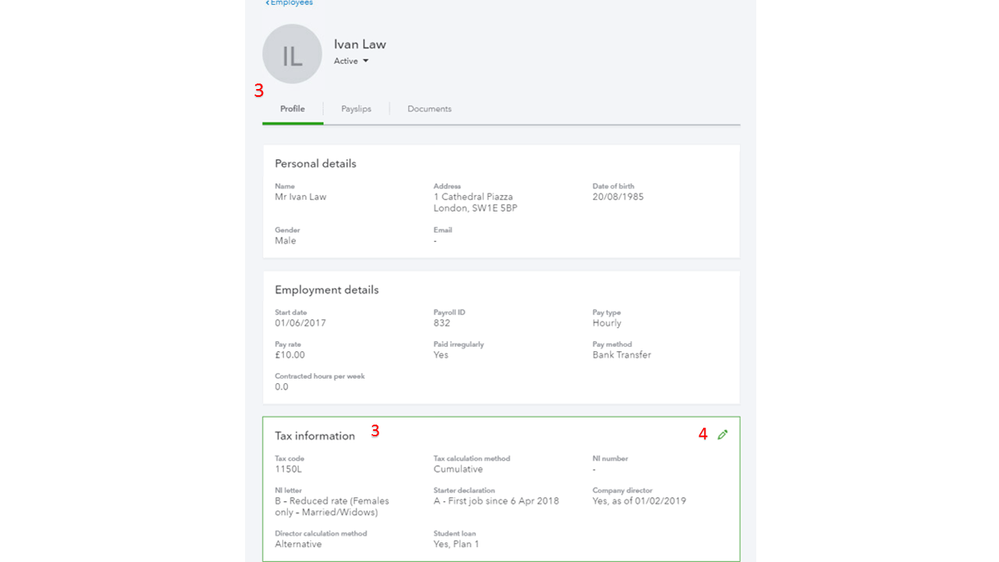
Please note the NI threshold affects the deduction in QuickBooks. If you're a director, the national insurance calculation is on an annual basis, not per period.
We use the tax information to calculate taxes and contributions when you run payroll. I've attached an article you can use to learn more about the tax details in the Online version: Add, and update an employee record in QuickBooks Online.
Keep in touch if you need additional assistance resolving the tax issues. We're always available and ready to help. Please take care.
