
- Mark as New
- Bookmark
- Subscribe
- Permalink
- Report Inappropriate Content
Payroll
Hello,
For that past couple of weeks my workers comp. code is not coming up in my preview check area or my employee set up. When I go into Edit preference workers comp. tracking it is turned off? Can someone please help me with this. I have not touch anything in there?
Thank you.


- Mark as New
- Bookmark
- Subscribe
- Permalink
- Report Inappropriate Content
Employees and payroll
I'll help with your payroll concern, Lowell211.
A different user might have accidentally turned it off. Can you tell us how many users do you have in your company file?
Although, you can open each paycheck that didn't have the workers compensation and manually add the code. Since it's a company contribution, it will not affect the employee's net amount.
If the paychecks are sent to Direct Deposit, you can create an employee liability adjustment to enter the amounts. Direct Deposit paychecks can no longer be changed once they're processed. Follow the steps in this article on how to record an adjustment: Adjust payroll liabilities in QuickBooks Desktop.
Let me also share these quick guides about managing workers compensation in QuickBooks Desktop:
Don't hesitate to reach out to us again if you need more help when running payroll.
- Mark as New
- Bookmark
- Subscribe
- Permalink
- Report Inappropriate Content
Employees and payroll
Hi,
Their are 4 users but I only do payroll. I can not go into each individual paycheck the code area does not appear. Can you tell me how I can turn it back on?
Thank you,
Lowell211

- Mark as New
- Bookmark
- Subscribe
- Permalink
- Report Inappropriate Content
Employees and payroll
Thank you for getting back to us here on the Community page, @Lowell211.
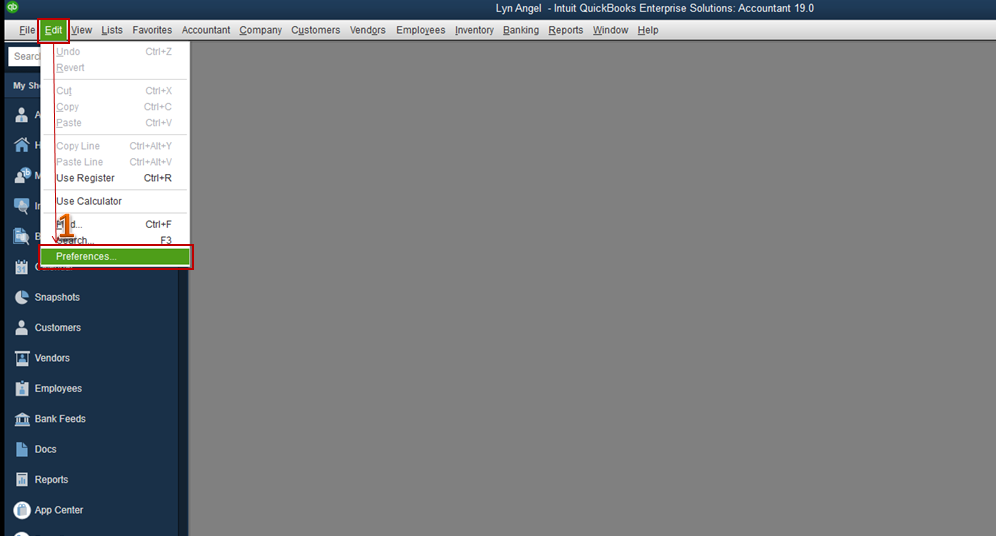
How was it so far? The code area is missing when the Workers Comp Preferences is disabled. At this time, we can perform some steps to add back the WC Code column before following the steps suggested by JenoP above. To add the code, enable the option to track workers comp in QuickBooks Desktop.
- Open your QuickBooks Desktop, then select Preferences from the Edit menu.
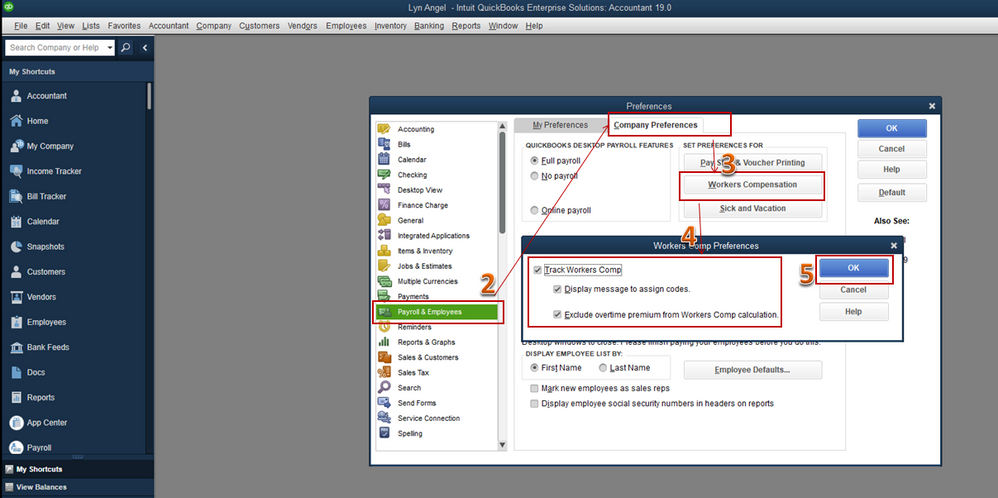
- Tap on Payroll & Employees at the left pane, then go to the Company Preferences tab.
- Click on Workers Compensation.
- Check the box beside the Track Workers Comp section and if you wish to display a message to assign codes and/or exclude overtime premium from Workers Comp calculation.
- Hit OK to save the changes.
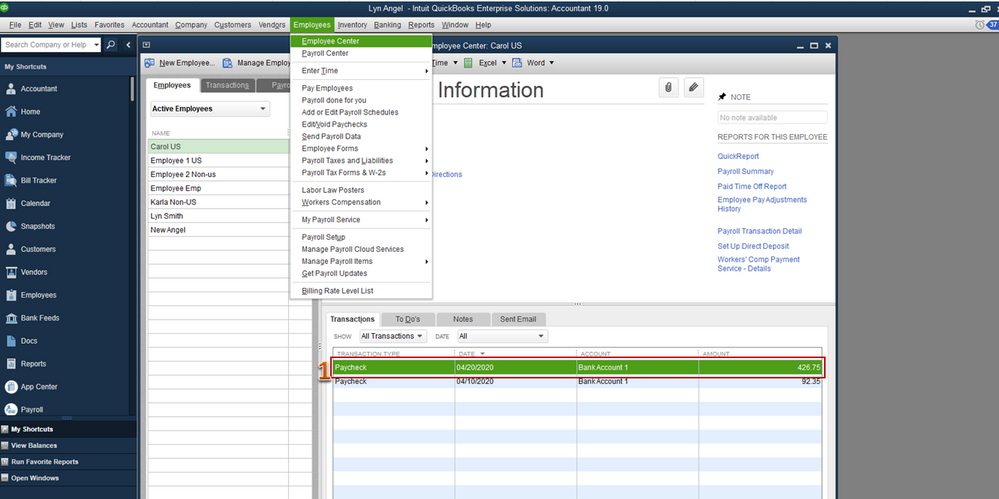
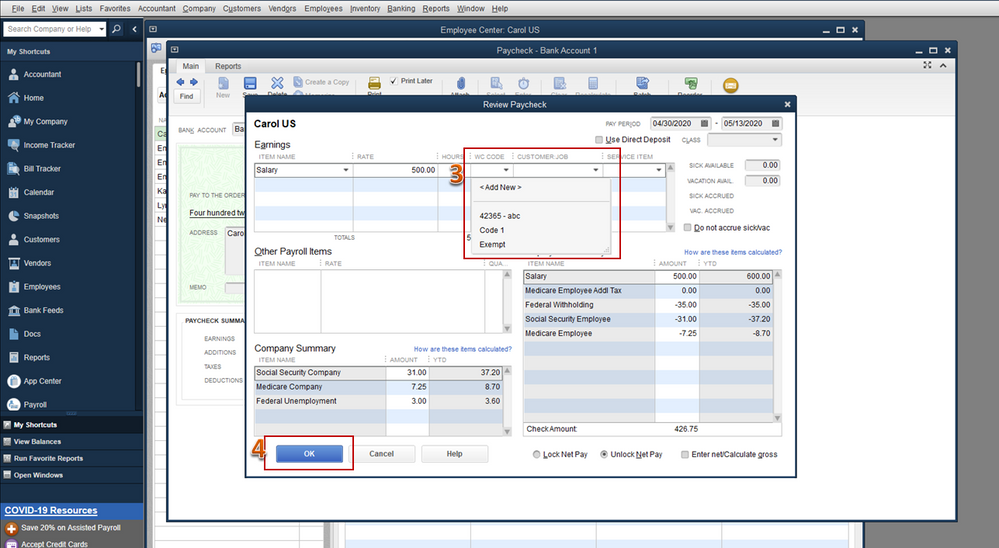
Once done, modify the employee's paycheck and add the code manually from there.
- Locate the paycheck you want to update from the employee's profile.
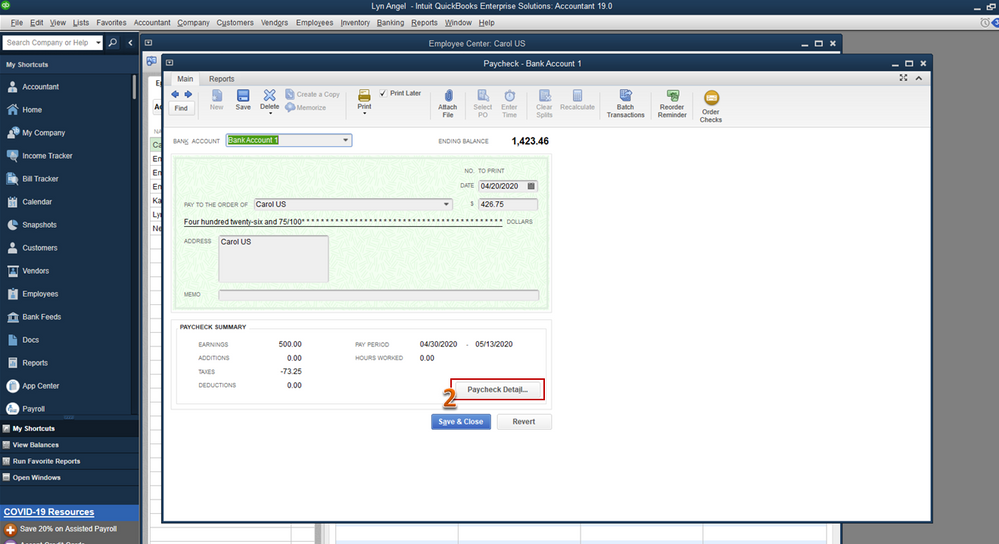
- Click on it to open, then tap on on the Paycheck Detail tab.
- Select a code under the WC Code column.
- Save the paycheck.
I've got these helpful articles about workers' compensation in QuickBooks Desktop, you can consider checking them for additional reference:
- Manual Workers' Compensation in QuickBooks Desktop
- Workers’ Compensation report in QuickBooks Desktop
Also, you can consider reading our help articles as an additional tips while working with QuickBooks in the future.
If you have any other QuickBooks questions, mention me in the comment section below. I'm always here to help. Have a good day!

- Mark as New
- Bookmark
- Subscribe
- Permalink
- Report Inappropriate Content
Employees and payroll
Angelyn_T: Will affect anything as far as payroll & payroll taxes if I go in and input the missing WC Code? I just want to make sure before I went ahead and correct that.


- Mark as New
- Bookmark
- Subscribe
- Permalink
- Report Inappropriate Content
Employees and payroll
Absolutely yes, @Wskyhotl. Workers' Compensation (WC) will affect your payroll because this is based on specific rates that vary depending on factors such as job classification, location, and the overall risk associated with the work performed.
However, the impact on your payroll will also depend on the set-up date for when it will be used.
Moreover, it's essential to ensure that you have communicated and documented this effective date clearly to avoid any discrepancies in payroll processing.
Furthermore, here are some helpful resources you can browse about worker's compensation that will be beneficial for you in the future:
- Troubleshoot Workers’ Compensation report in QuickBooks Desktop Payroll
- Create and print timesheets in QuickBooks Desktop Payroll
You can always have me if you have additional queries about WC in QuickBooks. It would be my pleasure to assist you in any way I can.
