
- Mark as New
- Bookmark
- Subscribe
- Permalink
- Report Inappropriate Content
Invoice created issue
It is 2019 professional edition with multi users, I can create and edit invoice on my desktop without any problem,
But, if I try to create/edit an invoice on a different laptop with windows 10 system, same QB, it is not working at all.
An error shows like "you need full access under edit closed transactions to perform this actions".
Solved! Go to Solution.

- Mark as New
- Bookmark
- Subscribe
- Permalink
- Report Inappropriate Content
Other Questions
Hey Marcus_Xia,
Being able to access QuickBooks on multiple devices with multiple users can have an incredibly positive effect on your bookkeeping. With a little bit of setup, you gain a seamless experience of working together with your team. I'm confident that a few minor changes to your user settings will resolve this error. I can guide you through this.
If you're logged in on your desktop, it's just a couple easy steps to manage user permissions:
- Go to the Company menu, then select Set Up Users and Password and then Set up Users.
- Select the user you sign in as on your laptop, then click Edit User...
- Fill out the User Name, Password, and Confirm Password fields, then select Next.
- On the Access for user: (username) window, choose which area of QuickBooks the user has access to, then select Next.
- If you choose Selected areas of QuickBooks, you can customize the restrictions for different areas of the company file for the user by selecting No Access, Full Access, or Selective Access.
- When done, select Finish.
This is the option mentioned in the message you're receiving:
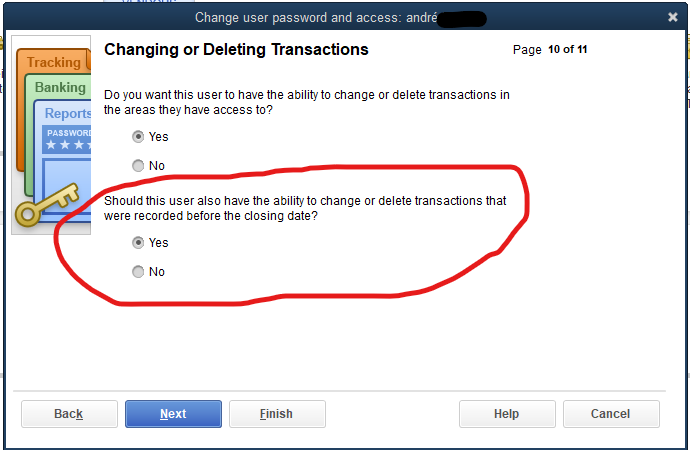
Let me know how this goes! I want to make sure you unlock the power of QuickBooks on all your favorite devices.
- Mark as New
- Bookmark
- Subscribe
- Permalink
- Report Inappropriate Content
Other Questions
Thanks for your reply, I didn't get reply from our QB admin.
I just curious that it is working well on my desktop, but it is not working if I change to another windows system.
Anyway, thanks again, I will let you how it goes.

- Mark as New
- Bookmark
- Subscribe
- Permalink
- Report Inappropriate Content
Other Questions
Hello we are using the Quickbook Enterprise 18 and have an exact same problem - can you let us know how to avoid?


- Mark as New
- Bookmark
- Subscribe
- Permalink
- Report Inappropriate Content
Other Questions
Hi there. Just to make sure we're on the same page, are you using the admin access to make the necessary changes?
- Mark as New
- Bookmark
- Subscribe
- Permalink
- Report Inappropriate Content
Other Questions
administrator updates the peemission
