
- Mark as New
- Bookmark
- Subscribe
- Highlight
- Report Inappropriate Content
Adding daily shop sales
Solved! Go to Solution.


- Mark as New
- Bookmark
- Subscribe
- Highlight
- Report Inappropriate Content
Other Questions
Hello ELEMENTS2019,
Welcome to the Community - thank you for your question!
You can enter your daily sales as a sales receipt. Select 20% in the VAT column, and this will then work out the VAT based on the amount you have entered for your sales in that day.
Have you set up VAT within the account yet? If not, you will need to do this first by going to Taxes and then Set up.
This will then pull through to your return and work out the amount of VAT you are due to pay/reclaim.
Thanks,
Talia
- Mark as New
- Bookmark
- Subscribe
- Highlight
- Report Inappropriate Content
Other Questions
- Mark as New
- Bookmark
- Subscribe
- Highlight
- Report Inappropriate Content
Other Questions
Hello there, @ELEMENTS2019.
Thanks for getting back to the Community. Let me help provide some information on how to track daily sales in QuickBooks Online (QBO) UK.
First, you'll need to set up an account in the Chart of Accounts. It represents and organizes the company's assets, liabilities, income, and expense. You can check how much money your company has, how much money it owes, and how much money is coming in and out.
To create an account, here's how:
- Click the Gear Icon.
- Go to Chart of Accounts.
- Click the New button.
- Choose an Account Type.
- Select Detail Type.
- Fill in the necessary information.
- Click Save and Close.
Next, create an item that your business offers in the Product and Services list. To do this, you can check the detailed steps in this article: Create and use a Products and Services list.
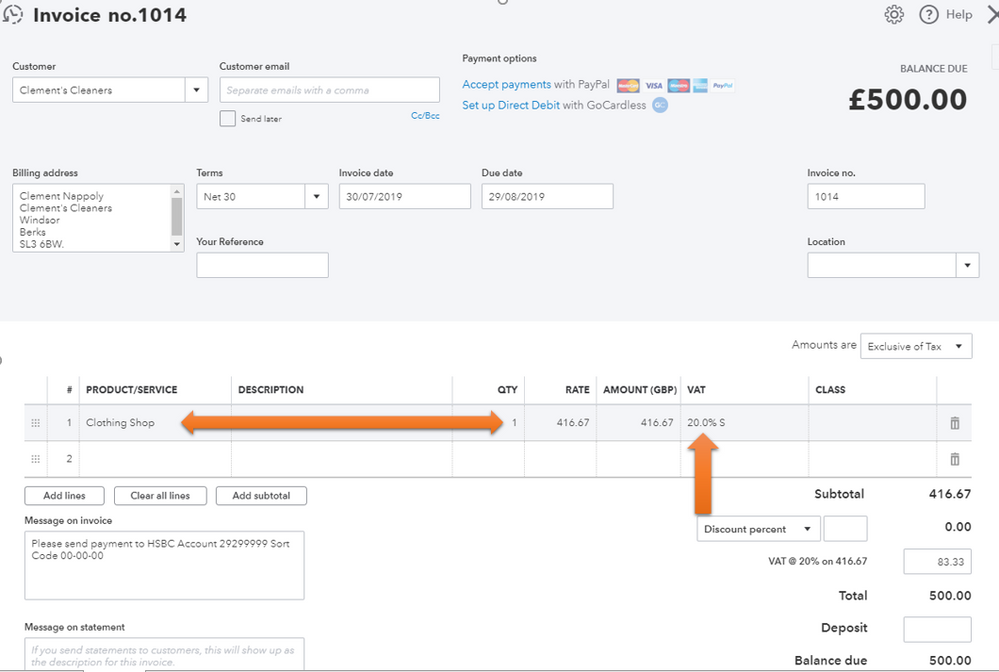
Once done, you can now create an invoice or other sales forms for your daily sales. On the Product/Service option, use the item you've created and then select the 20% in the VAT column.
For future reference, you can always visit these articles to learn more about the VAT code:
- VAT: Getting Started.
- Setting up MTD-eligible clients on HMRC and QuickBooks - MTD for accountants.
- Set up and edit VAT settings, VAT codes and VAT rates.
This should get you on the right track. Fill me in if you have any other questions about creating daily sales. I'm always here to help you out. Wishing you and your business continued success.
