- Mark as New
- Bookmark
- Subscribe
- Highlight
- Report Inappropriate Content
VAT Exclusive Estimates
Hello,
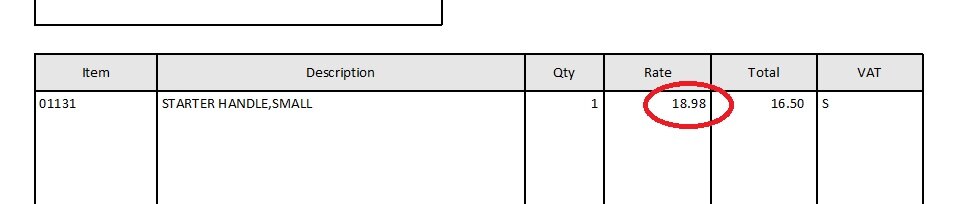
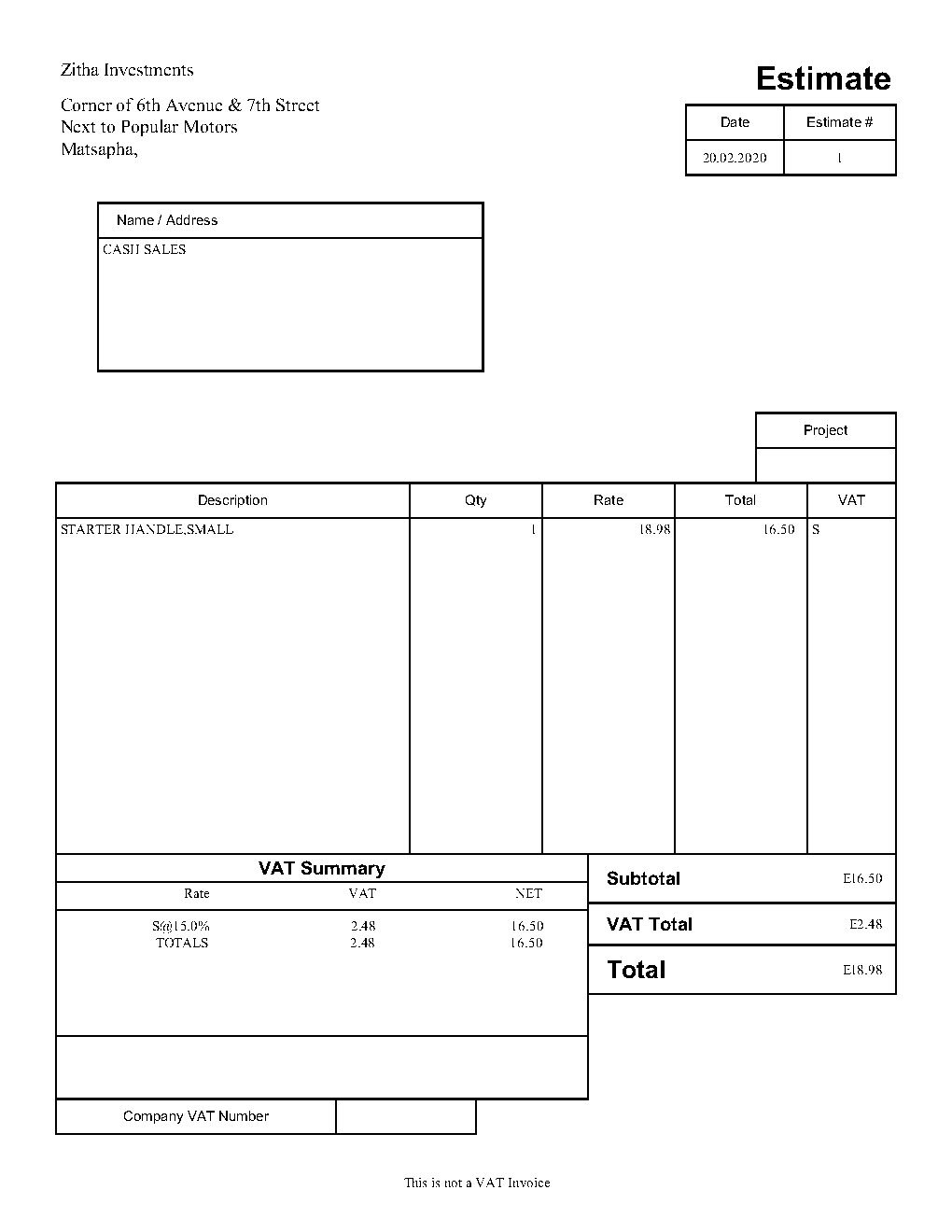
My Estimates show amounts including VAT on the 'Rate' column when printing or previewing, even when the 'Amnts Inculusive' box is unchecked. How do I turn this off? I am using QuickBooks Premier Accountant 2018.
Solved! Go to Solution.


- Mark as New
- Bookmark
- Subscribe
- Highlight
- Report Inappropriate Content
Other Questions
Hello Phesheya,
Thanks for reaching out to us on the Community page,
Could you send us a screenshot of this please, we would really appreciate it.
- Mark as New
- Bookmark
- Subscribe
- Highlight
- Report Inappropriate Content
Other Questions
Phesheya,
could you send us a screen of the whole page, not just that little section and can I ask what is the issue with the red circle for the rate?
- Mark as New
- Bookmark
- Subscribe
- Highlight
- Report Inappropriate Content
Other Questions
The issue with the highlighted area is that the amount includes VAT in the 'Rate' column. I can't get t to show VAT exclusive amounts on the Estimates, contrary to Invoices.


- Mark as New
- Bookmark
- Subscribe
- Highlight
- Report Inappropriate Content
Other Questions
Hello @Phesheya,
The Rate info of your estimate will always show the amounts of your item's cost and VAT rate. Instead, the item's total exclusive of the VAT amount is indicated in the TOTAL column.
Here's an article you can read to learn more about creating an estimate: Create an Estimate in QuickBooks Desktop.
You can also read this helpful article in case you wanted to start tracking partial invoices: Set up and Send Progress Invoices in QuickBooks Desktop.
Fill me in if you have any other questions. Always around ready to assist you.
- Mark as New
- Bookmark
- Subscribe
- Highlight
- Report Inappropriate Content
Other Questions
Attached is an Estimate from the QuickBooks sample company file. Please note the highlighted. The Rate amount shows the figure excluding VAT, as it should.

- Mark as New
- Bookmark
- Subscribe
- Highlight
- Report Inappropriate Content
Other Questions
Thanks for providing us the screenshot and the in-depth details of this issue, Phesheya.
It's possible the estimate template is damaged causing to show the amounts including VAT on the Rate column. We can delete the estimate transaction you created and create a new template. Then, make it as a default one in QuickBooks.
Here's how to create a new template:
- Click Lists on the menu and choose Templates.
- Tick the Templates drop-down at the bottom and hit New.
- Select EStimate, then tap OK.
- Enter the details in the Basic Customization page.
- Press OK to save your template.
Then, make it the default to the copy of your template. Here's how:
- Click Lists on the top menu.
- Select Templates.
- In the Templates window, double click the Estimate template.
- In the Basic Customization window, hit the Additional Customization tab in the bottom.
- Tick Default.
- Press OK on the dialogue box and click OK to save the changes.
Once done, recreate the estimate and ensure we choose the Non-Taxable Sales option in the Tax column.
To learn more about Sales Tax, please refer to this article: Set up sales tax in QuickBooks Desktop.
I'm just one reply away if you need a hand with running Sales Tax reports or any QuickBooks related. I'm glad to help.
- Mark as New
- Bookmark
- Subscribe
- Highlight
- Report Inappropriate Content
Other Questions
Hi @RCV, @JonpriL, @Ashleigh1
Here's what I have tried to do to resolve the issue so far:
1. Created a new template
2. Imported a template from another company file
3. Updated QuickBooks to latest release
4. Run Verify Data and Rebuild Data
5. Checked the company file with QuickBooks File Doctor
All of the above haven't solved the problem. Please note that the issue is with Estimates only. Invoices and other forms show no problems.

- Mark as New
- Bookmark
- Subscribe
- Highlight
- Report Inappropriate Content
Other Questions
Hi Phesheya
We would be grateful if you can provide us with a screen shot of the whole page/estimate screen. In this instance it is advisable if you contact the telephone support line; 0808168 9537.
- Mark as New
- Bookmark
- Subscribe
- Highlight
- Report Inappropriate Content
Other Questions
Hello Phesheya,
Thanks for the screenshot,
If you got to List > Templates
Edit the estimate template by double clicking
Go into Additional Customisation
Columns tab
Untick the print box for Rate> ok
Let us know how you get on.
- Mark as New
- Bookmark
- Subscribe
- Highlight
- Report Inappropriate Content
Other Questions
Hi @Ashleigh1
I could do that, but it wouldn't show the unit Cost/Rate, which customers want to see.
It appears there's no known solution to the problem.
- Mark as New
- Bookmark
- Subscribe
- Highlight
- Report Inappropriate Content
Other Questions
I appreciate you coming back, @Ashleigh1.
Thanks for keeping us updated with the results of every troubleshooting steps you've taken so far. At this time, we can try creating an estimate using a sample file to check if you're having a problem with only one file and not the program itself. You can also open it from a different location to check if the problem might be coming from a damaged folder.
You can visit this article for available trail links: QuickBooks Test-Drives and Trial Links.
If the same thing happens, I suggest contacting our QuickBooks Care Support. This needs a thorough investigation which they can best handle using the special tools such as screen sharing.
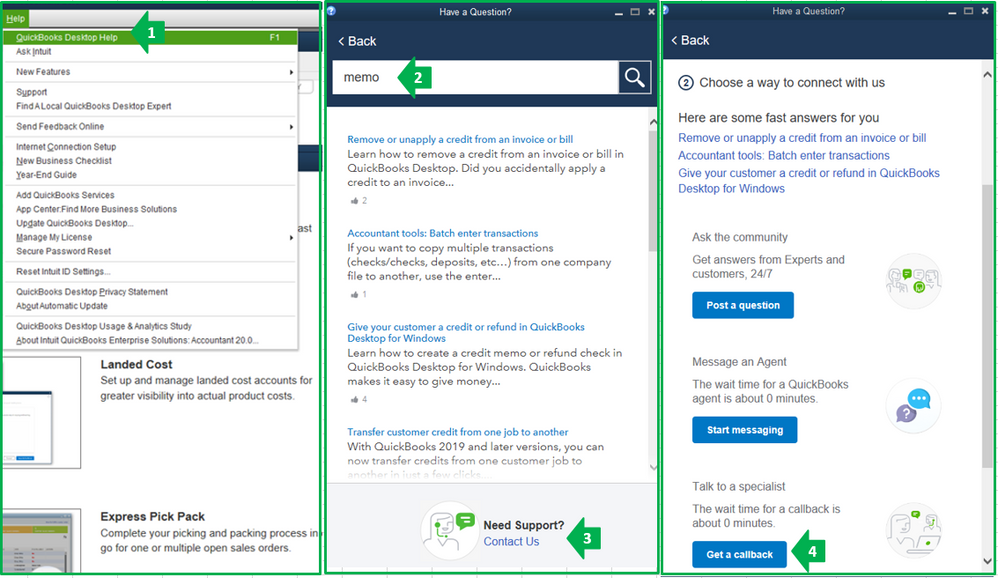
Here are some steps to contact support:
- Click Help at the top menu and select QuickBooks Desktop Help.
- In the Have a Question? window, enter a topic.
- Click Contact us.
- Hit the Get a callback button.
You can always reach back to me if you have follow-up questions. I'm always happy to help. Wish you all the best of luck!
- Mark as New
- Bookmark
- Subscribe
- Highlight
- Report Inappropriate Content
Other Questions
Hi @Charies_M
I can confirm that the program is working fine. As I mentioned in an earlier post, I have isolated the problem to the specific Company File. A sample file and a new company file I created for testing don't have the issue.