

- Mark as New
- Bookmark
- Subscribe
- Permalink
- Report Inappropriate Content
Other questions
Hello there, @on-tyme. Welcome to the Community.
I've got some information about the error you've encountered and help you perform some troubleshooting steps to isolate this matter. This way, you can get back to business and manage your deposit transactions in QuickBooks Desktop (QBDT) accordingly.
The details you got from our customer support are correct that we currently have an open investigation about the error "Please wait...We're matching your deposits to QuickBooks Desktop records" when accessing the Merchant Service deposits.
Based on the gathered data by our product engineers, the error happens because QBDT-Payments is in the process of switching the browser they use for file transfer (between the data file and Intuit servers) from Internet Explorer to Chrome. This is due to IE no longer being supported by Microsoft.
With this, I would encourage you to ensure your QBDT software is updated to the latest release. This way, we can guarantee the program is running with the newest fixes and patches. I'll show you how.
- Go to the Help menu and select Update QuickBooks Desktop.
- Choose the Update Now tab.
- You can select the Reset Update checkbox to clear all previous update downloads.
- Select Get Updates to start the download.
- When the download finishes, restart QuickBooks.
- When prompted, accept the option to install the new release.
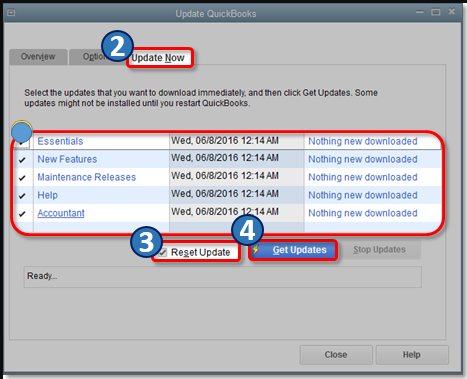
Then, you can also perform these additional troubleshooting steps below to further isolate the error:
- Turn off the Auto match & record option and then re-launch the Merchant Services Deposit window.
- Link the same merchant account to a test/blank data file (in QBDT), launch the Merchant Services Deposit window, and then switch back to the original data file.
- Clear your browser's cache/history (Note: The article is for QuickBooks Online but the same steps apply to the QBDT version). Then, restart the system.
In case the error persists after performing the recommended troubleshooting steps, I'd recommend contacting our Customer Care team again. They can securely verify your account, create a case to further investigate the cause of the error, and guide you with a fix. To do this, here's how:
- Go to Help, then select QuickBooks Desktop Help.
- Select the Contact Us button.
- Enter a brief description of your concern in the What can we help you with? field and click Continue.
- Choose a way to connect (Chat or Callback).
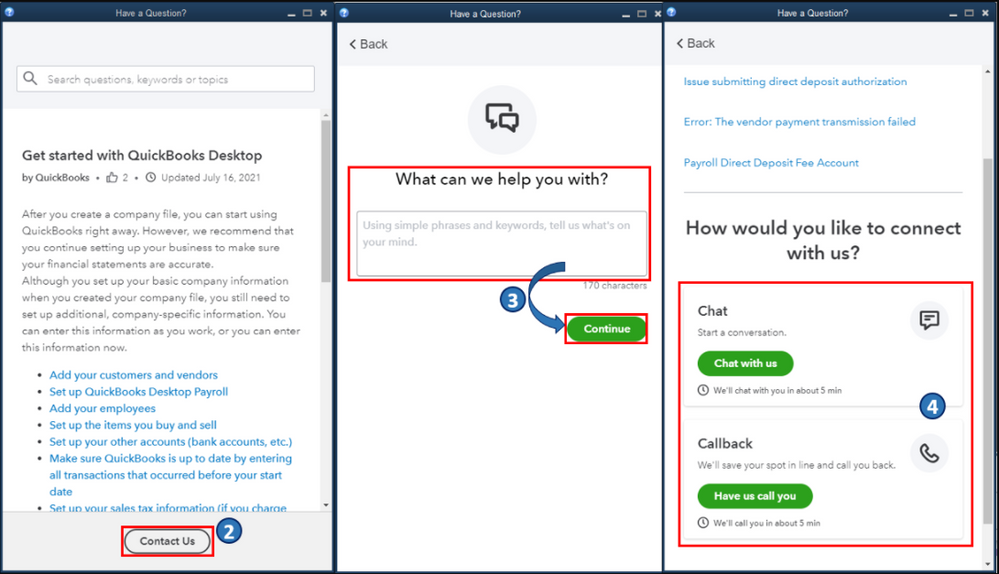
Once fixed, you may also want to check out this great resource to review some of our commonly asked Payments questions: QuickBooks Payments FAQ. This includes topics about funding status, managing Payments accounts, and transaction processing, to name a few.
We appreciate your patience regarding this matter. Please don't hesitate to comment below on how it goes and if you have other concerns about managing deposits and payment transactions in QBDT. I'm always around to help. Take care, and I wish you continued success, @on-tyme.
