
- Mark as New
- Bookmark
- Subscribe
- Permalink
- Report Inappropriate Content
Billable items
When entering a bill or invoice, the Billable box is checked automatically if a Job is selected. Is there a way to stop doing that? I do not wany the billable box checked ever.


- Mark as New
- Bookmark
- Subscribe
- Permalink
- Report Inappropriate Content
Other questions
Hello there, @sherylrazorback.
I'll help you remove the check for billable box as default in QuickBooks Desktop.
Here's how:
- Go to the Edit menu.
- Select Preferences.
- Choose Time & Expenses on the left-side panel.
- Click the Company Preferences tab.
- Uncheck the Mark all time entries as billable and Mark all expenses as billable boxes.
- Then click OK once done.
Let me also share this article that you can use for reference in case you need to edit your items and your employee’s hours:
Let me know if you have questions about managing invoices and bills in QuickBooks Desktop. I'm always here to help. Have a great day.
- Mark as New
- Bookmark
- Subscribe
- Permalink
- Report Inappropriate Content
Other questions
Hi Ethel,
Thanks for your reply. I went in to the preferences and that box is not checked. It is unchecked but if we cost anything to a job, the billable box automatically checks itself.
Thanks,
Sheryl


- Mark as New
- Bookmark
- Subscribe
- Permalink
- Report Inappropriate Content
Other questions
Hello sherylrazorback,
Thank you for responding! I would like for you to verify something for me. Are you able to manually uncheck it, and if so, could you let me know what happens afterward?
I will be looking forward to your comments! See you in a few,

- Mark as New
- Bookmark
- Subscribe
- Permalink
- Report Inappropriate Content
Other questions
Same here! I have both boxes unchecked. I can manually uncheck the billable box on each invoice, but I don't want to have to do that. I import from bill.com and I would have to go uncheck every invoice I import. There has to be a way to stop this on vendor invoices assigned to a job.

- Mark as New
- Bookmark
- Subscribe
- Permalink
- Report Inappropriate Content
Other questions
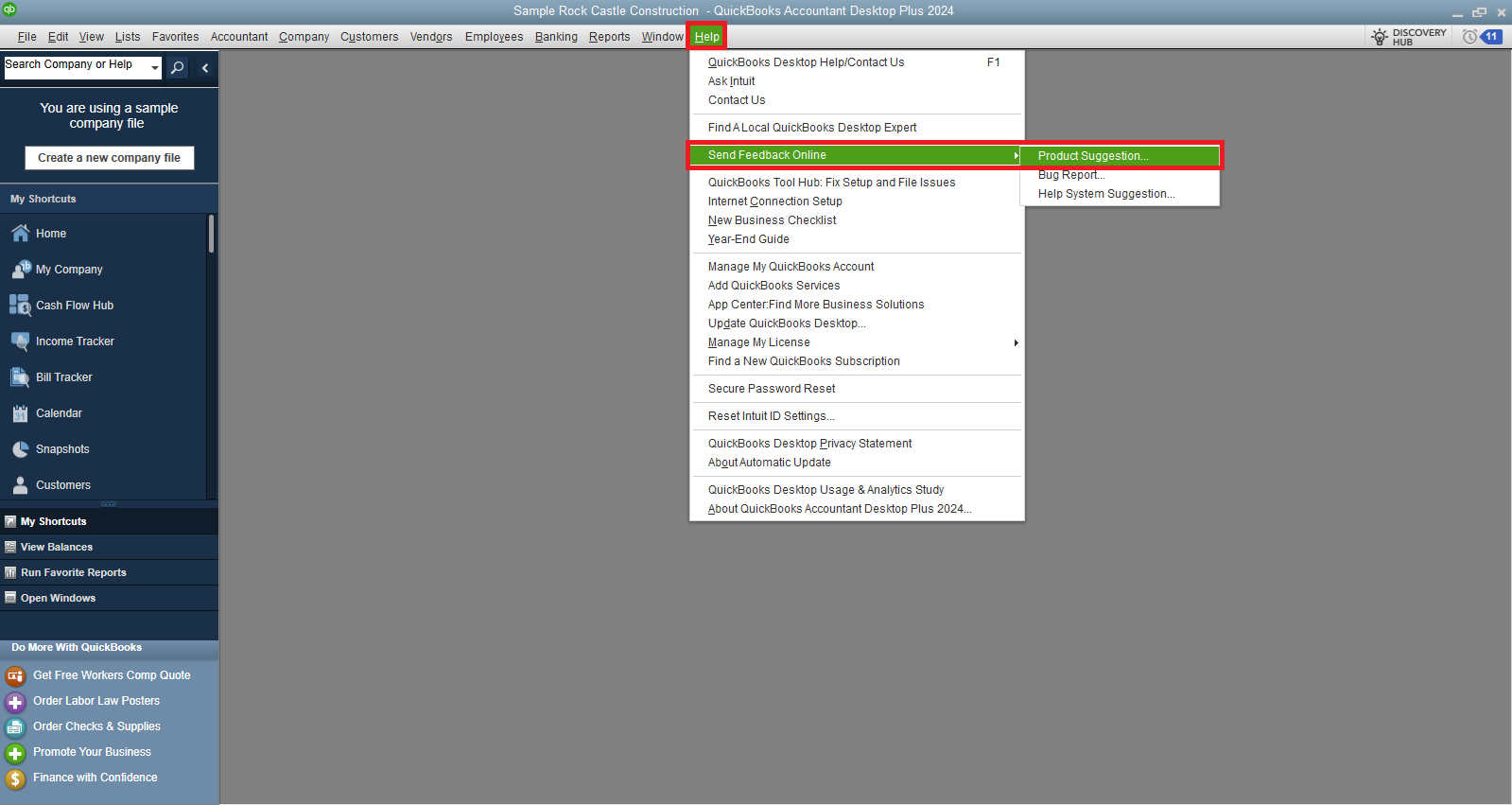
I can see how this would be a great help to have this functionality when importing your bills in QuickBooks Desktop (QBDT), Tracey. I suggest submitting a feedback form to our product engineers. Our team will review this and would implement this feature in the future.
Here's how:
- Open QuickBooks Desktop.
- Go to the Help menu.
- Select Send Feedback Online and then choose Product Suggestion.
- Fill out the feedback form with your suggestions and any additional details you think would be helpful.
While our team is still checking, I recommend manually unchecking the box for billable items if it's marked as checked.
Check out this article for guidance on paying bills using a check, credit card, or cash: Pay bills online from QBDT.
If there's anything else I can assist you with or if you have more questions, please don't hesitate to ask.
