
- Mark as New
- Bookmark
- Subscribe
- Permalink
- Report Inappropriate Content
Business Miles Wrong
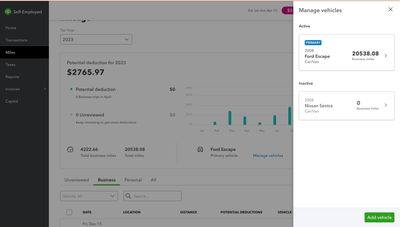
My business miles are showing as my total miles. I’ve tried reentering them severals times and hitting save but nothing changes. How can I fix this?


- Mark as New
- Bookmark
- Subscribe
- Permalink
- Report Inappropriate Content
Other questions
I'll share information about the business miles totals in QuickBooks Self-Employed (QBSE), Madison.
The total miles information you see in the Manage vehicle section is based on the total trips your vehicles made (regardless if this is for personal or business).
That said, I suggest checking the details under the graph displayed on the Mileage page to see the total miles for your business trips. See the info in the Total business miles section. Check the snip below for reference:

On the other hand, you can run a report to view only the business miles. Here's how:
- Select the Reports menu.
- Go to the Mileage log section, and choose the correct date range in the drop-down.
- Next, select the arrow beside View and choose Download.
- From there, edit the Excel sheet and delete those non-business mileage.
I also add this helpful resource that you can use as a guide in managing your quarterly and annual tax info in QBSE: Get quarterly and annual tax info from QuickBooks Self-Employed.
Should you need further assistance in managing your mileage, please don't hesitate to post again here. I'd be glad to assist. Have a good day ahead.

- Mark as New
- Bookmark
- Subscribe
- Permalink
- Report Inappropriate Content
Other questions
I am also having this issue. Trying to submit my tax info to TurboTax, but I get this error message:
Your business miles can't be greater than your total miles. Go to Manage Vehicles to fix this.

When I look at my business milage in the correct section, same car and for 2023, it all checks out 6396.23 business miles and 16865.17 total miles.
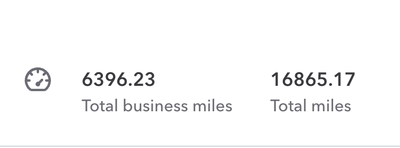
Then when I click on "Manage Vehicles" it tells me that my business miles are 15256.99 no idea where its getting that number from.
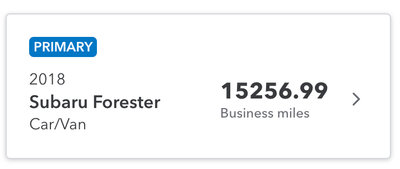
So now, I cant file my taxes because of this unfixable error.


- Mark as New
- Bookmark
- Subscribe
- Permalink
- Report Inappropriate Content
Other questions
Thanks for joining this thread, natesaggio.
To help you with the error message you're seeing when trying to submit your tax information to TurboTax, I suggest reaching out to our support team. They're available to assist you from Monday through Friday, 6 AM to 6 PM, and on Saturdays from 6 AM to 3 PM Pacific Time Zone.
Here's how to contact support:
- Click Help. Then, Contact Us.
- Enter "talk to a human," then click Continue.
- Choose to either Chat with us or Have us call you.
You can check out this article for more info on contacting support: Contact QuickBooks Self-Employed Support.
If you need help sending your tax information to TurboTax in the future, check out this guide: Send QuickBooks Self-Employed tax info to TurboTax Self-Employed or Live.
If you have any other concerns about tracking mileage in QuickBooks or sending your tax info to TurboTax, please don't hesitate to reply to this post. I'm here to help you out.

- Mark as New
- Bookmark
- Subscribe
- Permalink
- Report Inappropriate Content

- Mark as New
- Bookmark
- Subscribe
- Permalink
- Report Inappropriate Content
Other questions
Welcome to the Community, Mc222.
Please be informed that QuickBooks adheres to IRS guidelines by using the standard mileage rate to calculate your tax deductions.
In the QuickBooks Self-Employed (QBSE) mobile app, whether you opt for automatic or manual mileage tracking, just properly categorize your vehicle expenses as Business and select Car and Truck for the expense category.
For help with categorizing transactions, please refer to this article: Categorize transactions in QuickBooks Self-Employed.
If you need further clarifications about mileage in QBSE, feel free to click the Reply button below.
