
- Mark as New
- Bookmark
- Subscribe
- Permalink
- Report Inappropriate Content
Can you "UNDO PREVIOUS RECONCILIATION" on checking account? From previous months. It was VERY easy in the desktop version and I can't figure out how to do it on QBO?


- Mark as New
- Bookmark
- Subscribe
- Permalink
- Report Inappropriate Content
Other questions
I appreciate you reaching out here in the Community. I understand that the reconciliation process in QuickBooks Online works differently compared to QuickBooks Desktop, and I'd be happy to guide you on how to undo a prior reconciliation.
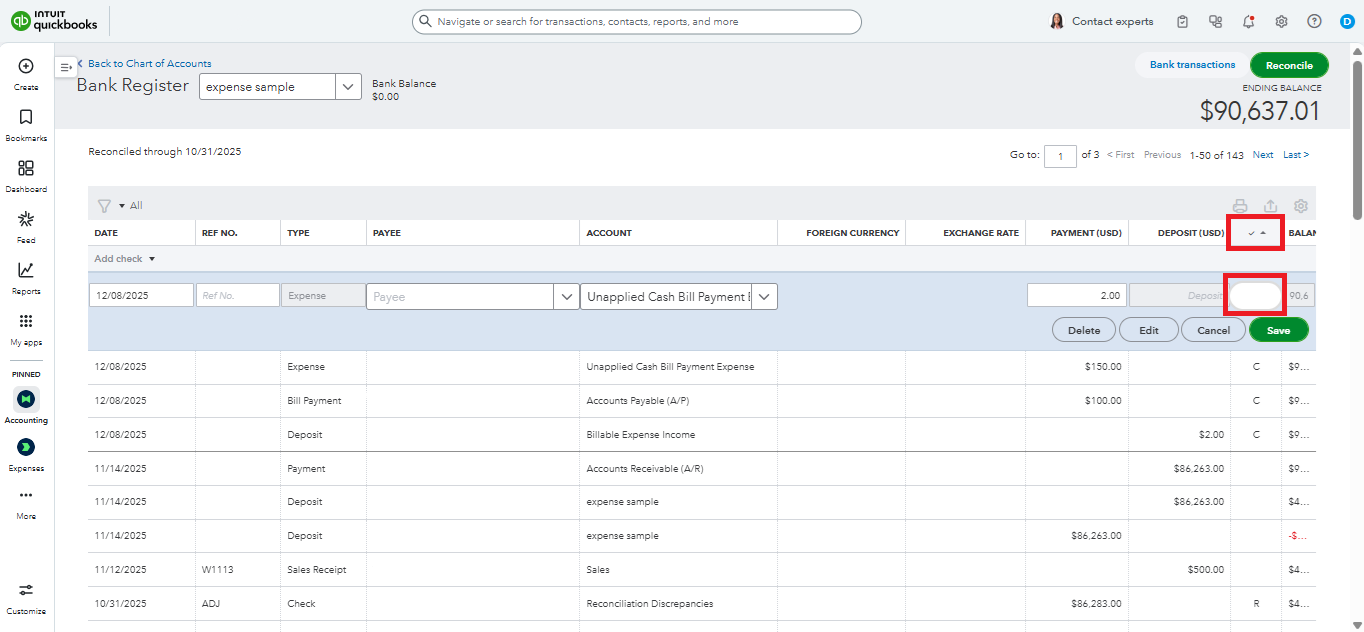
In QuickBooks Online, you can manually undo the reconciled transactions individually by going to your Chart of Accounts.
Here’s how:
- Go to the Gear icon and select Chart of Accounts.
- Locate the reconciled checking account you need to adjust.
- Click View Register next to the account.
- Find the transactions you'd like to unreconcile.
- In the Check mark column, click the field and change the status from R (Reconciled) to blank to remove the reconciliation status from the transaction.
- Click Save once you've updated the status.
If you're working with an accountant and using QuickBooks Accountant, they can undo the entire reconciliation period for you. QuickBooks Online provides accountants with access to an Undo Reconciliation feature that allows complete reversal of reconciliations when needed.
Don't hesitate to reply here if you have more concerns related to QuickBooks. We're here to help.

- Mark as New
- Bookmark
- Subscribe
- Permalink
- Report Inappropriate Content
Other questions
Hi there,
I just wanted to follow up to check if the resolution we provided helped resolve your issue.
Please let us know if everything is now working as expected or if you're still experiencing any problems.
We'll be glad to assist further if needed.
