
- Mark as New
- Bookmark
- Subscribe
- Permalink
- Report Inappropriate Content
Is there a short cut key to add transactions
I would rather use my keyboard to initiate a new transaction. Is there a short cut key?


- Mark as New
- Bookmark
- Subscribe
- Permalink
- Report Inappropriate Content
Other questions
Hi there, vjevans1964.
Currently, QuickBooks Online does not have a specific keyboard shortcut for adding a transaction. However, you can simplify your access by bookmarking the transaction pages for quick navigation to the transaction types you use most frequently.
Here’s how you can do it:
- Navigate to the All apps tab.
- Select the Sales & Get paid tab.
- Choose the Sales transactions.
- Click the Bookmarks icon next to Sales transactions.
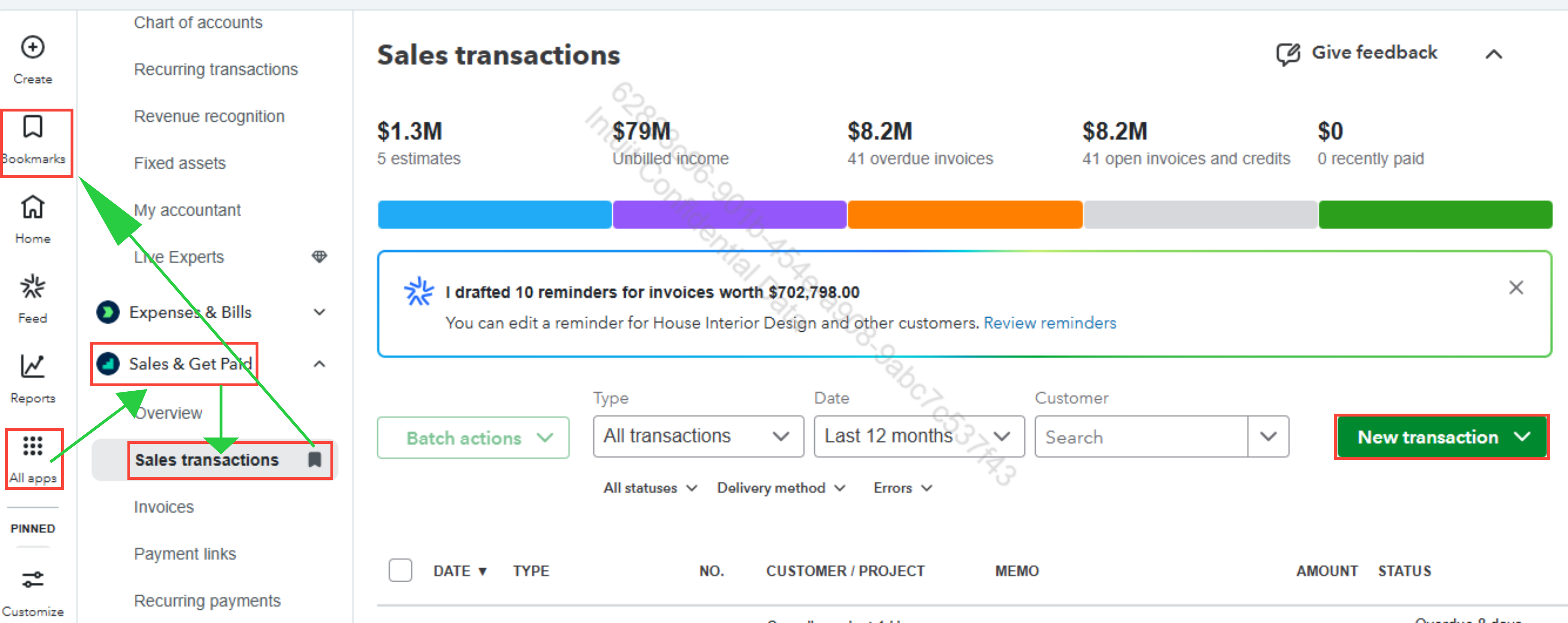
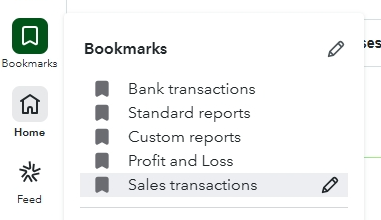
After selecting Sales Transactions and saving it using the Bookmarks icon, it will appear on your Bookmarks page, allowing you to access it easily when needed.
Feel free to drop a comment below if you have any other questions. We’re happy to help further.
- Mark as New
- Bookmark
- Subscribe
- Permalink
- Report Inappropriate Content
Other questions
Hi, vjevans1964.
I just wanted to follow up to check if the resolution we provided helped resolve your issue.
Please let us know if everything is now working as expected or if you're still experiencing any problems.
We'll be glad to assist further if needed.
