
- Mark as New
- Bookmark
- Subscribe
- Permalink
- Report Inappropriate Content
I am using QBO Plus. Why can't I find Invoices? It is not under Create, Customers.


- Mark as New
- Bookmark
- Subscribe
- Permalink
- Report Inappropriate Content
Other questions
Hi there, Pattyduffy.
The reason you can't find invoices under Create or Customers is that under Create, you can only create invoices, and on the Customers page, you can only view your customers' details.
To successfully navigate your created invoices. Please refer to these steps:
- Sign in to your QuickBooks Online account.
- Go to the All apps menu.
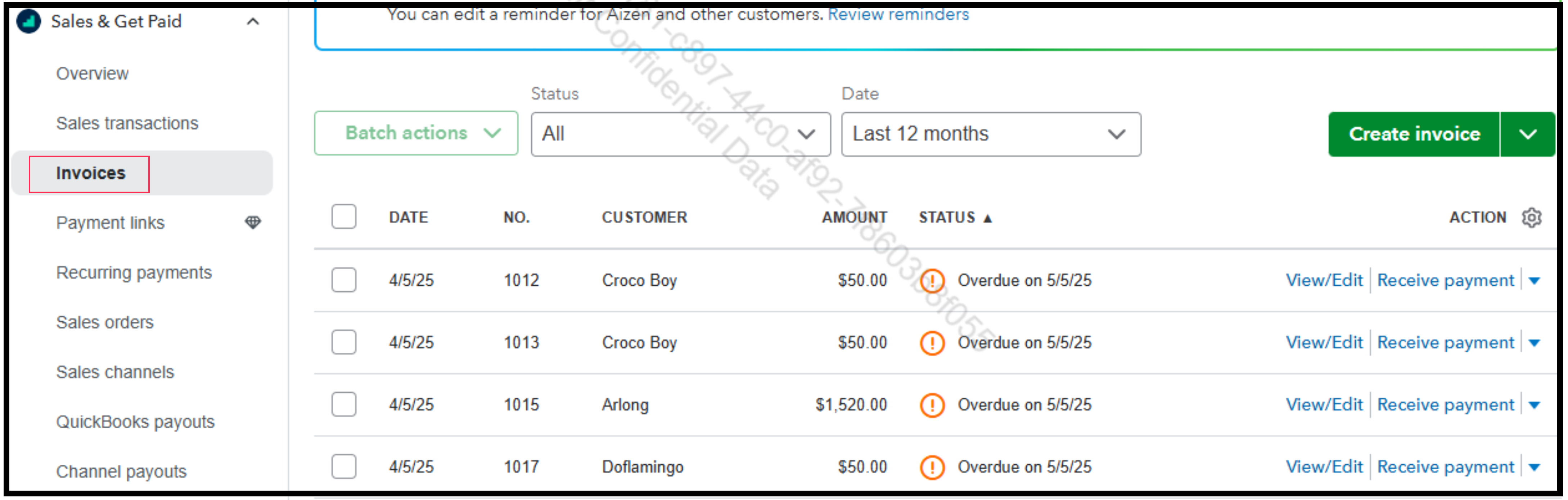
- Click the dropdown arrow beside Sales & Get Paid and choose Invoices.
- From there, you can locate your created invoices.
Moreover, did you know that we provide a complimentary session with our QuickBooks Live Expert Assisted service? Our experts excel at making financial management effortless and offer tailored advice, especially in managing your sales.
If you need further assistance, please return to this forum. I'm always here to help.
- Mark as New
- Bookmark
- Subscribe
- Permalink
- Report Inappropriate Content
Other questions
Hello, Pattyduffy.
I wanted to follow up on your concern and see if the solution I provided has resolved your issue. Please let us know if everything is now working as expected or if you have any questions. We’re happy to assist you further.
Looking forward to hearing from you.
- Mark as New
- Bookmark
- Subscribe
- Permalink
- Report Inappropriate Content
Other questions
No the problem is not resolved. I went where you told me to go and there is still no option for invoice. See attached.

- Mark as New
- Bookmark
- Subscribe
- Permalink
- Report Inappropriate Content
Other questions
Thanks for following up on this thread and trying the troubleshooting steps mentioned above, pattyduffy1968.
I know invoices are key for smooth day-to-day business operations so I want to make sure you're able to see yours in QuickBooks Online.
Here's another pathway to get to your list of invoices:
Finding all invoices
- From the left menu, select Sales, then click the Invoices tab.
- In the filter bar, set Status to All and Date to All dates to see everything.
- Click the Gear icon (settings) on the top right and adjust rows to max (e.g., 300) to see more at once.
Finding invoices for a specific customer
- Go to Sales, then select the Customers tab.
- Click on the customer's name.
- Use the Filter menu and select Invoices to see only their invoices.
If you're still unable to view invoices, this may be a browser cache related issue. I'm linking an article that provides steps for different browsers to clear the cache, which will remove anything preventing the page from loading properly. You can check it out here: Clear cache and cookies to fix issues when using QuickBooks Online.
Please don't hesitate to drop a comment below if you need assistance with anything else. The Community always has your back!

