
- Mark as New
- Bookmark
- Subscribe
- Highlight
- Report Inappropriate Content
Co-operative bank transaction issues.
I've synced my Co-operative personal account, but no transactions are uploading (tried deleting and re-connecting, but no change), so I've uploaded a csv file. The details are all in the file, but when I add it to my QB account (self-employed) only the incoming amounts are showing in my transactions, nothing outgoing - the transactions just show as £0. I've tried it twice now and no change. Is there anything I can do, short of adding each one individually?
Solved! Go to Solution.


- Mark as New
- Bookmark
- Subscribe
- Highlight
- Report Inappropriate Content
Transactions
I’m here to help you, @Shadowy.
I appreciate your effort to get these bank transactions downloaded to QuickBooks Self-Employed. Let me share some information to get this resolved.
When uploading a CSV file, you’ll want to make sure the mapping is correct. Review the column headers and data. Make sure the Date, Description, and Amount columns on the CSV match the columns and order in QuickBooks.
You can also add the entries individually by following the instructions below. Please know that once the account downloads the transactions, it’ll create duplicates. However, you can exclude them. This way, your records remain intact and accurate.
Here’s how:
- Select Transactions from your left menus.
- Click Add transactions.
- Enter the necessary details.
- Press the Save button.
Once you're done, here’s how to categorise your transactions in QBSE. This reference also helps organise your income and expenses.
You can visit our Community forums anytime if you have other banking questions or concerns. I'm always around if you need any help. Have a wonderful day!
- Mark as New
- Bookmark
- Subscribe
- Highlight
- Report Inappropriate Content
Transactions
Thank you.
I don't really understand the mapping (tech illiterate!). I've just tried uploading the csv again and the same has happened. I can see the incoming payments, but not outgoing - the transaction details are uploading for both, but the amounts outgoing are all £0. The csv has these as two separate columns though - is this the issue? They're labelled Money In and Money Out. In the Money In column there are blank cells where the outgoing transaction rows are. All other details look to be correct on my QB account - dates, transaction details, etc.


- Mark as New
- Bookmark
- Subscribe
- Highlight
- Report Inappropriate Content
Transactions
I'm here to make sure you can upload your bank transactions properly, @Shadowy.
To import them successfully, let's start by reviewing the format of the spreadsheet. You can bring in bank transactions to QBSE using CSV files. You can use either a 3-column or 4-column format. Make sure that all amounts in a 4-column format are positive. I've attached a screenshot for your reference.
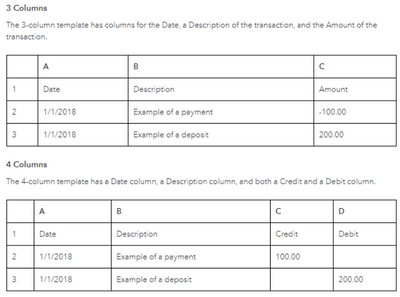
Then, you'll have to make sure you've chosen the correct columns in the mapping stage. Otherwise, QuickBooks will not be able to read the data. To make the mapping stage easier, you can do the following:
- Delete columns you do not need from your CSV to avoid any confusion. The columns that are required by QuickBooks are:
- Date - Correct and standardize the date format to a single format (for example, dd/mm/yyyy).
- Description
- Amount
- Change the names of the columns in your CSV to match the titles in QuickBooks.
Before deleting any rows and columns, please ensure to secure a backup copy. Follow the steps below to start the importing process.
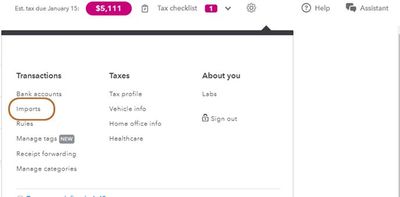
- Go to the Gear icon.
- Select Imports.
- Select Import older transactions for the account you want to add transactions to.
- Select Browse and find the file you downloaded from your bank. It's usually in your Downloads folder.
- Select the file and select Open to start the import.
- Review the column headers and data. Make sure the Date, Description, and Amount (Debit/Credit) columns on the CSV match the columns and order in QuickBooks. Select Debit for money in and Credit for money out transactions. The other column headers can be in any order.
- Select Continue to complete the import.
- Follow the on-screen instruction.
After you download your transactions in QuickBooks, you can begin reviewing them. This organizes your income and expenses. This way, you'll know what areas of your business have the biggest impact.
Here are some helpful resources that will ensure your success:
- Add older transactions to QuickBooks Self-Employed
- Errors for importing bank transactions using CSV
- Split transactions in QuickBooks Self-Employed
Please come back and post about your results in uploading your bank transactions. I'm determined to ensure your success.
- Mark as New
- Bookmark
- Subscribe
- Highlight
- Report Inappropriate Content
Transactions
Thank you! That seems to have helped. All transactions are there now, I just need to work through and clarify which are expenses (they're all showing as income!). Half the job done though.
- Mark as New
- Bookmark
- Subscribe
- Highlight
- Report Inappropriate Content
Transactions
No, on closer inspection it's now only saved outgoing amounts (as incoming). There's no sign of the incoming transactions on my QB account.

- Mark as New
- Bookmark
- Subscribe
- Highlight
- Report Inappropriate Content
Transactions
Thanks for getting back here, @Shadowy.
To further assist you with uploading the CSV files, I recommend reaching out to our technical support team. They can help you check the spreadsheet formats and map the details correctly. To do so, please follow these steps:
- Go to the Assistant menu.
- From there, enter your concern. Example: Co-operative bank transaction issues.
- Then, type Talk to a Human and click the Get help from a human option.
- Choose either Chat or Callback.
To ensure that you'll be assisted on time, check out our support hours page.
Also, to make sure that your transactions are under the correct account, you can easily categorise them in QuickBooks. For the detailed steps, please visit this article: Categorise transactions in QuickBooks Self-Employed.
Don't hesitate to post here again if you have further concerns in importing your transactions in QBSE. I'll be around to help. Have a good one.
- Mark as New
- Bookmark
- Subscribe
- Highlight
- Report Inappropriate Content
Transactions
Thank you! I think I've sorted it through trial and error! I will reach out if I need to though.
