
- Mark as New
- Bookmark
- Subscribe
- Highlight
- Report Inappropriate Content
Adding multiple receipts to split transaction
Hi - I'm using Quickbooks self employed and I have a bank transfer which is split into different categories and I want to assign receipts to each amount. How do I do this? Thanks


- Mark as New
- Bookmark
- Subscribe
- Highlight
- Report Inappropriate Content
Transactions
Welcome to the Community, Jo.
I'm here to guide you on how we can add your receipts to your split bank transactions into different categories in your QuickBooks Self-Employed (QBSE).
Attaching the receipts in your categorized transactions, you can do that by going over them one by one on the Transaction page in your QBSE. Follow the steps provided below in order to achieve your goal.
1. Go to the Transaction page.
2. Find your split transaction, then select the arrow ▶ to expand the view.
3. Click on the Receipt tab to attach your receipt.
4. Once done, click on Save.
Repeat the steps for the other split transactions in order to attach the receipts. Browse this article to learn more about attaching your receipts in QBSE: Export receipts from QuickBooks Self-Employed.
If your transactions are now ready, you can then categorize them.
Don't hesitate to leave a comment below if you have further inquiries about attaching your receipts to your transactions in your QBSE. I'll be sure to address them as soon as possible.
- Mark as New
- Bookmark
- Subscribe
- Highlight
- Report Inappropriate Content
Transactions
Thank you for your reply Irene - I have tried adding the receipts this way, however it adds the receipt to all the transactions in the split and then I can't add further receipts. I don't seem able to add as separate receipt for each transaction in the split.

- Mark as New
- Bookmark
- Subscribe
- Highlight
- Report Inappropriate Content
Transactions
Attaching multiple receipts to your split transactions is a great functionality, Jo Jones. I appreciate your effort in adding the receipt. I'm here to share additional insights about this matter.
At this time, we can only add one receipt to all your split transactions in QuickBooks Self-Employed (QBSE). It's the cause of why the image applies to all the entries.
I understand how this functionality helps organize your bookkeeping. While this feature isn't available in the program, I recommend submitting product feedback to improve your experience using the program.
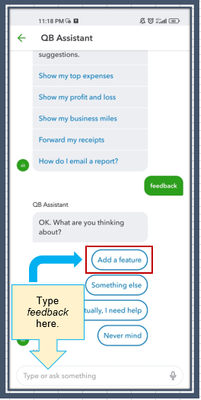
- Open the QBSE application.
- Tap on the Assistant icon at the bottom.
- Type feedback in the field.
- Choose Add a feature.
- Enter and send your product suggestions.
Additionally, I've included these resources to help you upload bank data and review them to ensure your record remains accurate:
- Manually import entries into QuickBooks Self-Employed
- Categorize Bank Data in QuickBooks Self-Employed
This thread is always open, Jo Jones. You can get back here to stay informed if there are any updates regarding the availability of the option. If you have any other questions or concerns about the program's features, please don't hesitate to keep me posted. I'm here to assist you.
