
- Mark as New
- Bookmark
- Subscribe
- Highlight
- Report Inappropriate Content
Online payments disable for different currency
Good morning,
I’m using QuickBooks Essentials and I enable multi currency. I created a customer and in Payment and billing tab from Customer information, I select the currency this customer pays me with.. The customer is overseas.
But when I create the invoice, the Online payments is OFF. I click On Edit And check the payment methods I wish, and OK. Same thing, it’s OFF.
How can I fix this?
Thank you for your assistance
Solved! Go to Solution.


- Mark as New
- Bookmark
- Subscribe
- Highlight
- Report Inappropriate Content
Transactions
Thanks for reaching out to us, Juvet.
You'll have to sign up for QuickBooks Payments so you can create and send an invoice to your customer. Then, this allows them to pay you when they choose Pay Now right from that invoice. Let me walk you through the steps.
- Select + New.
- Select Invoice.
Select the type of payment you'll accept under Online Payment.
- Enter the invoice details, including your customer's email address.
- Click Save and send.
- Review the invoice in the Send email window. You can add any additional information to the subject line and body of the email.
- Select Save and close.
Once done, this will turn on your online payments.
For future reference, you can match transactions in QuickBooks Online (QBO): Add And Match Downloaded Bank Transactions.
If there's anything else you need, let me know so I can help.
- Mark as New
- Bookmark
- Subscribe
- Highlight
- Report Inappropriate Content
Transactions
@MariaSoledadG Thank you,
But let me explain what is my issue.


- Mark as New
- Bookmark
- Subscribe
- Highlight
- Report Inappropriate Content
Transactions
Hello there, Juvet,
You'll want to check out a third-party application to enable this. GoCardless integrates directly into QuickBooks Online.
Here's how:
- Click Apps on the left pane.
- Search GoCardless.
Learn more about GoCardless here: https://gocardless.com/quickbooks/.
Feel free to reach out if there's anything else that you need.
- Mark as New
- Bookmark
- Subscribe
- Highlight
- Report Inappropriate Content
Transactions
I just read that Online payments are turned off because the currency of the invoice (XAF) does not match my business currency (USD).
Could you confirm that?

- Mark as New
- Bookmark
- Subscribe
- Highlight
- Report Inappropriate Content
Transactions
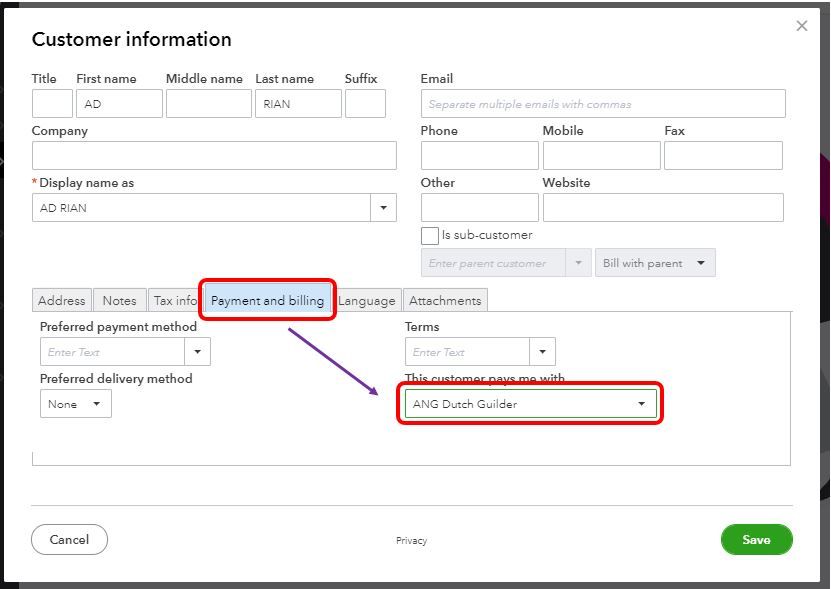
Let's make sure that your customer is set up for multicurrency, Juvet.
Once multicurrency is turned on, the next step is to set up your customer for this option. This way, when you create an invoice, the system will automatically detect ist currency.
Just a heads up, you'll have to assign their currency before adding them. Hence, you're unable to assign one once they're already in the system.
I'll show you how:
- From the Sales tab, select Customers.
- Click New customer, and then enter their information.
- Go to the Payment and billing tab.
- Select your customer's currency in the This customer pays me with field.
- Click Save.
You can also bookmark this article for more information about multicurrency and sending an online invoice:
Please let me know if there's anything else you need. Thanks for dropping by and stay safe!
- Mark as New
- Bookmark
- Subscribe
- Highlight
- Report Inappropriate Content
Transactions
I think you don’t read all I wrote.
All my settings for the Customer are correct. And I just got the confirmation on what I posted previously, I can’t enable Online payments in other currency except to subscribe to SYNDER.
I upgraded to Essentials only for multi currency.
Because I can’t go back to Simple Start, I decide to invoice my overseas customers in USD and in MEMO write the rate of exchange of the day.
Seriously disappointed.

- Mark as New
- Bookmark
- Subscribe
- Highlight
- Report Inappropriate Content
Transactions
Allow me to share additional insights about this feature, @Juvet.
The online payment option is turned off because the client currency is different from the business currency. At this time, you can check out with Synder if you need further assistance in enabling online payments in other currency.
If you don't want to subscribe with the third-party application, you can stick to the workaround used by adding the rate of exchange on the Memo field.
For additional reference about processing invoices and payments in QuickBooks Online, check out this article: Record invoice payments in QuickBooks Online.
If you have any other questions, mention me in the comment section. I'll be ready to pop-in and help. Have a nice day!

