Turn on suggestions
Auto-suggest helps you quickly narrow down your search results by suggesting possible matches as you type.
Showing results for
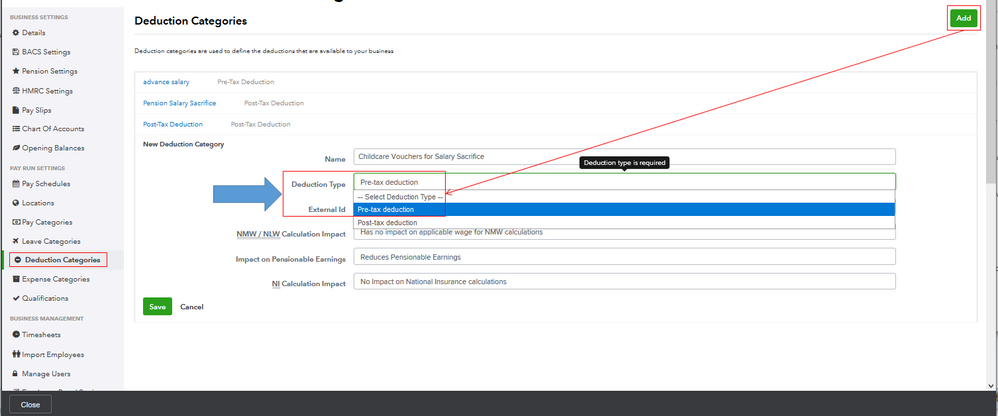
I have the steps you can perform to create a pre-tax deduction category in the program, @Skylane.
Based on your scenario, it looks like you've followed the steps provided by MirriamM above. Thus, you're using QuickBooks Online Advanced Payroll (QBOAP).
The stored cache on the browser may be full, which causes unusual behavior in QBOAP. That's why you have no option to create a pre-tax deduction category.
To help fix this, I'd first suggest logging into your QBOAP account through a private browser. It doesn't store data in the cache. Because of this, it's a great way to isolate browser-related issues. Here are the keyboard shortcuts depending on the browser you're using:
Once logged in, go back to Deduction Categories from the Payroll Settings menu. Just click Add to create a pre-tax deduction category and enter the details (see the screenshot below). If you're able to do so, let's clear the cache of your main browser. It removes the junk files on the browser so it'll function efficiently. If not, you can use another supported browser.
After that, assign the deduction to your employee. This way, the system will use it when you create a new pay run for them.
I'll be right here to help if you need further assistance. Have a great rest of your day, @Skylane.